Check out our latest products
![[Upgraded] USB Computer /Laptop Speaker with Stereo Sound & Enhanced Bass, Portable Mini Sound Bar for Windows PCs, Desktop Computer and Laptops](https://m.media-amazon.com/images/I/61NAayKmVIL._AC_SL1500_.jpg)


| Moto Razr Ultra (2025) – MSRP Starting A $1,299 With the Razr Ultra, Motorola has gone all out and made a Snapdragon 8 Elite-equipped, flagship-grade folding flip phone with very few compromises.
|
|||

|


|
||
The Razr Ultra is basically the result of Motorola deciding to crank its specs up to eleven and to make a proper, Qualcomm Snapdragon 8 Elite-powered flagship-level folding flip phone – in an attempt to leapfrog Samsung’s Galaxy Z Flip series in the process. So, did Moto make any compromises here? Is the Razr Ultra worth its stiff $1299 price tag? Read our full review to find out.
Moto Razr Ultra Hardware And Design
Three years in, Motorola’s Razr design still looks and feels fresh, and now it’s more polished than ever. The aluminum frame is still rounded instead of flat, making this handset easier to open. But with the Razr Ultra, the main OLED display has grown from 6.9 to 7.0 inches, and a new titanium reinforced hinge on all three 2025 Razr models allows the OLED panel to fold into a bigger teardrop shape, further reducing the crease’s visibility.
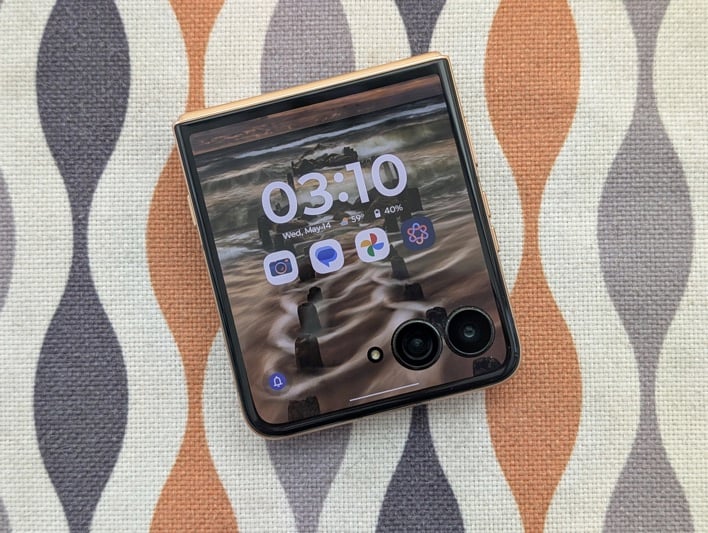
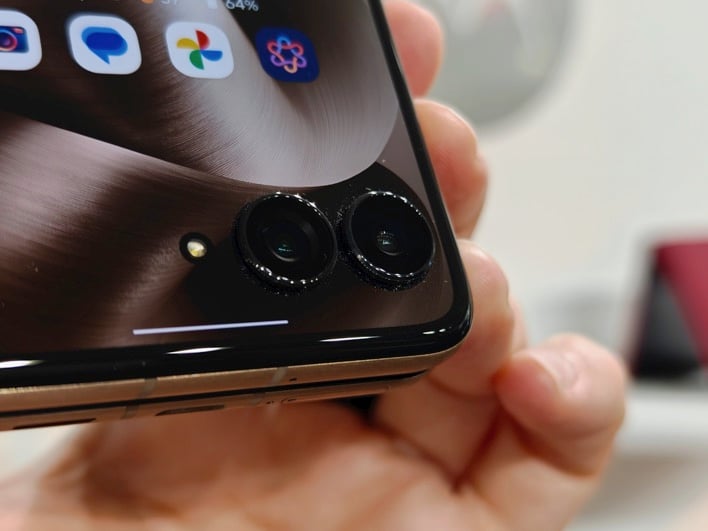
The Razr inherits the 4.0-inch OLED cover screen from last year’s Razr+. It spans the entire handset’s lid (or top half), and incorporates punch holes for the 50MP main and ultrawide cameras, plus the LED flash. It remains the largest outer display on a folding flip phone to date, and makes running Android apps on the cover screen a breeze. Both cameras protrude about 2mm, but the phone’s LED flash is flush with the glass lid.
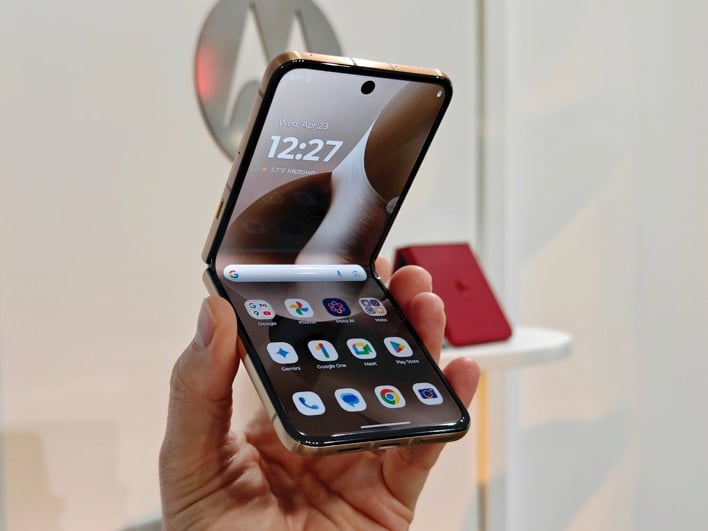
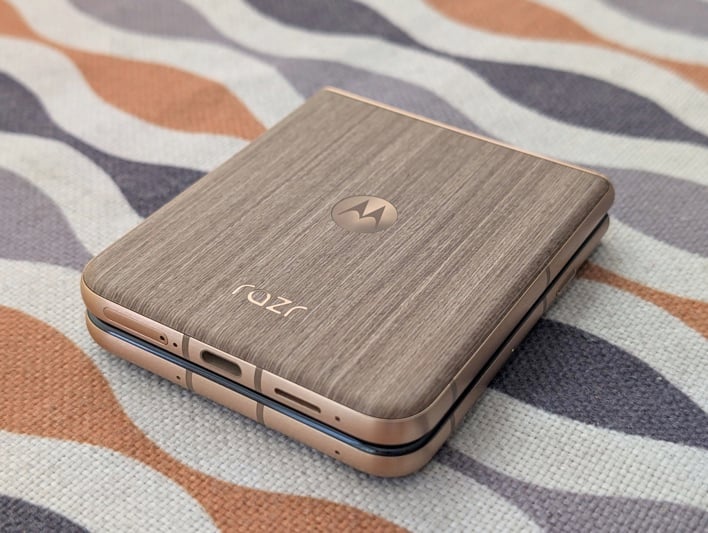
When open, the right side is home to the volume rocker and the power / lock key, which doubles a capacitive fingerprint sensor. Along the bottom, you’ll find the nano SIM tray, USB Type-C port, one of the two speakers, and a pair of mics. There are more mics on the top edge and the left side – where the new AI key is located. All three 2025 Razr models are rated IP48, making them water resistant and (slightly) dust resistant.
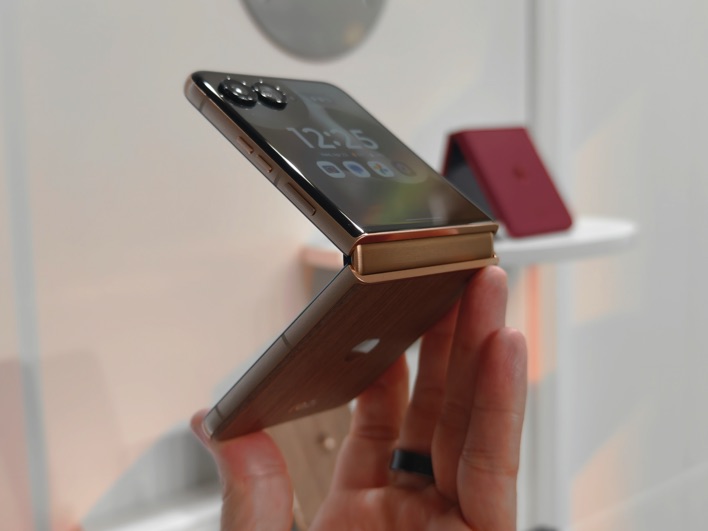
In all, we’re very pleased with the Razr Ultra’s design and materials. This phone looks extremely stylish and feels ultra premium. Plus, we’re big fans of the wood finish on our Mountain Trail review unit, which reminds us of the Moto X and Moto Maker.
Before we continue, watch our hands-on video:
Moto Razr Ultra Specs And Features
| Processing & 5G Platform | Qualcomm Snapdragon 8 Elite |
| Display | 7.0″ folding LTPO OLED, 2912×1224 resolution, 165Hz – 4.0″ OLED 1272×1080 resolution, 165Hz |
| Memory | 16GB |
| Storage | 512GB/1TB
UFS 4.0 |
| Rear-Facing
Cameras |
50MP 1/1.56″
f/1.8 Main OIS, Omni-Directional PDAF – 50MP f/2.0 122º Ultra-Wide, PDAF |
| Front-Facing
Cameras |
50MP
f/2.0 |
| Video
Recording |
Up to 8K @ 30 fps, 4K @ 60fps, 1080p @ 60fps, 1080p slow-mo |
| Battery | 4700 mAh, 68W wired charging, 30W wireless charging, 5W reverse wireless |
| OS | Android 15 With Hello UX |
| Dimensions | Unfolded: 171.5 x 74 x 7.2mm – Folded: 88.1 x 74 x 15.7mm |
| Weight | 199 grams |
| Connectivity | 802.11be
Wi-Fi 7, Bluetooth 5.4+LE, NFC, USB-C, LTE, 5G (sub-6GHz) |
| Colors | Rio Red, Cabaret, Scarab, Mountain Trail |
| Pricing | Find the Moto Razr Ultra (2025) @ Amazon, starting at $1.299 |
Moto Razr Ultra Display Quality
Open the Razr Ultra, and you’ll find a 7.0-inch (2912 x 1224 pixels, 464ppi, 22:9 aspect ratio) folding LTPO OLED main screen with HDR10+ and Dolby Vision support. It boasts a 165Hz refresh rate, 4500 nits peak brightness, and even bezels all around, plus a center punch hole for the 50MP selfie camera. This a beautiful display: colors are punchy, black are deep, viewing angles are wide, and it’s extremely bright.
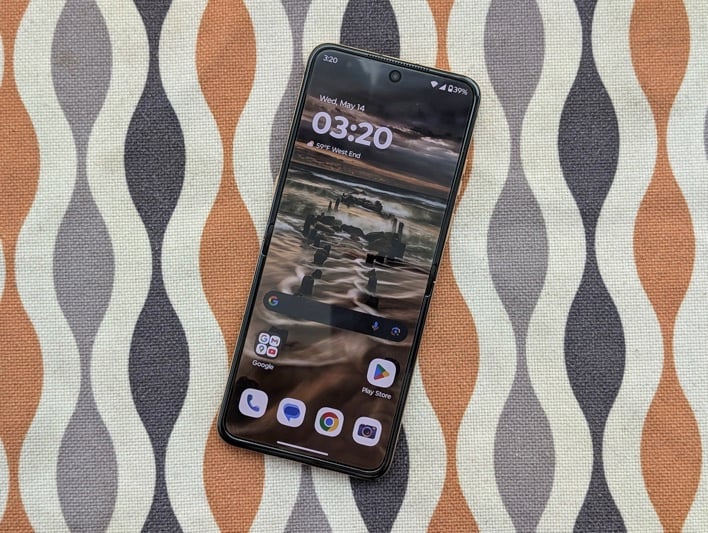
Outside, the Razr Ultra cover screen takes up the entire phone’s lid. This is a 4.0-inch pOLED panel (1272 x 1080 pixels, 417ppi) with HDR10+ and Dolby Vision capability. It features a 165Hz refresh rate, 3000 nits peak brightness, and cutouts for the LED flash, plus the 50MP main and ultrawide shooters. Quality-wise, it matches the main display closely in terms of colors, contrast ratio, viewing angles, and brightness.
Moto Razr Ultra Camera Performance And Image Quality
The Razr Ultra packs three shooters: a 50MP f/1.8 1.0-micron main sensor with omni-directional PDAF and OIS, a 50MP 1/1.56-inch f/2.0 0.6-micron 122-degree ultrawide lens with PDAF that doubles as a macro, and a 50MP f/2.0 0.64-micron selfie camera. Thankfully, Moto listened to reason and restored the ultrawide that went missing on the Razr+. All three shooters support pixel binning and output 12MP images.
Like Motorola’s other handsets, the Razr Ultra offers a wide variety of shooting modes. These include macro (via the ultrawide), action, night, portrait, pro/manual, 50MP high-res, panorama, long exposure, document scanner, tilt-shift, photo booth (which takes four photos in succession with a 3-second countdown and arranges them into a 2×2 grid, complete with a white frame), and group shot (which corrects blinking eyes in pics).

The only mode that’s missing (but is still available on the Razr and Razr+) is Spot Color, and that’s a bummer, because it’s awesome. It highlights a specific color you choose, turning the rest of the picture black and white. On the plus side, you get two color styles to choose from: Natural and Signature. The latter is AI-based and can be customized by importing and adjusting a series of images to train the AI model to your liking.







Video recording is stabilized and maxes out at 8k 30fps (4k/1080p 30/60fps on the ultrawide and selfie cameras), and audio is captured in stereo, with an optional AI-based audio zoom. Several video modes are available, including slow motion (4k 120fps, 1080p 120/240fps), Dolby Vision (4k/1080p 60/30fps), time lapse (up to 8k), and dual capture (which records from any two shooters in the same video, side-by-side, or picture-in-picture).
Obviously, like with previous Razr models, you can mirror the viewfinder to the cover screen so others can see what you’re shooting. Flex View lets you use the camera without a tripod by resting the (half-open) handset anywhere, and Camcorder Mode lets you hold the (half-open) phone like a camcorder to capture video. Finally, Horizon Lock (1080p 30fps) keeps the horizon level even if you rotate the phone a full 360 degrees.
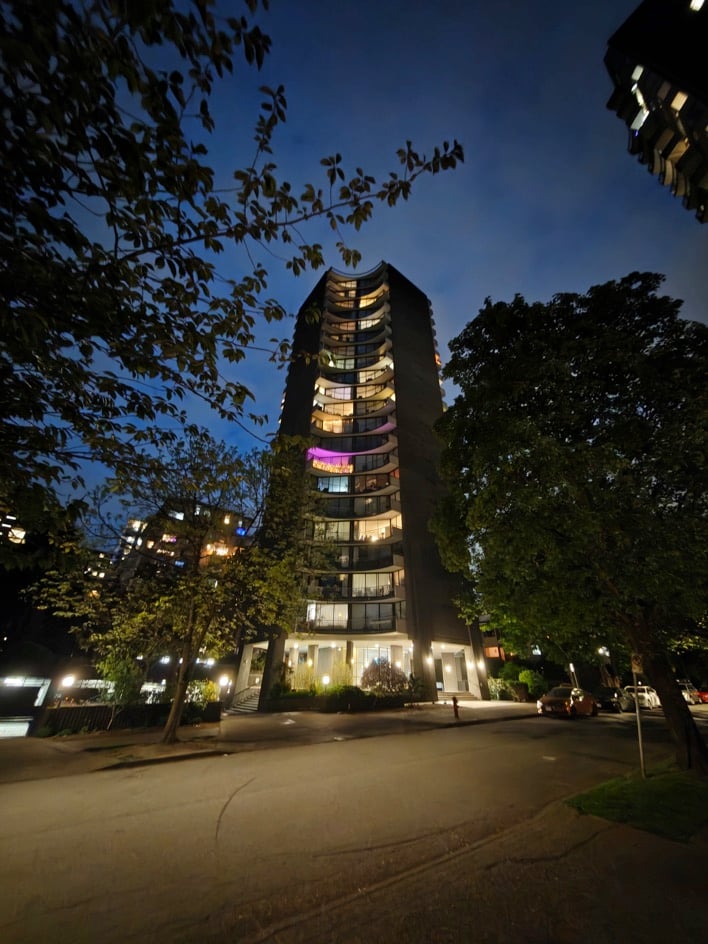

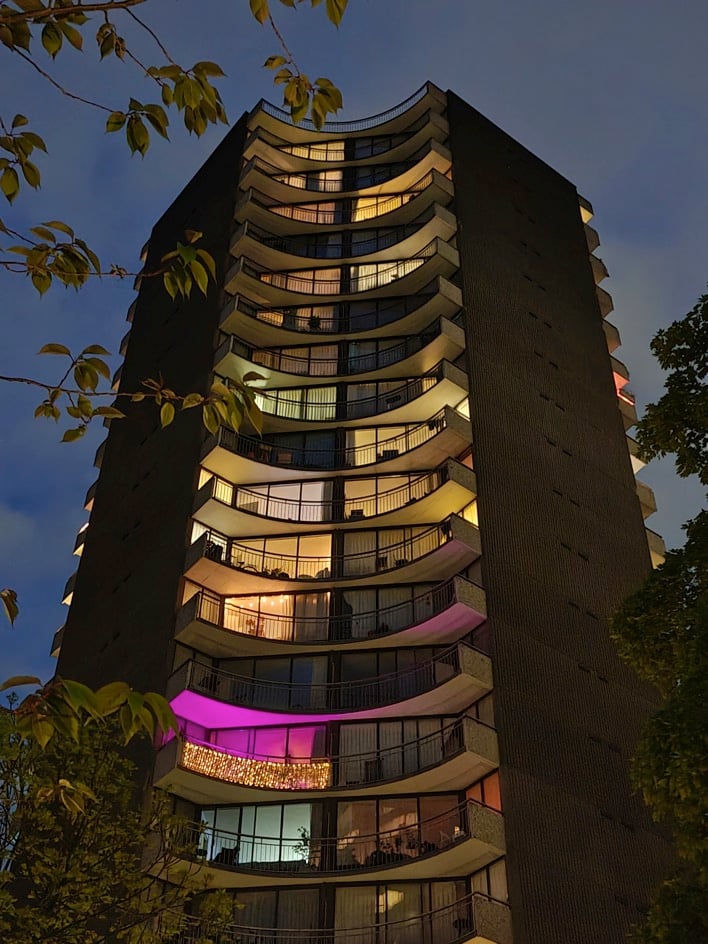
You can also use the shooters with the Razr Ultra closed. Just double-press the power / lock key or double-twist your wrist to start the camera app (depending on your settings), and the cover display shows an optimized camera interface. Here you can switch shooting modes and change settings. To capture a picture or video, just tap the display, press the volume rocker, or put up your hand (3-second timer) – it’s simple and intuitive.
Overall, these shooters deliver pleasing results, but there’s definitely room for improvement, especially when shooting in low light with the ultrawide, or zooming beyond 4-5x. It’s clear that Moto’s leaning heavily on the Snapdragon 8 Elite’s mighty ISP here, but image processing has never been Motorola’s forte, and while the Razr Ultra takes better photos than previous Razr models, these aren’t flagship-worthy cameras.



Video performance isn’t spectacular, but it gets the job done, and Horizon Lock is definitely a stand-out feature. Despite some of these limitations, we believe that the Razr Ultra cameras will satisfy most users.
Moto Razr Ultra Reception And Sound Quality
We used the Razr Ultra primarily on T-Mobile, AT&T, and Telus’ sub-6GHz 5G and 4G LTE networks in San Francisco and Vancouver (Canada) and didn’t have any issues with call quality of data speeds. The Razr Ultra lacks mmWave 5G, but supports dual SIMs (nano SIM + eSIM), and works on all major US carriers. It’s available from Motorola (unlocked), but also from T-Mobile and AT&T (sorry Verizon customers).
On the audio front, the Razr Ultra packs stereo speakers (bottom edge plus earpiece) with Dolby Atmos that sound surprisingly good considering the limited internal space. As you’d expect, the Razr Ultra lacks a headphone jack, but it supports digital audio devices over USB Type-C for wired listening with your favorite headphones / IEMs, plus LDAC and aptX HD for high-quality wireless sound over Bluetooth.
Moto Razr Ultra Performance And Battery Life
The Moto Razr Ultra combines Qualcomm’s flagship 8-core, 3nm Snapdragon 8 Elite SoC with 16GB of RAM and 512GB or 1TB of UFS 4.0 storage. Obviously, this phone feels extremely quick and responsive no matter how many apps you’re juggling. Our standard collection of social media, communication, and entertainment apps ran without skipping a beat, and the high refresh rate kept everything silky smooth on both displays.
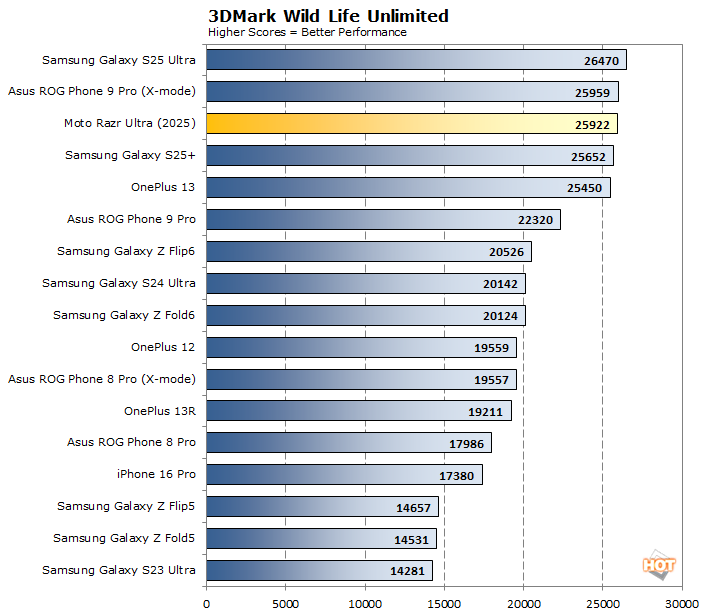
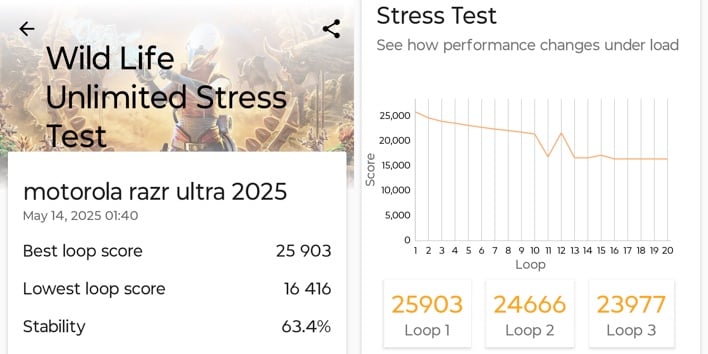
While this is disappointing, heavy gamers aren’t the target audience for this product, so we don’t expect this to be an issue for most users. It’s worth noting that the Razr Ultra sometimes gets warm under heavy use – even when not gaming – and while this doesn’t seem to impact performance, it makes us wonder why Moto didn’t use the 7-core version of Qualcomm’s Snapdragon 8 Elite designed for thinner devices.
Other specs are pretty standard for a modern handset with flagship specs, and include sub-6GHz 5G, CAT 20 LTE, tri-band WiFi 7 (802.11be), Bluetooth 5.4 (LE), NFC, A-GPS / Galileo / GLONASS, BeiDou, QZSS positioning, plus the usual array of sensors. The side-mounted capacitive fingerprint reader is fast and reliable, and so is face unlock. A linear vibration motor provides superb haptics.
Despite the Razr Ultra limited internal real estate, battery capacity is 4,700mAh – split between two cells (one in each half of the clamshell). While that’s less capacity than most of today’s top flagships, battery life is quite impressive, with our PCMark Work 3.0 battery test lasting 16 hours and 7 minutes at 165Hz (adaptive). Basically, in the five days we spent using this phone, we never once ran out of juice, even with heavy use.
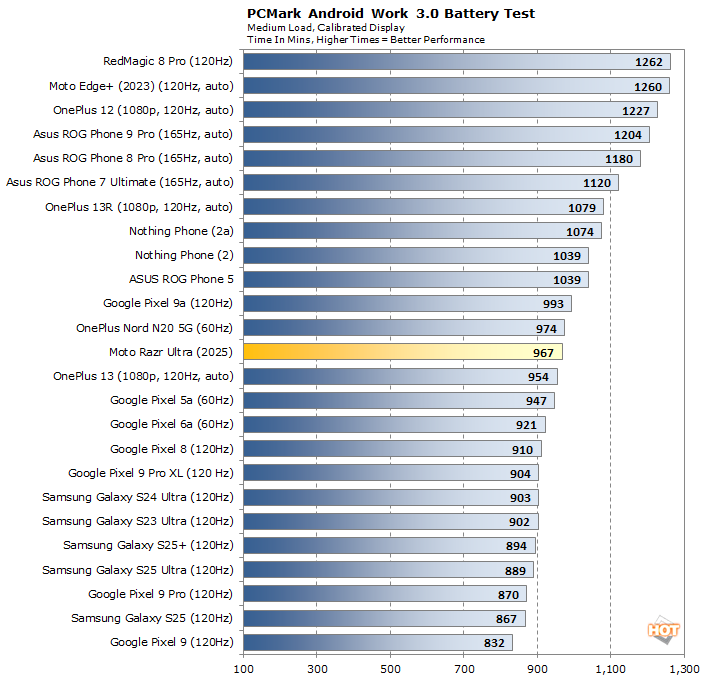
When it’s time for a refill, the Razr Ultra supports 68W fast wired charging (USB PD) and 30W Qi-compatible fast wireless charging with 5W reverse wireless charging. Sadly – and like with previous Razr models – there’s no charging brick in the box.
Moto Razr Ultra Software, User Experience, And AI
Motorola phones have always featured great software, and the Razr Ultra is no exception. It runs Motorola’s familiar “Hello UX” skin on top of Android 15, which delivers a clean, smooth, near-stock Android experience with a few helpful customizations thrown in – like the double chop gesture that toggles the flashlight on and off. You can read more about these features in our review of last year’s Razr and Razr+.
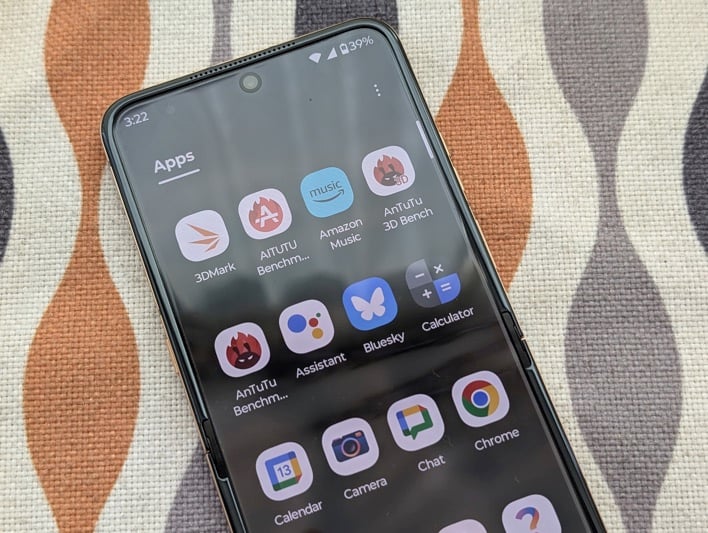
Moto’s software also takes full advantage of the foldable form factor with features like Flex View, which allows some apps (like the camera app and YouTube) to split their interface into custom top and bottom views on the main screen when the phone is open at a 90-degree angle. Plus, in addition to providing a bunch of useful panels (widgets), Motorola lets you run almost any Android app on the Razr Ultra’s 4.0-inch cover screen.
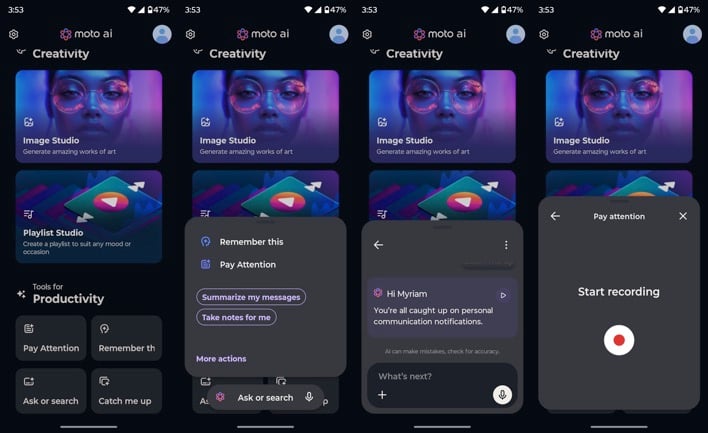
This year’s Razr family is all about Moto AI, and the Razr Ultra even gets a dedicated AI key on the left side of the phone. So we went ahead and took it for a spin, wasting several hundred kilowatts of energy in some data center somewhere so you don’t have to. You’re welcome 🙂 Moto AI blends AI technologies from Perplexity, Google (Gemini, Photos), Meta (Llama), and Microsoft (Copilot) to deliver a personalized AI experience.
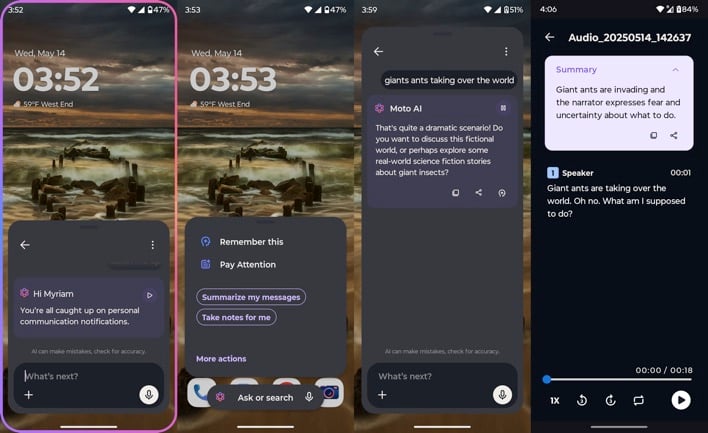
Depending on your settings, you can launch Moto AI by double- or long-pressing the AI key, double-pressing the power / lock key, double-tapping the back of your handset (Quick Launch), bringing your hand close to the cover screen then pulling it away (Approach), or simply looking at the cover display and talking (Look & Talk). Those last two gestures require the phone to be in tent or stand mode, and Look & Talk is exclusive to the Razr Ultra.
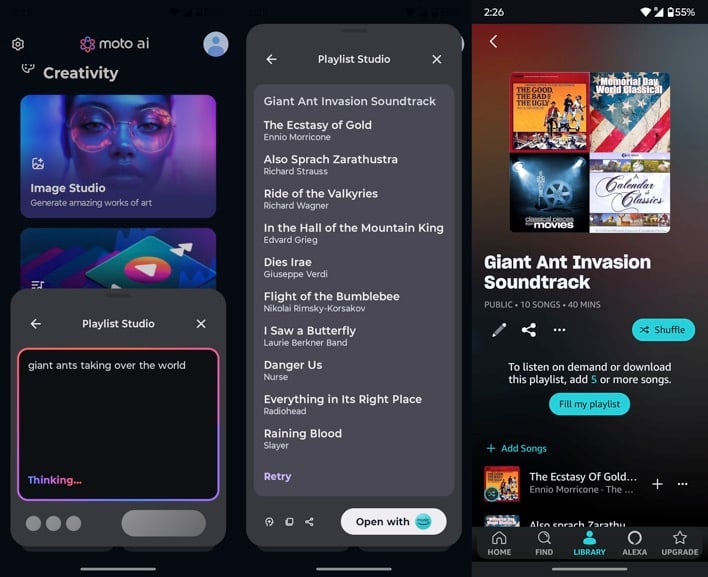
Obviously, you can also start Moto AI by launching the app. Moto AI offers two creativity tools (Image Studio and Playlist Studio), and four productivity tools (Pay Attention, Remember this, Ask or search, and Catch me up). With Image Studio you can generate AI images (in a variety of visual styles), stickers, wallpapers, or avatars using text, an image, or a hand-drawn sketch as a prompt – with mixed results (see below).
Playlist Studio lets you create AI-generated playlists using a text prompt. Currently, this only works with Amazon Music, limiting its appeal. Check out the “Giant Ant Invasion Soundtrack” Playlist Studio generated after I prompted it with “giant ants taking over the world”. Fun. Pay Attention records and summarizes an audio note, then adds it to Motorola’s Notes app. This might be more useful if it supported other, more popular note apps.
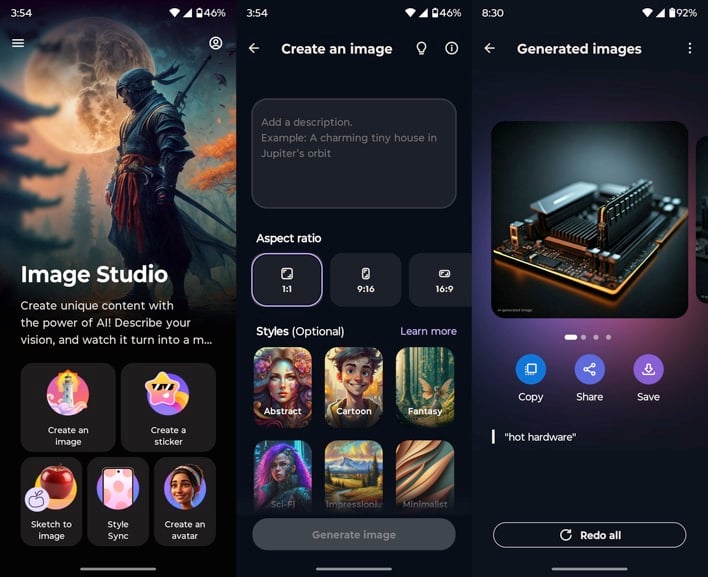
With Remember This, you can capture and save photos, screenshots, and text notes – memories – for you to recall later using Moto AI. Ask or search brings up Moto AI’s generic text prompt, which lets you ask questions and search for apps, settings, contacts, or memories. Finally, Catch me up summarizes unread notifications, but only for a dozen or so messaging apps. Plus, the results aren’t particularly astute.
Ultimately, as it stands today, Moto AI just isn’t compelling enough. It feels half baked at best, and like a gimmick at worst. Compounding this, it’s unclear what happens to the personal data Moto AI gathers, what gets processed on device and in the cloud, and by which AI technology partner. We’re also not sure how your Moto AI history and memories are preserved when you switch phones, especially if you move away from Motorola.
Wrapping things up, Motorola is promising four years of security updates and three years of OS upgrades, which is fine, but lags behind the competition. Thankfully, the unlocked Razr Ultra is almost completely free of bloatware. Besides the usual smattering of Google and Moto apps, our review unit came with Adobe Scan, Microsoft Copilot, and Perplexity pre-installed.
Hot Hardware’s Moto Razr Ultra Review Summary
With the Razr Ultra, Motorola is offering something truly special: a Snapdragon 8 Elite-powered, flagship-grade folding flip phone that makes very few compromises. This handset delivers an elegant design, refined materials, big beautiful screens, quality speakers, solid performance, and impressive battery life. All this is crowned by Moto’s excellent software and the ability to run almost any Android app on the cover display.

What about those compromises, then? Unfortunately, the Razr Ultra’s cameras don’t live up to the same flagship pedigree, especially in low light with the ultrawide shooter. In addition, Moto AI is certainly interesting, but feels like a solution in search of a problem. Plus, it definitely needs more time in the oven to bake. Which brings us to that $1,299 price tag. That’s a lot of money, especially for a folding flip phone.
Regardless, right now – and until Samsung possibly one-ups Motorola with the Galaxy Z Flip7 – the Razr Ultra is arguably the new king of the folding flip phones. Long live the king!