
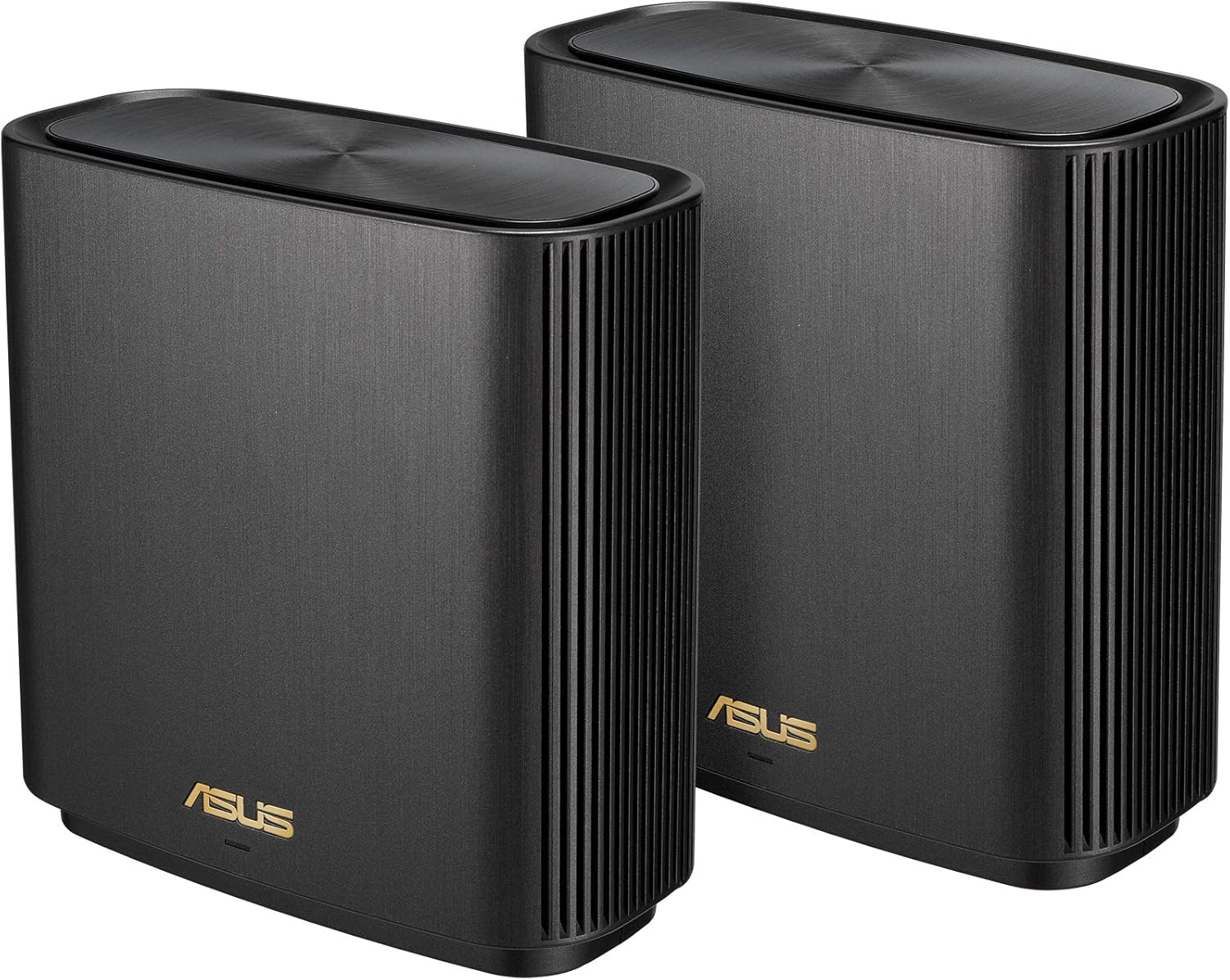
ASUS ZenWiFi AX Whole-Home Tri-band Mesh WiFi 6 System (XT8) – 2 pack, Coverage up to 5,500 sq.ft or 6+rooms, 6.6Gbps, WiFi, 3 SSIDs, life-time network security and parental controls, 2.5G port
Original price was: €330.€260Current price is: €260.


Price: $329.99 - $259.99
(as of Aug 03, 2025 16:09:32 UTC – Details)
ZenWiFi AX (XT8) is a whole-home mesh WiFi system that combines extremely fast and stable wireless networking performance with simple configuration and elegant design with coverage up to 5, 500 sq. ft. Featuring the latest WiFi 6 technology, ZenWiFi AX takes mesh WiFi to a whole new level with dramatically improved coverage, speed and stability. Disclaimer: Actual data throughput and WiFi coverage will vary from network conditions and environmental factors, including the volume of network traffic, building material and construction, and network overhead, result in lower actual data throughput and wireless coverage.
Connector Type : USB.Power Supply : AC Input : 110V~240V(50~60Hz). DC Output : 19 V with max. 1.75 A current. DC Output : 12 V with max. 3 A current.
Banish WiFi Dead Zone—Tri-band mesh WiFi system with unique antenna placement delivers strong WiFi to every corner of your home, providing total wireless speed of 6600Mbps.
Next-Gen Wi-Fi 6 Technology— With OFDMA and MU-MIMO, ZenWiFi AX enables more efficient, stable, and faster transmission even when multiple devices are transmitting data at the same time.
Hassle Free Control – 3 steps setup and easy management with ASUS Router App
Always Up-to-date Protection— The lifetime free network security powered by Trend Micro makes sure your privacy on connected devices is protected.
AiMesh Supported– Mix and match ZenWiFi with AiMesh-compatible routers to form powerful and flexible whole-home WiFi system
7 reviews for ASUS ZenWiFi AX Whole-Home Tri-band Mesh WiFi 6 System (XT8) – 2 pack, Coverage up to 5,500 sq.ft or 6+rooms, 6.6Gbps, WiFi, 3 SSIDs, life-time network security and parental controls, 2.5G port
Add a review
Related Products




Original price was: €330.€260Current price is: €260.
RE Henley –
The best WiFi system I have ever used
I have purchased 100s of items from Amazon and have never reviewed a single product. After setting these routers up I felt like I had to let people like myself, who do extensive product research before making a purchase of this nature. My goal was to find the best choice for signal coverage, ease of use, and connection speed. I purchased a set of routers 3 asus AX ZenWiFi routers to replace a set of synology mesh routers – RT6600 + (2) MR2200s. The synology system was not horrible but I had dead spot, infrequent drops, and less than optimal connection speeds. From the time I opened the boxes it took me 90 minutes to read the instructions, download the app, power cycle the modem, then set 3 routers up at various locations throughout the house then reconnect everything in the house. The coverage is perfect and the signal is strong. There is not a single location in the house that doesnât have full signal. I have 21 devices connected to the system and all of them are working well. I guess an explanation of the house geometry would also be helpful. The house is 2 stories ~2500 sqft with a full basement ~1500 sqft. The cable modem sits in the southwest corner of the basement. I placed the main node right beside the modem. The first aiMesh router was placed in the northeast corner of the basement and the second aiMesh router was placed in the center of the 1st story. I have a 200Mb internet connection. 5 TVs, 2 PCs, 2 Laptops, 1 iPad, 2 cell phones, 4 Alexa speakers, 2 printers and 3 other devices connected. I ran a speed test on my laptop and cell phone while streaming HD on all 5 TVs – 2 on Hulu, 2 on Netflix, and 1 on YouTube. The laptop registered 31Mb DL and 10Mb UL and cell phone was 22Mb DL and 8MbUL. I was not able to watch all TVs at the same time but as I walked thru the house checking connections I never saw a single issue with the video quality. Hope this review helps with your research. The only CON that I could possibly list is the price. The system cost $550 which is about $150 more than the synology routers I was running before installation of this Asus ZenWifi system. On another note, I replaced a Netgear router + mesh extender with the synology system in 2021 I didnât notice much of a difference between the NetGear and Synology systems. I guess the bottom line is spend the money and get this system for your home if you are wanting a great WiFi solution. That lives up to the marketing hype on the website.Last comment – I am a real person who recently purchased this system and I am in no way being compensated for this review. I didnât rate the tech support because I didnât use it.
SFloyd –
Excellent Wi-Fi coverage, no problems
I bought the ASUS Zen mesh Wi-Fi system to replace a Linksys Velop mesh system that is three years old and had been giving us problems. We started losing WiFi frequently. I checked the Linksys app and found that the node router had weak signal and no devices were connected to it. I checked the node and unplugged it and restarted it several times but itâs light kept slowly fading and coming back on. I never really liked the Velop system. I didnât like that in order to use the app you had to be connected to the internet and have a Linksys account. Supposedly you could log on with the router password but that never worked. When I first set the Velop system up I had to get a lot of tech support to figure out I needed to set up separate 2.4g and 5g networks in order to use our Sonos home theater system. I only bought it because Apple discontinued the Airport routers and sold Linksys. The automated message on the Velop support line said that a recent firmware update may be causing problems and you may need to restore the routers to factory and set up again. Two things I really donât want to do are frequently restart the WiFi and go through the setup again. So Iâm not sure if there is anything wrong with the routers or if it is a firmware problem but I did not want to deal with it. Of course it was about one week past the 3 year warranty period. So I did some online research and decided to try ASUS. The setup was easy using the app on my iPad. The choice to separate 2.4g and 5g was part of the setup. Also I did not have to create an online account in order to use the ASUS app for set up or to check the system. The app is pretty easy to use. It is easy to see lists of devices that are connected to the main router and the node. One odd thing is that the app displayed the names of our desktop computers, but the mobile devices are identified by numbers. Had to figure out which number went with which device and then rename them. Itâs important to recognize our devices to make sure no one has joined our network without permission. We have been using it for more than a week now and everything is fine. No more dropped WiFi, good signal throughout the house including the basement (routers are upstairs) and in the yard. We stream a lot of movies and tv, no gaming. I concur with one of the reviewers who said that the 2.4g doesnât have blazing speed. We have 500mbps service. I used our ISPâs speed test and found that we got about 150mbps on the 2.4g network and 500mbps on the 5g. I canât comment on their tech support because fortunately I havenât had to use it! Very pleased with the ASUS Zen system that seems to work consistently and we donât have to think about it.
Patrick –
Easy setup, liked the lifetime Trend Micro and Parent controls, also coverage and speed was immediately noticed. Used EERO 2nd gen and had 15-20 connected, now coverage is great. Haven’t had to use tech support yet. I think that their is an option for web but did everything from the app.
Amr El Naggar –
Ù Ùتج ٠٠تاز جدا Ù Ùعتبر اÙض٠اختÙار ØاÙÙا ÙÙ 2023 Ùربط شبÙØ© Mesh wifi ا٠Øت٠Ùاستخدا٠ة ÙراÙتر Ù ÙÙص٠٠٠اسÙس .Triple bandAx6600wifi 6ai mesh for asusرائع ٠ت٠استÙا٠٠Ù٠ا Ù٠باÙÙص٠ت٠ا٠ا ٠٠اÙبائع Ù Ùب٠اÙتارÙØ® اÙ٠عÙÙ Ù٠اÙاÙردر
LUIS BAEZA –
Funciona de maravilla, son 30 dispositivos los cuales tengo conectados entre la red wifi 2.4g y 5g, del cual el modem del provedor de internet ya no soportaba tantos dispositivos y se desconectaban los dispositivos, pero con el mesh de ASUS se solucionaron los problemas de conexión. 100% recomendado.
Gerald A. Audette –
Probably overkill. Which is what’s great about it. Full bars, stable signal, crazy good speeds on all 3 floors. Router in basement, node on main floor. Easy set up. Easy to forget it’s there. Just going through and learning all the settings now because I like to pretend I’m a networker guy – and might change some. But probably not. Setting this up was really, really easy.
Clock –
I shopped around a lord and bought these and am not disappointed. Easy to setup, mo disconnects, super fast and reliable. Short story – but these over the Orbi as they are more cost effective and deliver the same performance. They loo good too.