

Joso Phone Controller for iPhone/Android Support Phone Case, Mobile Gaming Controller with Ergonomic Design – Wireless Gamepad for Cloud Gaming & PS Remote Play
Original price was: €26.€22Current price is: €22.


Price: $25.59 - $21.99
(as of Aug 03, 2025 16:56:33 UTC – Details)
Product Description
Joso Phone Controller for iPhone, Android with Cloud Gaming Support
The video showcases the product in use.The video guides you through product setup.The video compares multiple products.The video shows the product being unpacked.

1 Wireless Gamepad
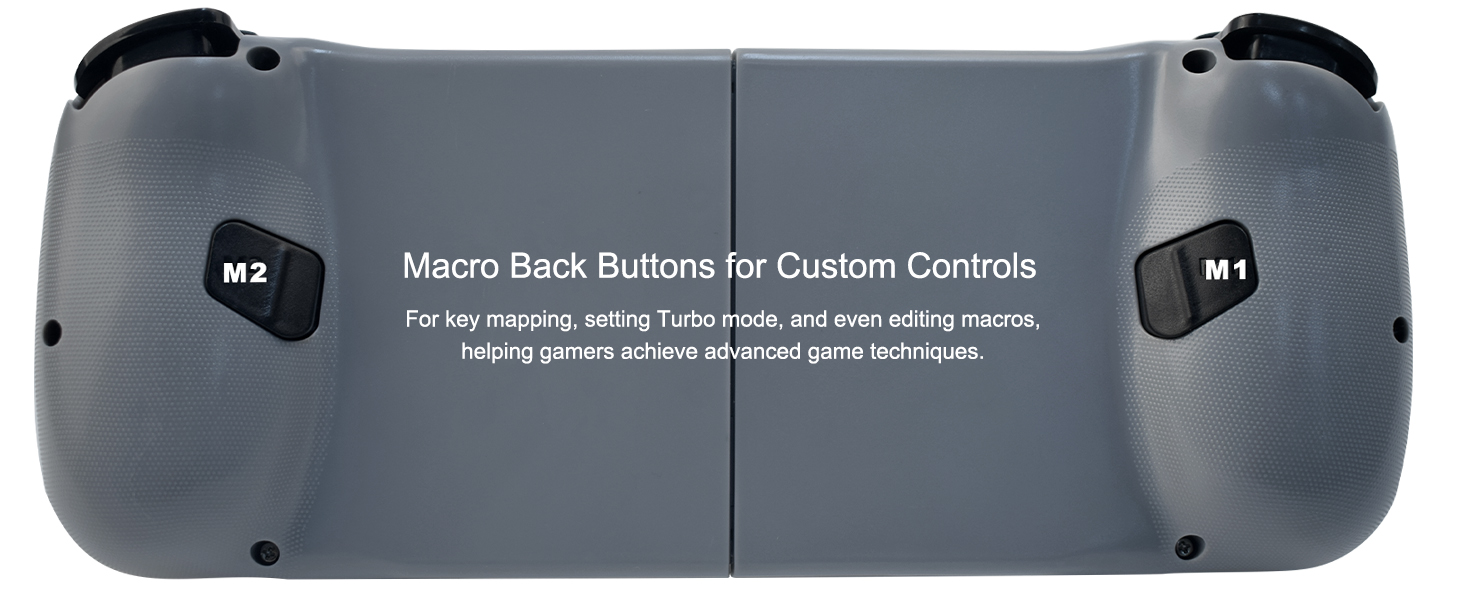
2 Macro Buttons
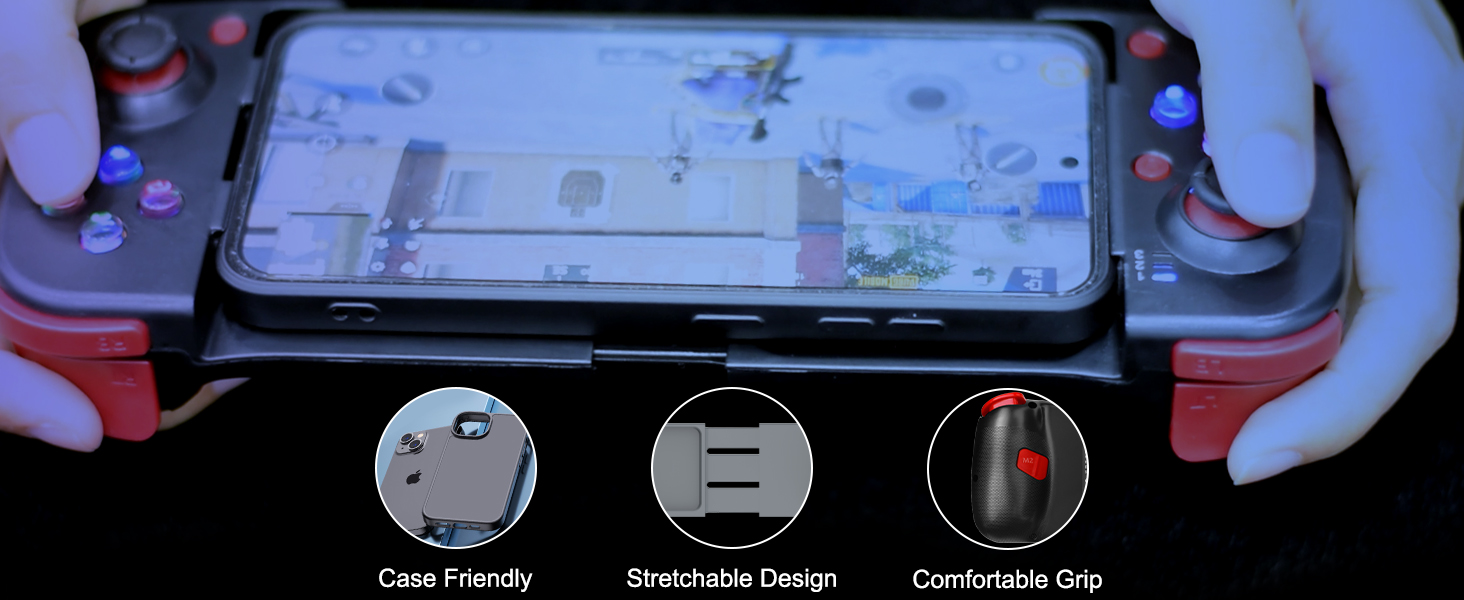
3 Support Phone Case
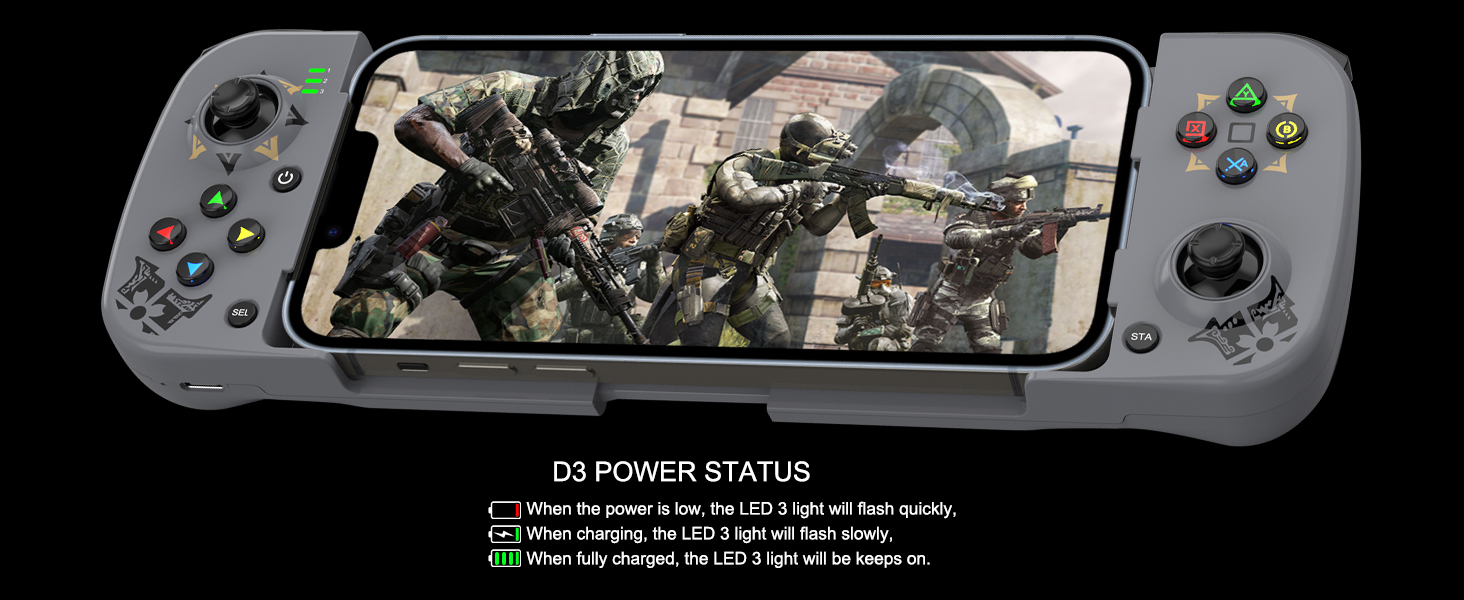
4 Power Status
Multi-platform compatible: Compatible for iOS, Android, PC, Cloud, Streaming, and Mobile GamingFor iOS 13.4 and higher: Compatible with iPhone 16, iPhone 16 Plus, iPhone 16 Pro, iPhone 16 Pro Max, iPhone 15, iPhone 15 Plus, iPhone 15 Pro, iPhone 15 Pro Max, iPhone 14, iPhone 14 Plus, iPhone 14Pro, iPhone 14 Pro Max, iPhone 13 mini, iPhone 13, iPhone 13 Pro, iPhone 13 Pro Max, iPhone 12, 12 Pro, 12 Pro Max, X, XR, XS, XS Max, 11 Pro, 11 Pro Max, 11, 7, 7Plus, 8, 8Plus, etc.. (Not support Apple TV&iPod, Fire TV/TV Box.)For Android 6.0 and higher: Compatible with Samsung Galaxy S24 Series, Galaxy S23 Series, Galaxy S22 Series, Galaxy S21 Series, and more Galaxy Series; For X-iaomi, m-oto, Pixel 9/8/7/6 Series, TCL, oppo, vivo, and more Android phones.Play Controller Supported Games: The mobile gaming controller supports games from the App Store/Play Store such as COD Mobile, Warzone Mobile, Genshin Impact (works with iPhone only), stream through cloud gaming services such as Game Pass, or play games with Remote Play from your PS5/PS5, Xbox or PC.Custom programming function: The phone controller with 2 buttons allow to do key mapping, set Turbo mode, or even edit Macro, helping gamers achieve advanced game techniques.Support Phone Case: Supported length of devices is between 5.0 – 6.9 inches. ( The controller’s telescopic holder can support up to 6.9 inches, so it does not support the iPad on the controller)

Joso Wireless Controller Connection Guideline
The video showcases the product in use.The video guides you through product setup.The video compares multiple products.The video shows the product being unpacked.
Mobile Controller for iPhone Tips for Boot the iOS Controller:
Please fully charge the controller before first use; Make sure the controller is off before Bluetooth pairing connection;Select the corresponding controller boot mode: Hold down the function key (e.g. ‘RB’), then press the ‘HOME’ button to boot the controller.
The video showcases the product in use.The video guides you through product setup.The video compares multiple products.The video shows the product being unpacked.
Controller for Android Tips for Boot the Android Game Controller:
Please fully charge the controller before first use;Make sure the controller is off before Bluetooth pairing connection;Select the corresponding controller boot mode: Hold down the function key (e.g. ‘RB’), then press the ‘HOME’ button to boot the controller. 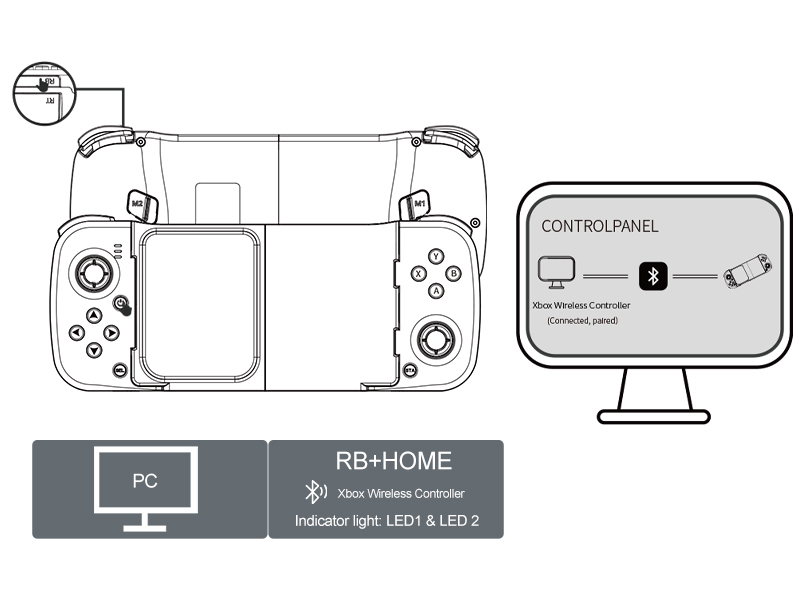 PC Wireless Controller The gaming PC needs to come with Bluetooth capability.
Hold down the ‘RB’ key, then press the ‘HOME’ key to boot the controller.Turn on the Bluetooth connection ‘Xbox Wireless Controller’ on your PC.Start Playing.
More Controller Colors for Gamers 
Joso Mobile Gaming Controller
Add to Cart
Add to Cart
Add to Cart
Add to Cart
Customer Reviews
3.6 out of 5 stars 225
3.6 out of 5 stars 225
3.5 out of 5 stars 37
3.7 out of 5 stars 88
3.6 out of 5 stars 40
3.6 out of 5 stars 66
Price
$35.59$35.59
$38.99$38.99
—
—
$31.99$31.99
$24.99$24.99
Connection Mode
Wireless
Wireless
Wireless
Wireless
Type-C
Wireless
Working Platform
For iPhone & Android
For iPhone & Android
For iOS/Android & N-Switch
For iOS/Android & N-Switch
For iPhone 15 Series & Android
For iOS/Android/PC & N-Switch
Back Button
No
No
No
2 Back Buttons
2 Back Buttons
2 Back Buttons
Maximum Length
180mm
180mm
252mm
280mm
180mm
/
Colors Available
Black, White, Grey, Pink, etc.
Black, White, Purple, etc.
Black, White, Grey, Pink, etc.
Black, White, Red, Blue
Black, White
Black, White, Grey, etc.
Universal Compatibility: The phone gaming controller works seamlessly with iPhone & Android phones, including iOS 15+/Android 10+; Completely suitable for the full range of iPhone 16/15/14/13 and so on; Bluetooth controller for android is compatible with Galaxy S series, Galaxy A series & more Android smartphones
Multi-Platform Support: Optimized for cloud gaming (X-box Cloud, GeForce NOW), PS remote play, emulator games
On-the-fly Mappings: Configured 2 extra back buttons (M1/M2) for instant mapping combined functions; Mappable buttons: A/B/X/Y/RB/RT/LB/LT/L3/R3/D-Pad
Ergonomic Design: Non-slip grips & tactile buttons for extended gaming sessions without fatigue; Lightweight and portable for on-the-go use
Stable Wireless Connection: This game controller adopts Bluetooth 5.0 connection technology, stable connection, low latency, suitable for competitive games such as cod mobile, warzong mobile, fortnite (work with remote play), etc.
Package Includes: Mobile controller, USB-C charging cable, and user manual (The wireless controller does not support charging smartphone directly)
Customers say
Customers give positive feedback about the controller’s compatibility and find it comfortable to hold. However, the functionality receives mixed reviews – while some say it works great, others report it doesn’t work with most Xbox games. Moreover, the build quality is criticized for being made of cheap flimsy plastic that breaks after minimal use, and the buttons are problematic as they don’t map correctly. Additionally, customers disagree on the ease of use, with some finding it super easy to use while others struggle with unclear instructions. The connectivity and value for money also receive mixed feedback, with some saying it connects well and is a good product for the price, while others report connection issues and consider it a waste of money.
13 reviews for Joso Phone Controller for iPhone/Android Support Phone Case, Mobile Gaming Controller with Ergonomic Design – Wireless Gamepad for Cloud Gaming & PS Remote Play
Add a review
Related Products


Original price was: €26.€22Current price is: €22.
Hunter Teston –
Thumbs Up!
Great Controller. Good buttons, comfortable on the hands. Works great on android.
Operator –
Can’t customize the controls.
The issue I have with it is the non-customizable controls. (It may just be the games I play on it, but it also could be the controller itself) If you want a cheap and easy-to-use controller then this is a good choice. And if you are worried about the button noise then I have one thing to say about it. It’s just a bit loud, but not like a mechanical keyboard.
Techguy1214 –
Works better than expected
Honestly I wasnât expecting much from this controller just got it to try it out. Honestly it works great! The build quality is obviously not there because it does feel somewhat cheap but you get for what you pay for right. Still I have retro arch on my iPhone 14 Pro Max and I was able to connect the controller to my iPhone and it recognized it with out any issues. Retro arch automatically mapped out the buttons correctly and I just had to go in change the options to toggle the menu but thatâs pretty much it. Also it works with the xbox one app if you want to try and do the game streaming. Now obviously depending on your internet connection. Still for this price to have it actually be recognized by the xbox application is pretty cool been using it for about 2 hours and the battery has held up. Maybe I got one of the good ones who knows.
Amazon Customer –
Great for the price!
I was looking into getting a controller for mobile gaming for a while. Iâd seen a lot and they were either too pricey, had issues, or both. A lot of controllers I saw were nearly $100. Which was way out of my price range for mobile gaming.I use this controller to play Genshin Impact and Honkai Impact on my phone. Iâve tested it on other games with controller support like Stardew Valley and Tower of Fantasy. But I bought it for Genshin and Honkai Impact and it works great.Iâve not experienced any real technical issues. In Genshin Impact the cursor feels a little slow on the map screen. But other than that itâs worked perfectly. The controller has buttons on the back for programming the controller, but I havenât needed to use it. The grip might feel a little awkward but you get used to it. Especially if youâve played with joycons before. Just as an fyi if you like your controller buttons to click when pressed you wonât find that here. Battery life is very good. You can play for hours without worry. Itâs also very simple to put your phone in.I havenât had issues with this controller. It works as intended. My only real con is that I ordered a pink one and got the one with Nintendo joycon colors instead.Overall if your looking for a mobile gaming controller, and you donât need an additional app or service that some people offer, then this is a great option for you.
jerry wong –
Not for my phone
Didnât work for me
TJ –
Great for the price
Took a little bit to configure it and had to wash some videos and reread the brochure a few times but got it to work. I’ve used it on Android on Xbox game pass, playing everything from warzone to fallout 4. You might need to configure it as a Xbox controller for best results. Also works well with call of duty mobile and dolphin emulator but again you will need to configure to your needs.Only question is what is the Bluetooth connection four-digit code?
Akhir W. –
They Already Knew…
I received the BSP-D3 Mobile Game Controller. Upon opening the box i immediately fully charged turned on and reset the controller. I took the connection manual and proceeded to connect my Android 10 Galaxy S9 which indicated a connection but only the left side stick works…it does connect to my Iphone13 without problem..but however i didn’t purchase this product for Iphone it’s was in mind for my bigger screen Android Galaxy A71 5G….I am asking for full refund and i wouldn’t recomment this product to anyone into gaming….How about i recieved an Email days prior to receiving the controller telling me of potential connections errors. Which indicates to me this product is trash…
Eddie –
Barely works
Doesn’t work for cod mobile
Tishauna –
I ordered white and got black. The button on the top right keeps falling off, NO CHARGING CABLE. This was a gift ð¤¦ð¾ââï¸returning it ASAP. Seems as though they sent a used one.
Fearghail –
I bought this to use with my PPSSPP Emulator and it works perfectly and seamlessly with the PPSSPP Emulator. I use it almost every day. It connects to your phone via bluetooth and it gives you 18hrs of gameplay and you only need to charge it the controller for 2-3hrs. It will turn off automaticly after a few minutes of inactivity to conserve battery power. I wanted to get the camo controller but they were out stock on that one so I bought the pink controller instead as I didn’t like the other colour options. This is a fraction of both the backbone controller and the GameSir controller. I highly recommend this controller if you need or want a controller to use with the PPSSPP Emulator.
Scott –
Useless product, buttons cannot be mapped so I literally just threw this in the garbage where it belongs
Levi –
Honestly worked pretty well for the price I paid. Not the best quality you can get but again for the price it does the trick and allowed me to play a ton of emulator games on my phone.
Salem –
not bad workig good but i dont like the qualityand stick is small and stack