
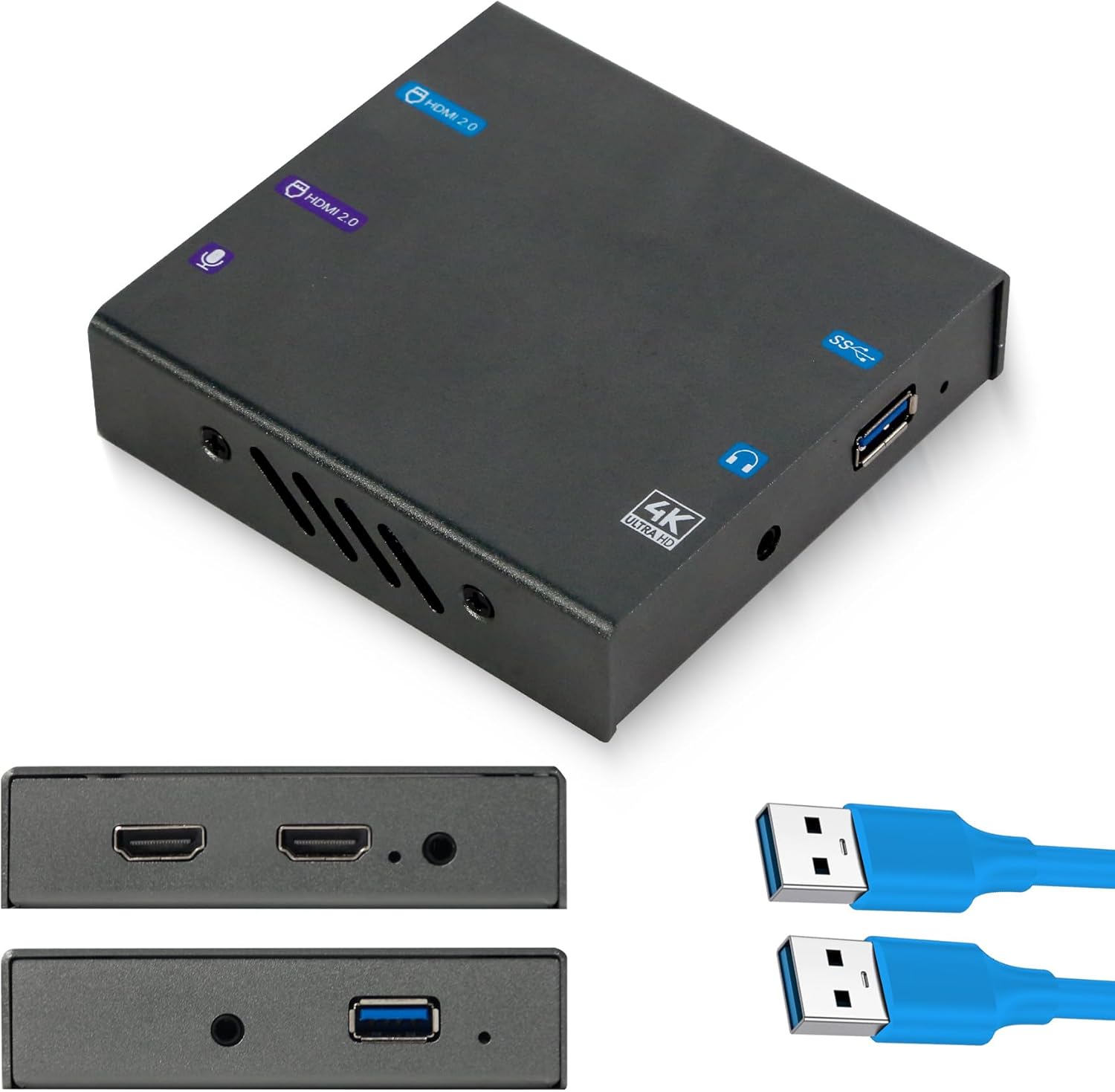
4K HDMI Capture Card for Streaming PS5, Xbox, Switch, PC – USB 3.1Game Capture Device for OBS, Twitch, YouTube, Low Latency, RGB24 True Color,HDR Loop Out- MSP331
Original price was: €90.€70Current price is: €70.


Price: $89.99 - $69.99
(as of Aug 07, 2025 01:57:28 UTC – Details)
Product Description
4K Capture Card for Gaming 
4K Video Capture Console Content for Streaming 


4k60HDR Support & RGB24 Colour precision
1 HDR ON 2 RGB24
Connect with Any Set Up 
4K Game Capture for Gaming Streamers: Premium quality 4K30 video capture with ultra-accurate RGB24 true color—perfect for Twitch, YouTube, Discord, and live streaming via OBS or Streamlabs.
Low Latency 4K60 HDR Passthrough: Experience ultra-smooth gameplay with real-time 4K60 HDR passthrough while recording in 4K30 . Delivers immersive visuals without lag during game streaming with RGBlink 4K HDMI Capture Card for Streaming .
Plug & Play with USB 3.1: No drivers required—connect via USB 3.1capture card for instant streaming and recording on PC or Mac. UVC compatibility ensures easy setup and stable performance.
Broad Compatibility & Seamless Integration:RGBlink 4K video capture card supports PS5, Xbox, Switch, and PC. Works flawlessly with OBS, Twitch, Zoom, and RGBlink switchers including mini, mini pro, mini-ISO, mini-edge, and mini-mx
Ultra-Wide Resolution Support for Creators: RGBlink video capture card’s input up to 4K60, 1440p144, and 1080p240—ideal for pro gamers, creators, and AV professionals who demand high frame rate and resolution flexibility.
8 reviews for 4K HDMI Capture Card for Streaming PS5, Xbox, Switch, PC – USB 3.1Game Capture Device for OBS, Twitch, YouTube, Low Latency, RGB24 True Color,HDR Loop Out- MSP331
Add a review
Related Products




Original price was: €90.€70Current price is: €70.
carlos castro –
Calidad y eficacia.
Totalmente satisfecho, era todo lo que yo esperaba.
David Morgan –
Stuck in a reboot cycle
This device is garbage. Worked for about 10 minutes then gets stuck in a reboot loop
How can I get this to work on my Mac –
Help
Product does not work and no one will talk with with me for refund ot replacement
Jay –
Great Video Podcast Switcher
I’ve been using this version for over a year now to broadcast my podcast, and it works like a charm! I use three cameras and a laptop as sources. Crystal clear video recorded to OBS. Highly recommend for video podcasts! It’s awesome!
Helpful –
Broke
This would have been a good video capture device if it had kept working.It was initially easy to use and had no lag. For about a week it gave me good video and audio quality, but then it simply stopped turning on.And now it’s in the trash, a shame.
Jinfrey –
Perfect for casual and pro streamers
This capture card feels premium and delivers great quality. I used it for streaming my PS5 gameplay, and the visuals were stunning. everything looked sharp and vibrant. Overall, it’s a solid choice for anyone looking to enhance their streaming experience without breaking the bank.
Signus –
Notna smooth experience
The “RGBlink MSP 331U 4K Capture Card – HDMI 2.0, USB 3.1 Game Capture Card with HDR, 4K60/2K240, HDCP, Uncompressed Video, Audio Mixing, Plug-and-Play for PS5, Switch Streaming & Recording in OBS, Vmix” I received did not proove to be a seemless experience.This is one of the most finicky 4k capture cards I’ve ever owned. If you are using a camera for capture, it has to be set just right, or the card will freeze up or create artifacts. It doesn’t like USBC 3.2 Gen 2 ports very much. If you have one of the latest Strix motherboards, you may notice the capture card not liking the 10Gbps usb ports on the back. The front port is friendly to a point.A cheap N100 cpu-based laptop’s usbc port worked, but it struggled to maintain a 4k 30fps stream on VLC using a secondary monitor. This card definitely needs a fast computer that can handle the streaming data speeds. That in itself is expected, however.I tested several cameras and codec combinations. The mjpeg setting is too muddy for my taste. However, some of the other compression settings seemed to create a better, sharper image.4k capture cards are generally more expensive than this one. For the price, it does work fairly well once dialed in. You do need a fast machine with plenty of bandwidth to run it smoothly. It is better to turn off as many background programs and services possible including updates or during heavy CPU intensive nighttime routines, the video card may have a meltdown.Although 4k is mainstream these days on TVs, you still need an adequately fast video card with more than 12gb of Video Ram to give this card room. The manual (what can be read out of the ridiculously small text and unreadable images) says it wants 8Gig video memory and at least an RTX10XX. I did most of my testing on an RTX4090 (24Gig memory), i9 14k with 64Gig Ram, and the latest motherboard with updated bios. No excuses there.This capture card could use its own driver app like some others do. Having capture settings handy off an app so a person can simply set the card for how they want it to perform would save a lot of extra tweeking time. Magew*** does it that way for setting resolution, etc. It can save a lot of time.If you are running usb/hdmi combo cameras, plug the USBc/a port into a power source only and do it AFTER you plugged that hdmi cable to a camera.Video capture cards are generally no exception. If you have a fast machine with at least slightly better specs than the capture card required, and you are streaming off game gear or decent cameras that output clean 4k, then this card may fit your needs. Just be ready to adjust adjustnadjust if using a camera.I noticed the unit ran warm, so that is a bonus. Overall, two stars were removed due to video instability and labor-intensive adjustments to dial it in.
DTech –
Easy to use capture card
Very easy to use basically plug and play capture to stream my games. Make sure to use high speed quality hdmi and usb c cables to get the most of the system.