
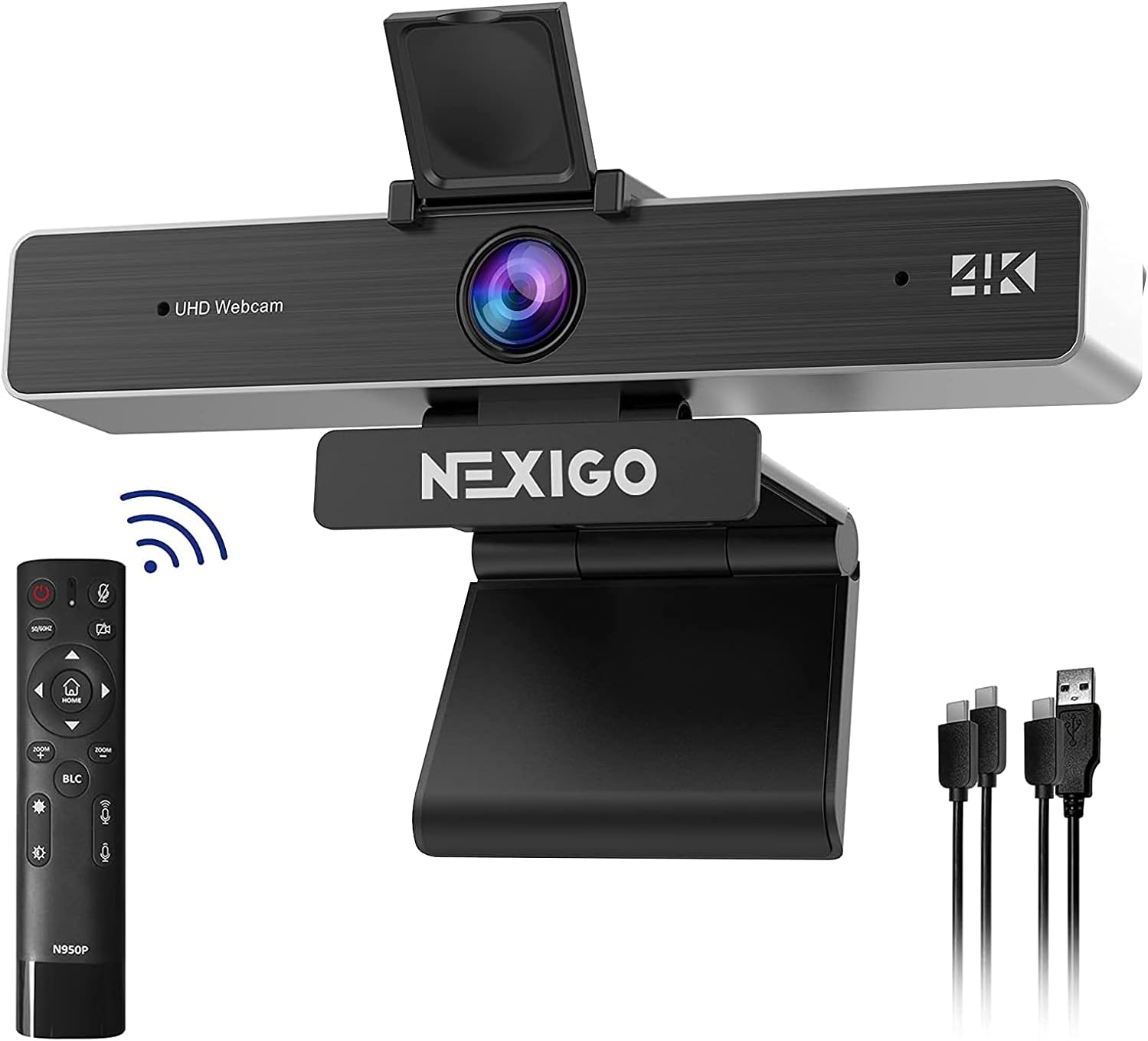
NexiGo Zoom Certified, N950P 4K Zoomable Webcam with Remote Control, Sony_Starvis Sensor, 5X Digital Zoom, Pro Web Camera with Dual Stereo Mics, for Zoom Skype Teams Twitch
Original price was: €130.€123Current price is: €123.


Price: $129.99 - $123.49
(as of Aug 08, 2025 10:09:55 UTC – Details)
From the brand


Upgrade Video Call Quality


Budget Webcams
Streaming Webcams
4K Webcams
【4K Quality】The NexiGo N950P webcam comes with an 8.5 Megapixel Sony sensor that features up to 3840 x 2160 QHD resolution at 30 frames per second for crisper images and clearer videos.
【Remote with 5X Digital Zoom】Control your video calls with a remote, so even away from the desk you are still in charge. Turn off the webcam, adjust the volume, zoom in and out, mirror/flip your image, and more. With support for 5X digital zoom at 1080P, the NexiGo 4K webcam makes it possible to zoom in gradually with the single press of a button. 【Note:】Please do not use the power button to turn off the camera.
【USB Type A or C & Privacy Cover】The NexiGo N950P webcam is compatible with USB-A and USB-C inputs. Both cables are included. A webcam privacy cover is also included to provide security and peace of mind.
【Built-in Stereo Mics】Built-in dual omnidirectional mics with noise cancellation ensure that you get clear audio from every angle. Automatic low-light correction provides ideal video even in dim lighting conditions. Adjustable clip and threaded base for secure mounting on monitors, laptops, tripods, or even just a flat surface.
【Wide Compatibility】The NexiGo N950P works with USB 2.0/3.0, no additional drivers required. Ready to use in approximately one minute or less on any compatible device. Compatible with Mac OS X 10.7 and higher / Windows 7, 8, 10 & 11 / Android 4.0 or higher / Linux 2.6.24 / Chrome OS 29.0.1547 / Ubuntu Version 10.04 or above. Perfect for Zoom, Skype, Facetime, Facebook, YouTube, Microsoft Teams, and any other popular video calling software.
Customers say
Customers find the webcam performs admirably and is easy to set up with no computer configuration needed. The camera excels in low-light conditions and offers good value for money. The picture and sound quality receive mixed feedback – while some praise the 1080p resolution and microphone clarity, others report issues with picture quality and microphone performance. The zoom feature works well at 1080p but doesn’t function with Zoom, and the build quality receives mixed reviews, with some finding it solid while others note a plasticky feel.
8 reviews for NexiGo Zoom Certified, N950P 4K Zoomable Webcam with Remote Control, Sony_Starvis Sensor, 5X Digital Zoom, Pro Web Camera with Dual Stereo Mics, for Zoom Skype Teams Twitch
Add a review
Related Products


Original price was: €130.€123Current price is: €123.
Chris T Ellis –
Solid Camera for Remote Work
With my usual remote-work setup, my laptop’s built-in camera isn’t an option, as I use attached monitors instead of the laptop screen. That’s really no loss, as the built-in camera is…let’s go with poor quality to be charitable. But that means I’m in need of a decent webcam and a light, as my workspace does have a window that faces me, the daylight can be obscured by the trees outside, the shadow of my monitor and plain old clouds or darkness.While I’m not so sure it’s necessarily a good thing for my colleagues that this camera/light combination is good quality, as they’re stuck seeing me relatively clearly, it does provide a professional appearance that’s a step up from the older, lower quality webcam I had been using. With the light built in, it also saves me space atop my monitor, and a USB slot since I need only one.For some context, my most usual conferencing service is Teams, and I use a separate headset/microphone. With that in mind, I’ve found this camera to be reliable, easy to use and capable of delivering a high-quality video call. I also use a portable green screen behind me most days so that the background feature in Teams works a little better, and this camera is far better than my previous one at making the background look smooth–few weird bits of my room/screen tend to show on the screen, just me and the backdrop.The 1080p quality is noticeable, and that’s the step up from my older 720 camera. I look…less fuzzy, for lack of a better term. I can still soften the focus with Teams’s filters. I always looked a little harsh on the previous camera, now I look more “real,” without the odd sort of jagged edges. The built in light also helps with that, as it directly surrounds the camera, instead of needing to be mounted next to it, and angled awkwardly, creating an inevitable “Phantom of the Opera” type shadow effect on my face. I also wear glasses, and while I do sometimes see some reflection of the light with this camera and light, it is nowhere near as bad as the annoying circle of light I would see reflected in my lenses before, with a fairly standard ring light setup. The light has three modes (I usually prefer the cool mode) and you can control the brightness by holding the button at the top of the camera (a light tap switches mode, a press and hold changes the brightness).I’m also a fan of the somewhat narrower field of view on this camera, 78 degrees. While still considered wide, this is, to me, far better for a single user than the 90+ degree cameras out there. Those tended to make me as one person on screen look ridiculously small relative to the background. It also might be better to have a narrower field of view if you want to keep people from having too much of a look around you at home.Also easy to use is the built-in privacy slider. In lieu of an obvious cover over the lens, you simply slide a lever and a red disc slips over there camera letting you know it’s covered up and should slide it back before trying to go on camera.All things considered, I’m quite happy with this webcam/light combination. It’s been an improvement to my remote working, and I wouldn’t hesitate to recommend it.
Shawn –
Great quality for the bucks
At this stage of my life I work at home, and spend a ton of time in video calls with coworkers over Zoom, Skype, Teams, etc. I also do some YouTube streaming for work and personal purposes.I was in the market for a new 4k webcam that was budget friendly and that fit my needs. I researched 4k webcams for a few weeks before finally settling on the NexiGo N950P Pro. The specs, price and the brand reputation really influenced my purchase, but specs don’t tell you all you need to know. I decided the only way to know was to buy the N950P Pro. I am very happy I did. It instantly started working without any issues.My first initial impression of the NexiGo N950P Pro was how well put together the packaging looked. After getting the N950P Pro plugged up and taking it for a test run I was pleasantly very surprise by the quality.The quality of the video is AMAZING. The 4k is legitimately fantastic. It looks crystal clear. Even in low light settings image quality looks amazing and crisp. I’m very impressed. Compared to my laptop cam, this looks absolutely ridiculously good.Anyhow if you’re looking for an excellent cam for video chats, streaming, or screencasting, I can’t recommend this enough. Great job NexiGo! This camera is such an improvement over my laptop webcam. As someone who does a lot of video chat meetings, I notice when people are using a nice camera because the way they “pop” compared to others.Resolution: It looks great on video chat apps, clients noticed the bump in quality right away and complimented it.Lighting: I have a window to one side and my laptop camera tends to make everything look washed out and cool even if I close the shades and turn on some lights. But the N950P Pro takes in light and colors so much better, the colors appear more balanced and neither too warm or cool no matter the lighting setup.Field of view: This is much wider than my laptop camera without distorting it with a fish eye effect. I have art and things on the wall behind me and it does a great job of capturing them clearly. Of course, I can adjust the settings to be more focused if I want.Mobility: (This applies to all webcams) I think we also under value the angle in which we are viewed in meetings. I set this camera on top of my laptop and angle it more level with me and it looks so much better than the classic upshot angle from the standard laptop camera.Accessories: The remote function as intended and adds more functionality to the webcam. The privacy cover is also a great addition for security which NexiGo is well known for. Two input cables are included, a USB-A as well as a USB-C, doesnât matter to me but itâs always great to have choices.All in all, this is worthwhile investment. Being as I won’t be in person for a long time, I think it makes sense to buy a nice camera to present yourself to others. This is a great camera with exceptional quality. If you’re in the market for a well-made camera the N950P Pro is it! I could not have done better when you consider the price and specs. In fact, I considered the price a great bargain for what this device delivers! This is by far the best webcam I’ve ever used.
Aaron –
Solid camera with some minor frustrations
I bought this camera both for work and for discord calls with my buds. This camera, overall, is a mostly high quality product and is definitely an upgrade over my previous webcam. Hardware-wise, the unit is very solid, with mounting solutions for both on monitor and a hole on the bottom for a tripod, which is a nice touch.Installation was completely plug and play; worked within seconds on my Windows 10 machine.The picture quality is excellent, and definitely a testament to the value of upgrading to a 4K camera. The automatic backlight compensation (activated by a button on the remote) works well, and helps since Iâve got a bright window right next to my desk. Speaking of the remote, itâs super handy to be able to adjust settings on the fly, rather than having to go into software each time you need to change something.The microphone built into the camera is decent, but you might be better off having a dedicated mic. However, the active noise cancellation used works quite well, eliminating any background noise from my stream.Finally, as other reviewers have mentioned, the manual for this thing can sometimes be unclear, not really explaining the function of some options. However, with a little messing around I found it pretty easy to figure out. Another snag is that when you switch between some options on the camera, such as turning the backlight compensation on/off, you have no indication whatsoever on the camera itself, so itâs hard to gauge what options you have enabled. Another reviewer mentioned hitting the home button when you turn it on, which sets everything back to default, and THEN activating the buttons. Iâve found this method to be my go-to.
BcyZone –
Görüntü kalitesi, ring light ıÅık performansı, dahili mikrofon ses kalitesi dahil olmak üzere her Åeyi mükemmel.
dean platt –
Should have invested in this years ago
MaxdionQc –
Avec le contexte actuel de la Covid, j’ai besoin d’une Webcam pour les enfants. Elle correspond a ce que je souhaite comme qualité mais j’ai jamais utilisé de Webcam avant aujourd’hui.
Très bon produit et livré rapidement, pas de soucis pour moi ! –
Le produit répond à mes attentes, 60fps en 1080. Dommage que l’angle d’enregistrement ne soit pas un poile plus large.Le logiciel est vraiment basique.Bon produit pour son prix.
Gordon Kamitomo –
This is actually my second Nexigo camera and I got it because of the built-in light. The adjustable light is very good. I have very wierd lighting and restricted space so have this on a gooseneck above my laptop (on a stand with 2 external monitors) and above my screen light on my laptop. Autofocus is quite quick. Resolution is excellent for a webcam in this price range. Build quality seems to be good. It was smaller than I expected. The Nexigo software (I use Windows 11) works very well. The microphone works well enough but playback showed that it had a “hollow” sound. Not a deal breaker for me as I use a headset anyway. Overall, a good value.