

YUYIU Wireless 2.4GHz Controller with 7 Colors RGB Light for Xbox Controller, Xbox One Series X|S,Consoles,Steam PC Windows, with 1000mAh Battery/Dual Vib-ration/Turbo/Programmable, 3.5mm Audio Jack
Original price was: €42.€40Current price is: €40.


Price: $41.97 - $39.97
(as of Aug 09, 2025 12:15:06 UTC – Details)
Product Description
2.4GHZ Wireless Xbox Controller with 7 Colors RGB Light
The video showcases the product in use.The video guides you through product setup.The video compares multiple products.The video shows the product being unpacked. hero-video Merchant Video
For Xbox, Xbox One, Series X|S, Consoles, Steam, PC Windows 10 and above 
Wired and Wireless Connections ,Dual Vibration 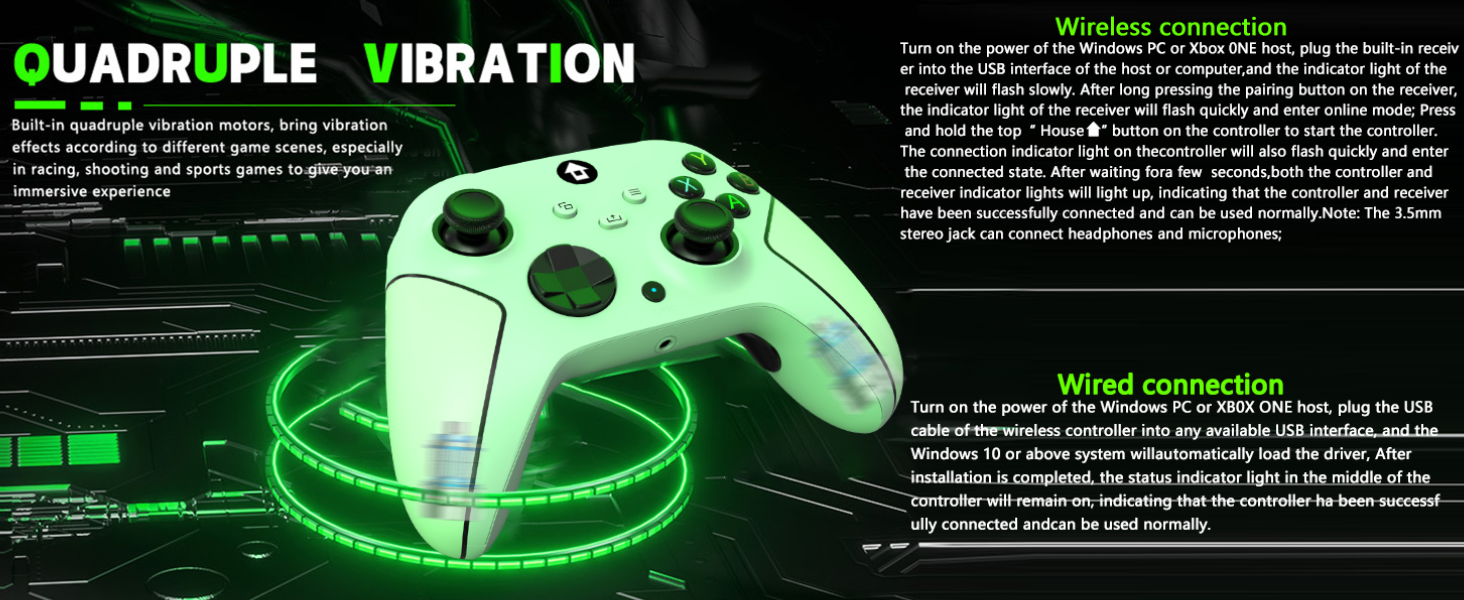
TURBO and AUTO TURBO Function 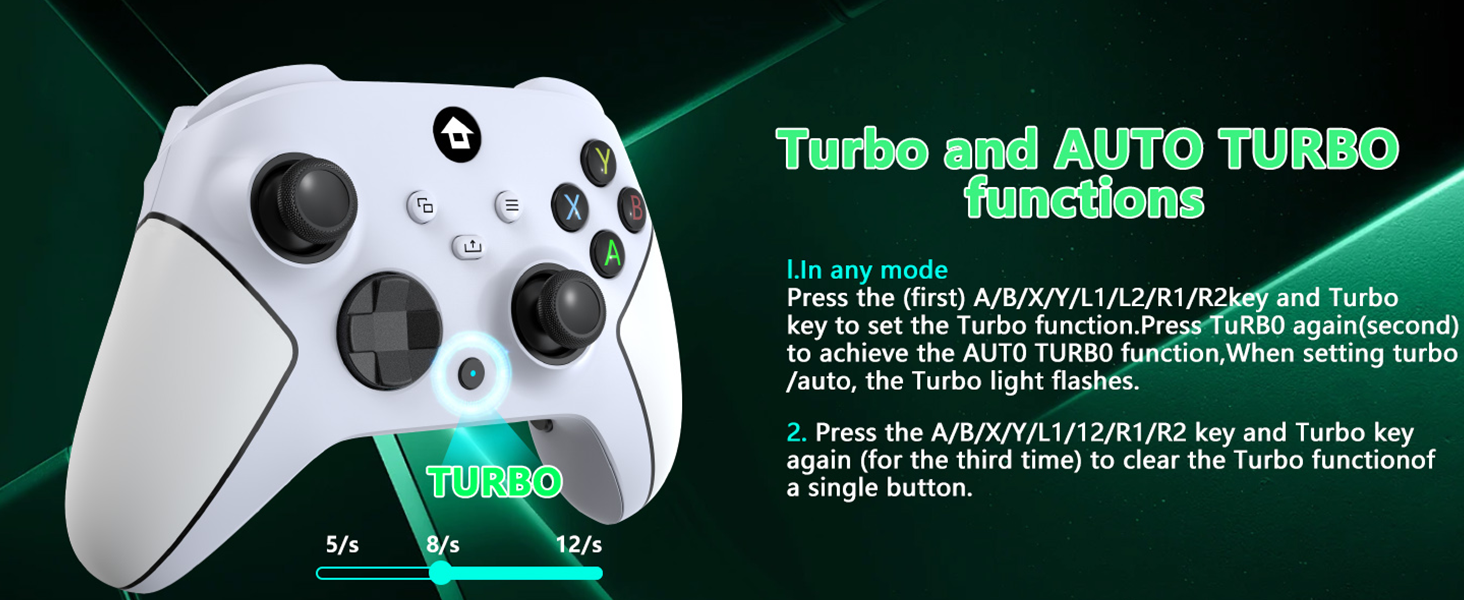
4 RGB Lighting Modes, 2 Programmable Keys 
3.5mm Stereo Jack , Type-C Charging Cable 
1.What I Get?
1. 2.4GHz Xbox controller * 1
2. 2.4GHz wireless adapter * 1
3. USB-C cable * 1
4. 2.4GHz Xbox controller User manual * 1
2.How to use xbox one controller trigger stroke lock?
1. Set fast trigger travel lock to “ON” position and activate it. Trigger travel is the minimum travel. In shooting games,bullets can be fired or filled more quickly
2. Lock To“OFF” position and close it. Trigger travel For the maximum default state
3.What are the xbox controller manual key programming (Mapping) mode operation steps?
1. Press and hold the programming mode button for 2 seconds, Xbox button will light up and flash slowly
2.Press the following buttons that you want to program(map):A/B/X/Y/LB/RB/RT/LT/L3/R3/D-PAD, with the Xbox key emitting a fast flashing logo
4.How to use the Xbox one controller clear programming (mapping) function?
1. Press programming mode key for 2 seconds,Xbox key emits a slow flashing logo, Controller has entered programming mode
2. Press the key again it for 5 seconds, key’s illuminated logo flashes longer, programming (mapping) functions have been cleared
5.How to use the Left and Right Joystick RGB light mode of this xbox controller?
1. Monochrome light constant on mode:Light setting key+A key.
2.Light setting key+B key, the left and right joystick lights are in breathing mode.
3.Circle running marquee changing mode:Press the+Y key to set the lighting.
(Wide Compatibility Platform&4 RGB Lighting Modes) – Our wireless xbox one controller with 2.4GHZ wireless adapter for Xbox One/Xbox One S/Xbox One X/Xbox Series X/Xbox Series S Consoles,Steam PC Windows 10 and above.plug and play, without the need to install additional drivers. (Dual use of wired and wireless). Lighting Modes;Monochrome light constant on mode:Light setting key+A key.Light setting key+B key,breathing mode.Circle running marquee changing mode:Press the+Y key to set the lighting.
(3.5mm Stereo Jack&Type-C Charging) – Wireless xbox series s controller has a 3.5mm stereo jack that can connect headphones and microphones,allowing users to receive and transmit audio simultaneously.Insert a USB cable into the computer or host USB port, and the indicator light of the controller starts to flash slowly, indicating that the controller is being charged. When fully charged, the indicator light of the controller will remain on, indicating that the battery is fully charged.
(Built-in 1000mAh Lithium Battery&2.4GHz Wireless Adapter) – Built-in 1000 mAh lithium battery, supporting Type-c port charging, it only needs 2-3 hours of charging and can be used for 10-14 hours.Our wireless Xbox one controller adopts 2.4GHz wireless transmission technology, allowing you to enjoy delay free gaming within a range of 33 feet.
(Dual Vibration Motor&360°Joystick) – The wireless xbox one controller comes with a dual vibration motor and a 360 ° all-round Joystick.The vibration motor provides precise feedback, making weapons, impacts, and vibrations realistic.360° Omnidiretianal joystick with rapid rebound and higher accuracy.Let you enjoy an immersive gaming experience.
(Programmable Keys&AUTO TURBO) – Buttons “ML”/”MR” on the back of the wireless xbox one controller can map basic function keys of A/B/X/Y/LB/RB/L3/R3/D-PAD, achieving 1-16 combination function keys.In any mode.Press (first)A/B/X/Y/L1/L2/R1/R2 key and Turbo key to set turbo function. Press tubro again(second) to achieve auto turbo function. When setting turbo/auto,turbo light flashes.Press A/B/X/Y/L1/L2/R1/R2 key and turbo key again (for the third time) to clear turbo function of a single button.
(Buy with Confidence) – YUYIU has been committed to the research and development of Xbox One controller for more than ten years. Committed to improving good game experience and good products for game lovers. If you encounter any problems during use. Please contact us by email in time, our high-quality customer service will solve your problem as soon as possible.
Customers say
Customers find the controller works well with Nintendo Switch and appreciate its good feel in the hands. Moreover, the controller receives positive feedback for its quality, long battery life, and value for money, with one customer noting it performs better than regular Switch controllers. Additionally, customers find it easy to set up. However, connectivity is a concern, with multiple customers reporting connection issues.
13 reviews for YUYIU Wireless 2.4GHz Controller with 7 Colors RGB Light for Xbox Controller, Xbox One Series X|S,Consoles,Steam PC Windows, with 1000mAh Battery/Dual Vib-ration/Turbo/Programmable, 3.5mm Audio Jack
Add a review
Related Products


Original price was: €42.€40Current price is: €40.
Mat Olson –
Great controller for the money.
Past perfectly with Xbox series X. Full performance and programmable interface. Fairly priced and good equipment.
Bill –
Great option
I tried a couple of cheaper options on Amazon but this controller has been the best ones. The low quality ones disconnect and have problems very quickly but so far this controller has shown zero signs of failure and I have full confidence in it working whenever I pick it up to use
Coach –
Solid
Solid controller. The Left and Right triggers don’t compress all the way (like the Xbox ones), so you’ll feel like they are not actuating, but they work fine and you get used to it.
tana argo –
It WILL connect, it just takes a few tries the first time
I understand what everyone is saying about the connection- BUT, hear me out, itâs exactly like another one I bought that does the exact same thing. It takes a few (maybe 4) attempts to get it to connect, but if you read the directions and do exactly that way, it will eventually connect, and when it does, it has no trouble connecting ever again. Even if you use it on another Xbox, which we have, it immediately connects with no problems. It must have something to do with the generic-ness of the initial USB connector pieces. But Iâm telling you, once it connects, itâs perfect.
Billy –
Good and Bad
Horrible instructions. Worked for a few hours. Left it to charge, came back, won’t turn on. Had to ‘reset” it. With that said. Love the feel of it. It’s tight, feels good in hand. So, poorly translated instructions and the fact that it needed to be reset after only a few hours means it has to take a hit on its rating.
Kristen –
Kinda Confusing On The LED changing part
love this controller!!! itâs everything it said and more . love the light display
Billy S. –
Have used it for a long time now
Used playing through all of Breath of the Wild and Tears of the Kingdom and I am super impressed with this controller for the price. I have never used an official pro controller, but it doesn’t feel cheap in the hands. Fits very comfortably and the motion controls work just fine with it as well. I spent 75+ hours in BOTW and maybe charged this thing three or four times in that time span. It was extremely infrequent compared to my PS5 controller.
LN –
No good
Feels like they took a 2-year old controller and shipped it with slight modifications. The extra features are nothing more than gimmicks; most of the time they don’t work as intended or have very negligible impact on actual gameplay. The sticks have terrible deadzones, and out of the deadzone they are super sensitive. Almost every button/input feels old and gummy. Overall, very terrible.
Alexandre B. –
This remote connects very well to the switches. Comfortable in hands. Really satisfied!
Richard C –
Great secondary controller! Shock/vibrate feature works well. Syncs seamlessly. Battery performance is also great. The only drawback is that it doesnât have the motion sensors for games like sports or Just Dance.
Allyssa –
I really enjoy my controller a lot. So comfortable in hands.
Becky Eastwood –
This controller has a great grip and it is a very good price.
Quentin –
Très bon produit