

UGREEN 8K Displayport KVM Switch 2 in 1 Out DP1.4 with 4 USB 3.0 Ports(3 USB-A + 1 USB-C) Support 8K@60Hz 4K@240Hz Share 1 Monitor Keyboard Mouse U-Disk Printer, with 2 DP Cables, 2 USB A to C Cables
Original price was: €86.€72Current price is: €72.




Price: $85.99 - $71.99
(as of Sep 27, 2025 10:51:44 UTC – Details)
From the brand

HDMI/DP/USB-C KVM Switch
HDMI/DP KVM Switch
HDMI Switch
HDMI Switch/KVM Switch
USB Switch/USB-C Switch
HDMI Cables and DP Cables
Product Dimensions : 3.74 x 2.24 x 0.94 inches; 1.63 Pounds
Item model number : 25962
Date First Available : January 1, 2024
Manufacturer : UGREEN GROUP LIMITED
ASIN : B0CFFFHFJT
Best Sellers Rank: #52 in KVM Switches
Customer Reviews: 4.0 4.0 out of 5 stars 576 ratings var dpAcrHasRegisteredArcLinkClickAction; P.when(‘A’, ‘ready’).execute(function(A) { if (dpAcrHasRegisteredArcLinkClickAction !== true) { dpAcrHasRegisteredArcLinkClickAction = true; A.declarative( ‘acrLink-click-metrics’, ‘click’, { “allowLinkDefault”: true }, function (event) { if (window.ue) { ue.count(“acrLinkClickCount”, (ue.count(“acrLinkClickCount”) || 0) + 1); } } ); } }); P.when(‘A’, ‘cf’).execute(function(A) { A.declarative(‘acrStarsLink-click-metrics’, ‘click’, { “allowLinkDefault” : true }, function(event){ if(window.ue) { ue.count(“acrStarsLinkWithPopoverClickCount”, (ue.count(“acrStarsLinkWithPopoverClickCount”) || 0) + 1); } }); });
Displayport KVM Switch 1 Monitor 2 Computers: This DP KVM switch allows 2 computers to share a monitor and 4 USB 3.0 devices such as a set keyboard, mouse, hard drives, U disk and printer, it’s not only a DisplayPort Switch, but also is a keyboard mouse switch. You can easily switch between two hosts, which helps to maximize productivity. NOTE: Must Connect two USB A to C cables for the Power Supply and data transfer. It is NOT a USB-C KVM Switch
UHD 8K@60Hz Resolution: This DP 1.4 KVM switches 2 port supports resolution up to 8K@60Hz and backward compatible 4k@240Hz, 4k@120Hz, 4K@60Hz, 2560*1440@60Hz, 1080p and below. Providing clear picture quality images, and lag-free transmission. It also supports DP1.4. NOTE: If need to achieve 8K@60Hz resolution, in addition to the computers and monitors needing to support 8K, your 8K DP1.4 cable input and output should be within 3.3FT/1m AWG30
KVM Switch Displayport with 4 USB 3.0 Ports: This KVM DisplayPort 8K has 4 USB 3.0 ports (3 USB-A+1 USB-C) for sharing USB flash drives, printers, mobile hard drives, U disk, and other USB 2.0 and USB 3.0 devices. USB 3.0 offers data transfer speeds up to 5Gbps, while USB 2.0 is only 480Mbps. It allows faster file and picture transfer to make work and life easier and more convenient. NOTE: Please Ensure USB C Charging to the power source when connecting high-power equipment such as hard drive
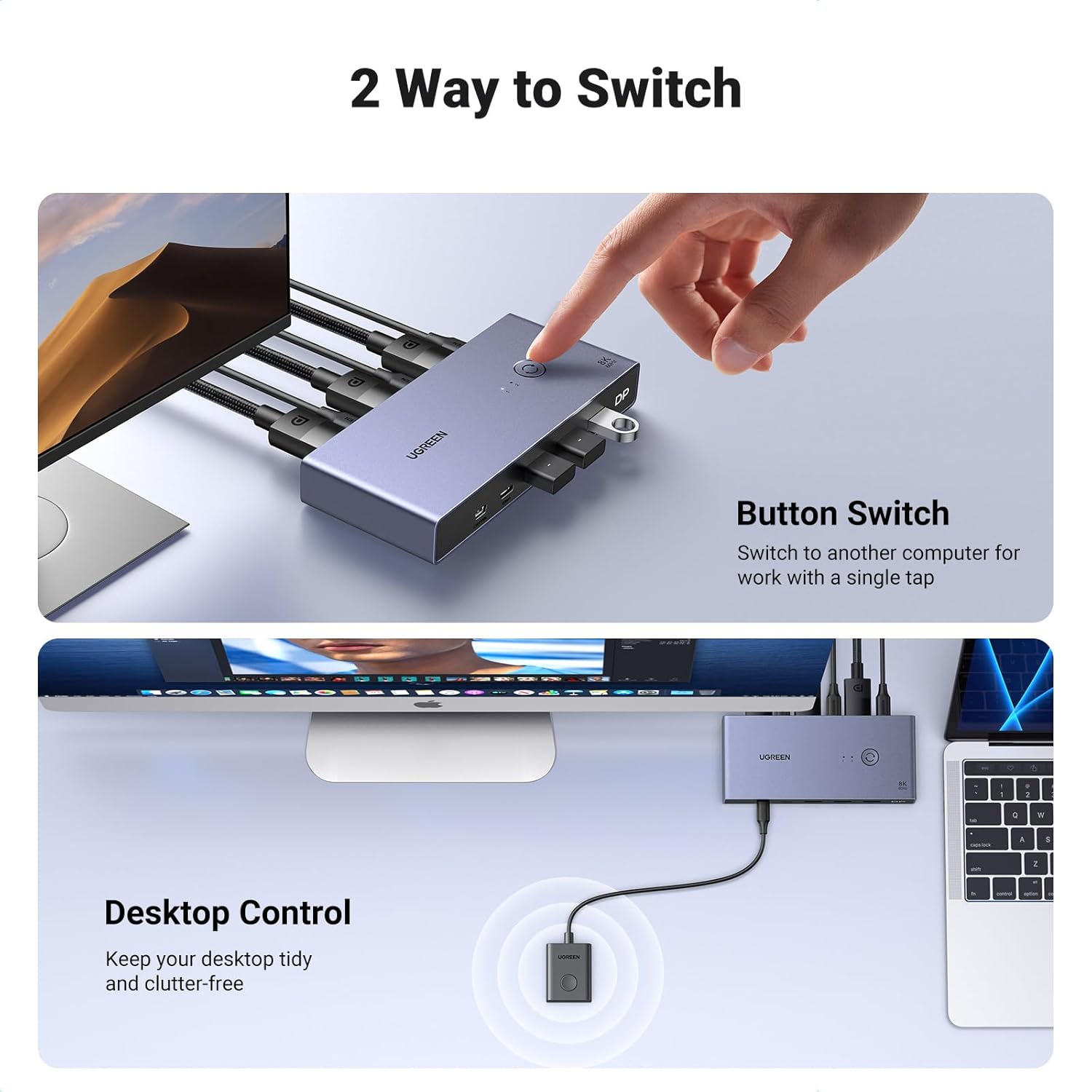
Two Switch Ways: By One-Botton switch or desktop controller, freely switch between 2 computers, saving space on your desk and sharing your display, keyboard and mouse between both computers, increasing your productivity. When the DP switch is not placed on the desktop, the controller will be a good helper for you to switch quickly. NOTE: This Displayport KVM switch does not support Hotkey Switching
Driver-Free & Package List: This DisplayPort KVM switch 2 port box supports Windows 11/10/8.1/8/7, Mac OS, and Linux(Ubuntu) systems. Just plug and play, driver-free. It is widely applied for Enterprise, Office, Multimedia Teaching, Meeting Rooms, Gaming Rooms, Research Tests, etc. Package List: 1* DP KVM Switch, 2* USB A to C Cables, 2* DP Cables, 1* Desktop Controller, 1* User Guide
Important Notes: 1, Please Must connect both two USB A to C cables for the power supply. 2, USB-C power cable or power adapter is NOT INCLUDED. 3, To avoid incompatibility, we recommend that you do not use it with the docking station. 4, It is NOT a USB-C KVM SWITCH. 5. It is NOT an HDMI KVM switch and it does NOT have HDMI interface
Customers say
Customers find the KVM switch works well with 1440 ultrawide monitors at 100Hz and supports 4K @ 240Hz, with solid build quality and reliable functionality. The USB ports and connectivity receive mixed reviews – while some customers report issues with USB ports and connection loss, others note the USB C port failure. The flickering aspect is negative, with multiple customers reporting screen cutouts. The power supply aspect is mixed, with some customers appreciating that no external power is needed, while others mention the lack of included power supply.
11 reviews for UGREEN 8K Displayport KVM Switch 2 in 1 Out DP1.4 with 4 USB 3.0 Ports(3 USB-A + 1 USB-C) Support 8K@60Hz 4K@240Hz Share 1 Monitor Keyboard Mouse U-Disk Printer, with 2 DP Cables, 2 USB A to C Cables
Add a review
Related Products


Original price was: €86.€72Current price is: €72.
Alek –
Don’t bother with those other KVM switches!
Excellent KVM switch! Works perfectly with the UGreen thunderbolt 4 dock and outputs to my 240hz monitor without any issues. Effortlessly switches between my gaming desktop and docked laptops. Works perfectly with my Macbook Pro. It did have an issue with my Lenovo X1 Carbon for like a week because Fedora Workstation pushed an update that caused screen flickering. But that has since been resolved and there has not been any issues what so ever. I also pass through mouse, keyboard, and audio and have not experienced any latency or stutters.UGreen continues to make affordable and quality gadgets!
The Van Andels –
Excellent switch!
Works perfectly with my ultrawide monitor from both a Linux PC and a Macbook. The Macbook connects to the switch with a USB-C to DP cable. My only complaint is the use of obsolete USB-A ports on the front. If the inputs were all USB-C it would be perfect. Fortunately, I have a drawer full of C-to-A adapters, but I wish it weren’t necessary.
Leslie M Eldridge –
Ports just stopped working
Like others, worked fine for maybe 6-9 months and then all the USB ports just stopped working. Sometimes has some connectivity lags but might be able to get over this annoyance if I could still plug the peripherals in. Unfortunately seems like all of the Amazon options are from random anonymous brands so not sure if there’s a better option.
WY.C –
Capable little KVM
Can confirm that this KVM works with the following setup: M1 Max MacBook Pro and Lenovo laptop both running usbc to dp 1.4 (ugreen) to the KVM. Mac is connected via an anker thunderbolt 4 cable to the KVM while the Lenovo is using the included usb a to c cable. Juicing it with 18w is sufficient it seems since I get picture and surprisingly, the usb a ports output enough power that my MX Master 3S detects a charge! KVM is connected using a standard DP 1.4 cable to the monitor. I didnât use the included one because itâs way too short and too thick.The KVM is metal, is surprisingly small compared to my 4 in 1 out HDMI 2.1 switch but is comparable in weight. Looks and feels well made but only time will tell.My monitor is a Lenovo curved ultrawide with 3440 x 1440 pixels and both machines are able to hit the max 144hz via this KVM with DP 1.4 cables.The wired remote is a single button with no indicator so you have to look at the dock itself to see which device you have switched to. The indicator lights on the decide itself is very small and too close together which might be an issue for some.Very pleased with the product so far. Will update if anything else changes.Update: the KVM pulls around 0.027A from the outlet and I was not able to get it to pull anymore by loading up the USB ports with peripherals. It also seems to work just fine with it unplugged. The KVM does get its power from the connected laptops because if I dont connect it to the laptop via USB C, the KVM will not charge my mouse, even if I connect it to the outlet. Since my setup only needs it to drive a 3440 x 1440 @ 144hz monitor, I suspect that higher definition/ refresh rate might result in power draw from the outlet. The product can certainly do with more detailed documentation.
Lee Clay Co –
Great KVM, but with some long term durability concerns.
I purchased this KVM switch to streamline my setup, allowing me to use two computers with dual monitors and several USB peripherals. Initially, the switch worked as expected, seamlessly enabling me to switch between machines while sharing the same keyboards, mice, and monitors. For anyone with a multi-computer setup, this KVM switch is a convenient, space-saving solution.However, after about seven months, I’ve noticed some issues that raise concerns about its durability. My primary computer has recently started to get stuck in a continuous VGA boot sequence whenever the KVM switch is connected, preventing it from booting up properly. Disconnecting the KVM is the only workaround I’ve found, which is inconvenient and defeats the purpose of having the switch.Additionally, my USB headsetâs receiver has started producing crackling sounds when plugged into the KVM. Moving it directly to my motherboardâs I/O panel resolved the issue, indicating that the KVM’s USB ports might be the cause. Windows has also begun to issue warnings about USB connectivity issues with the KVM, which is worrisome for long-term use.**Overall:** Itâs a functional product, especially for those needing a streamlined setup, but Iâm concerned about its longevity and reliability over time. If youâre looking for a durable KVM switch that you can rely on for years, you might want to consider other options.
Markelm –
Works Perfectly!
First Day of Use: This little guy is so far perfect for my setup! Extremely easy install for connecting my iMac and MacBook Pro to a LG Ultragear 38″ monitor, along with an apple keyboard (wired via USB-C), a G502 gaming mouse, and a Wacom Intuos Pro tablet. Now I can use all my best/fav peripherals seamlessly between both computers.As a bonus, the LG monitor has a built-in USB hub, so I was able to plug that into the KVM switch via USB-A and have my desktop speakers plugged into the back of the monitor, and now I can play music from either computer thru the speakers via the switch/monitor hookup.I did go ahead and get a USB-C cable and wall plug to power the switch as it does not come with its own power cable, and some reviews mentioned that it didn’t get enough juice from just the two computers to power it properly. I also had to get an extra USB-C to Displayport cable because the MacBook doesn’t have a standard Displayport plug. In total I spent $90 for the switch and 2 extra cables, totally worth it and way less than a lot of KVM switches out there.I’m able to get full resolution at 144Hz on both machines with no issues (so far). As long as the switch continues to work as well as it has out of the box, this thing is a huge time and headache saver. No more multiple keyboards or mice, and no more unplugging/plugging cables!*
Dylan Cole –
This is my second ugreen display-port KVM. 1st one is working great and is used on my primary monitor while this one is used on my secondary monitor.Both are working fine with no issues.
NP –
Compact and stylish design and a great ease of use. Would recommend!
cdmx –
Gran producto como todo lo de UGreen.Recomendado 100.Al usar el switch le toma 1 seg más o menos para cambiar / actualizar la salida de DP al monitor principal.Tengo conectados G915 TKL & G502X Lightspeed. A veces, al hacer el switch, el software de Logi tarda en volver a reconocer el equipo & cargar los perfiles, pero nada grave.Sólo ten en cuenta el cable que vas a usar; si tu equipo no tiene salida DP necesitas comprar un cable / adaptador.Recomiendo el cable Ugreen de usbC > DP.
Amazonã®ã«ã¹ã¿ãã¼ –
LG ã¢ãã¿ã¼ ãã£ã¹ãã¬ã¤ 40WP95C-W 39.7ã¤ã³ã/5K2K æ²é¢åã¦ã«ãã©ã¯ã¤ãã®Macã¨Windowsã®åãæ¿ãç¨ã«è³¼å ¥ãã¾ãããåé¡ãªãå©ç¨ã§ãã¦ãã¾ãã
fevereiro –
Excellent product at a decent price