

Photo Scanner with PictureStudio by Ambir
Original price was: €250.€200Current price is: €200.


Price: $249.95 - $199.95
(as of Sep 28, 2025 22:34:16 UTC – Details)
Product description

The video showcases the product in use.The video guides you through product setup.The video compares multiple products.The video shows the product being unpacked.
 Impressive Auto-Functions
One-touch tools auto-enhance, color restore, colorize B&W photos, apply filters, borders, & more.
 Easy to Use. Easy to Share.
Easily share your newly scanned photos on Facebook, Instagram, and more with PictureStudio.
 The Perfect Gift
Enhance, organize, and share your most precious memories effortlessly with PictureStudio by AMBIR.
 Fast Photo Scanning
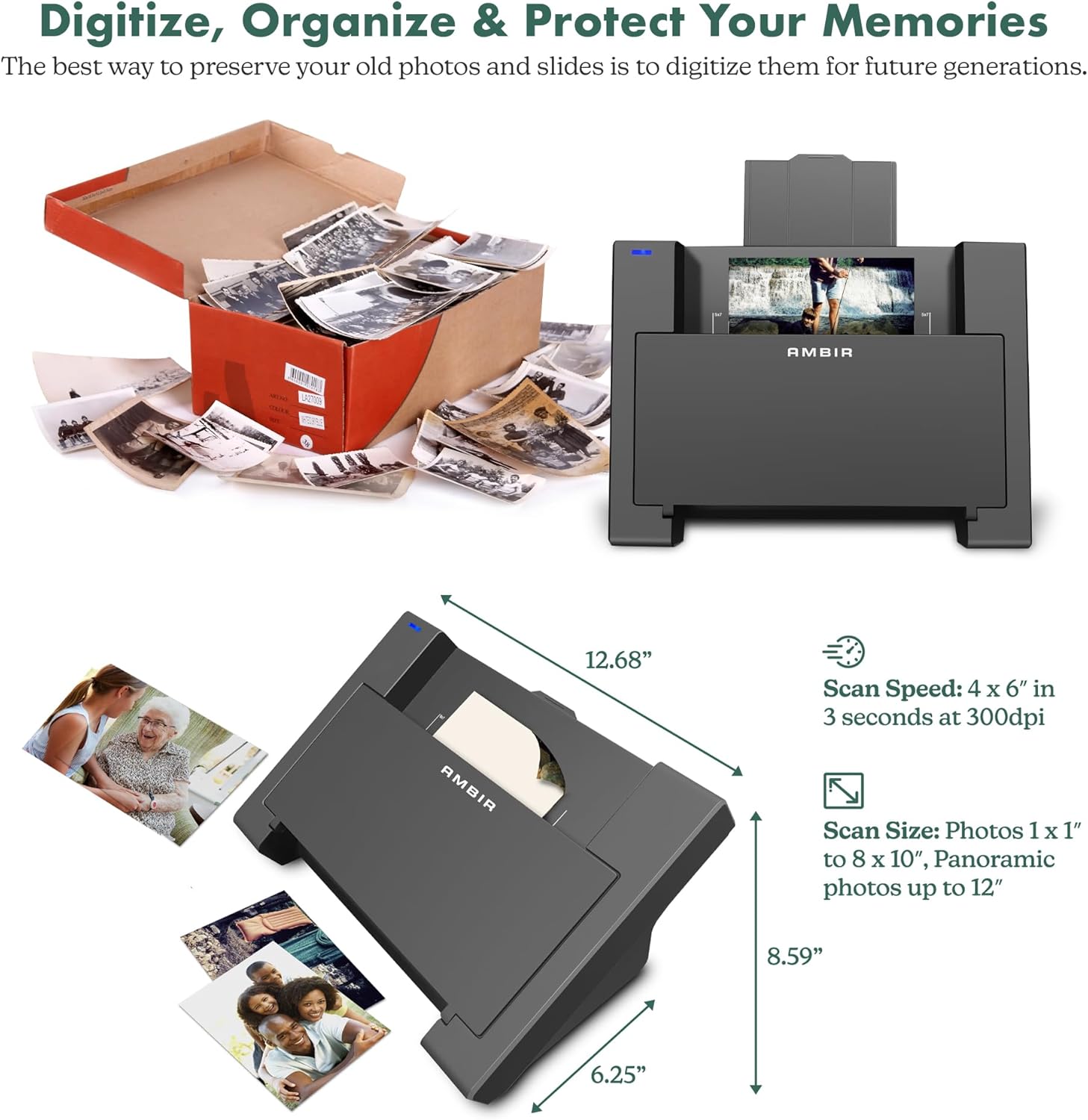
Scan 4×6” in 3 seconds at 300dpi. Handle sizes ranging from 1×1” to 8×10”; and up to 12” with ease.
1 Impressive Auto-Functions
2 Easy to Use
3 The Perfect Gift
4 Fast Photo Scanning

PIctureStudio by AMBIR
Color Restoration
Color restoration revives the original hues of faded or distorted photographs. The software analyzes and adjusts the color balance, saturation, and brightness to bring back natural tones and vibrancy, restoring cherished memories.
Image is simulated.

 PictureStudio by AMBIR
Tagging & Notes
This innovative feature allows you to tag people and objects in your photos for effortless searching. You can also add searchable notes with detailed descriptions, dates, locations, and personal memories to your photos for unparalleled organization. PictureStudio makes it easier than ever to find and relive your favorite moments, ensuring your memories are always at your fingertips.
Image is simulated.
Supported Operating Systems Windows 10 and higher, Mac OS 11 or higher Software Included PictureStudio by AMBIR Unit Dimensions 12.68 x 8.59 x 6.25″ Weight 3.5 lbs Scan Speed 4 x 6″ in 3 seconds at 300dpi Scan Size Photos 1 x 1″ to 8 x 10″, Panoramic photos up to 12″ Connection Type USB-C (includes USB-C to USB-A adaptor) Power USB-powered
Quickly Scan 4”x6” color photo in 3 seconds at 300dpi.
Accommodates photo sizes ranging from 1×1” to 8×10”; and Panoramic photos up to 12” with ease.
Scan or upload photos from a computer or connected device (Apple Photos, Google Photos, Digital Cameras, Memory Drive, etc.)
Complete one-touch Tools to Auto-enhance, Color Restoration to old-faded photos, colorize b&w photos, apply filters, boarders and more.
Comprehensive set of advanced settings to adjust brightness, contrast, exposure, sharpness, gamma, and more.
Colorization: Use AI to analyze tones and infuses color into grayscale images.
Seamlessly search through your digitized photo collection by user added tags and notes.
Choose between high-resolution (300dpi) or ultra-high resolution (600dpi) scanning options.
Scan delicate photos without worry; includes a carrier sheet and a microfiber cloth for gently dusting photos.
USB-powered. Easily connects with a single cable.
Customers say
Customers find the scanner easy to use and appreciate its top-notch quality, with one noting its outstanding scan results. The device works as advertised, with one customer highlighting its auto-deskewing feature, and customers like its colorization options and editing capabilities. The scanning speed receives mixed feedback, with some finding it fast while others note it’s not quick at all. The photo quality and organization features also receive mixed reviews.
12 reviews for Photo Scanner with PictureStudio by Ambir
Add a review
Related Products


![Canon Megatank GX2020 All-in-One Wireless Supertank [Megatank] Printer | Print, Copy and Scan| Mobile Printing |2.7″ LCD Color Touchscreen | Auto Document Feeder and Auto Duplex Printing](https://m.media-amazon.com/images/I/71KWZwpMfmL._AC_SL1500_.jpg)


Original price was: €250.€200Current price is: €200.
Doc –
Photo Scanner with PictureStudio Review
The Photo Scanner with PictureStudio excels at its primary task: quickly and efficiently digitizing boxes of old photos. With the auto feed function it can make quick work of a box of old photos. Depending on your needs it can scan at either 300dpi or 600dpi. Once scanned the software takes over, here is where some of the automatic features really speeds up the process, like the auto-deskewing, as I rarely placed the photo in perfectly straight. Auto color optimization and cropping also aided the process.I also experimented with some of the other settings, like colorizing black-and-white photos, and was impressed with how well the AI handled the process. While it’s not perfect, the results were surprisingly good and definitely added a bit of life to some of my older images.Overall, I believe this scanner is an excellent choice for anyone looking for a fast and effective solution to digitize and organize their old photo albums. Itâs a great tool for both beginners and those with large collections, offering a solid combination of quality, convenience, and ease of use.
Melissa –
Don’t do it! Highly disappointed.
The product arrived quickly, was securely packaged and easy to set up… and that’s where the good points end.I chose an automatic feed photo scanner because I have boxes of old family photos recently found that I want to digitize.- while the feed rolls of the scanner can technically be called automatic. It is far from what I had envisioned. You still have to Manually Place one photo at a time in the tray.-the rollers that pull the photos through will turn the pictures when scanning causing distorted images or grabbing and scanning mutilple photos into one jpeg,png, etc.- this is NOT quick at all. The software takes a pretty long time to render an image on your screen and you have to wait for the photo being scanned to finish and fall out the bottom before you can load another one.- I will let the pictures tell the rest of the story. I scanned the one in the red dress twice. The first created weird glitches on the right hand background. I turned off the enhancement features and there was significant lines and streaks (which are not visible in the original)
Major Dude 55 –
Easy to use and works with Windows 11
Does what it says it does for alot less than others .
Bill Familia –
Great product
This is a wonderful scanner for digitizing years and years of printed photographs. I am just getting started and havenât begun to use all the features available. But I am able to categorize photos in âalbumsâ which is extremely beneficial. Minor corrections are possible with exposure and brightness and colorization is also an option.
Colleen Burnham –
Disappointed…
Unfortunately about 25 scans into a project the device developed a vertical line through the scanned image. Cleaning and re-calibrating allows me to scan 6-7 photos – cleaning and recalibrating every 6-7 photos is VERY cumbersome! Document scanning is not great producing a gigantic file that doesn’t convert with OCR cleanly – essentially useless. The provided manual includes features not available in the application (eg, tagging, front to back scanning, title editing). Overall I’m very disappointed with this device.
Aide Blaker –
Uneven scanning
My father-in-law had a very hard time scanning small pictures and he couldn’t use the product because it was taking too long. We ended up returning the scanner and he is using an app to scan pictures manually.
Pete –
PictureStudio is a must have to go digital!
â â â â â The PictureStudio photo scanner is an absolute game-changer! I was able to digitize hundreds of old family photos with exceptional ease and speed. The quality of the scans is outstanding â every detail, color, and nuance is captured beautifully. The software is user-friendly (even for someone not tech-savvy) and it offers plenty of options for editing and enhancing photos. I also love the fact that it handles different photo sizes without any issues. If youâre looking to preserve your family pictures with top-notch quality- at a good price- this scanner is a must-have. Highly recommend!
Vinny –
Using picture studio to save family photos
Bought scanner to scan all my family photos. Itâs very easy to connect and use. Scanner works fine and scans photos really fast. Software is also easy to figure out. Once the photo is in their system there is a decent amount of editing to the pics. Iâm using it for some photos that have some moisture and bent ends. So far so good. This is a great tool to have and back up pics. The sharing on social is pretty cool
Sailor –
Purchased to copy pictures from the family album into an electronic storage. Copies relatively quickly (about 5 seconds per picture) and another bit to save to a file in one of 3 formats.
Frederick F. –
I have read all the reviews both in Amazon and other platforms before purchasing. Understanding the pros and cons of what i have paid. I have lowered my expectation and hope for the best.A. If you are looking for something to auto reload the stacks of photo automatically, this is NOT for you. It is a single photo scanner.B. For this price, it meets my objective – digitalising thousands of photo for safe keeping. I know there is another photo scanner in the market now(April 2025) but it costs 3 times more. Considering it probably 1-2 times use for me and passing this to my friends and relatives, this is suitable for me.C. There are a few negative reviews here (Amazon) based on the software and quality. I think we have to understand we are NOT paying a lot of this device. Yes, there should be more information or support for the software.D. There is no software or manual which come with this scanner. A search online for “Picture Studio for Ambir Photo Scanner” would lead one to these. There should be a sheet or information for any user which comes together with the scanner(hardware). Most people who have stack of old photographs to be scanned are not IT experts and some requires their younger friends or relatives to help them to set up.E. Hardware – the calibration at the beginning stage was little painful and the roller unable to accept the paper which comes with the scanner. A little pushing into the slot helps. These “pushing” helps at times when some of the photos are of different quality paper, hence, it may gets stuck. For me, only 1-2 for a stack of 50 requires some pushing.In fact, i like the single photo scanning as i can check on the software for scanned photo if the cropping works as advertised or i wanted. There is a LED on the scanner, there is no information in the manual. Green, Blue and Off, basically when there the LED is off, it is busy or OFF. I like the function of “Auto-scanning” which it quickly scan the photo when i place it on the slot. It is much faster compared to those flat scanner devices.E. Software – works well for my Mac OS and easy to understand. For more functions, one can refer to he manual. Love the auto scanning and auto cropping ( i do not need to place the photo nicely on the slot). Please do not expect the brightness or contrast to your preference. For me, i prefer some photo to be brighter but for some it can also captured some small “black dots” on photo which i have to pay more attention on the hardcopy photo. Nevertheless, it is good enough for me. I have other softwares(Adobe) to edit it if i want to. Hence, this software for editing is fine but the main purpose for this software to be installed so that it can link your Computers or Macs with the appropriate driver to the scanner.F. Scanning of 300dpi format or 36 photos requires 2-3minutes (auto-scanning) and i used another 1-2 minutes to check. It is much faster and good quality, comparing to a average flat scanner. If required a higher quality of 600dpi, it requires 3-4 more time to scan.Finally thoughts, it is a great product for people who just want to get rid of the old photos and digitalised them for safe keeping. If you a professional photographer, you have to lower your expectation for this product.Hope my review helps!
Cheryl Brand –
Quality scanner. User friendly. Great technical support when I needed. Would highly recommend
gerred –
the scanner is OKThe software is what i had problems with it my have been me or may have been my new PC ?