

OMOTON Bluetooth Keyboard Compatible with Mac, Compact Wireless Keyboard Compatible with MacBook Pro/Air, iMac, Mac mini/Pro Laptop and PC (Silver)
Original price was: €22.€20Current price is: €20.
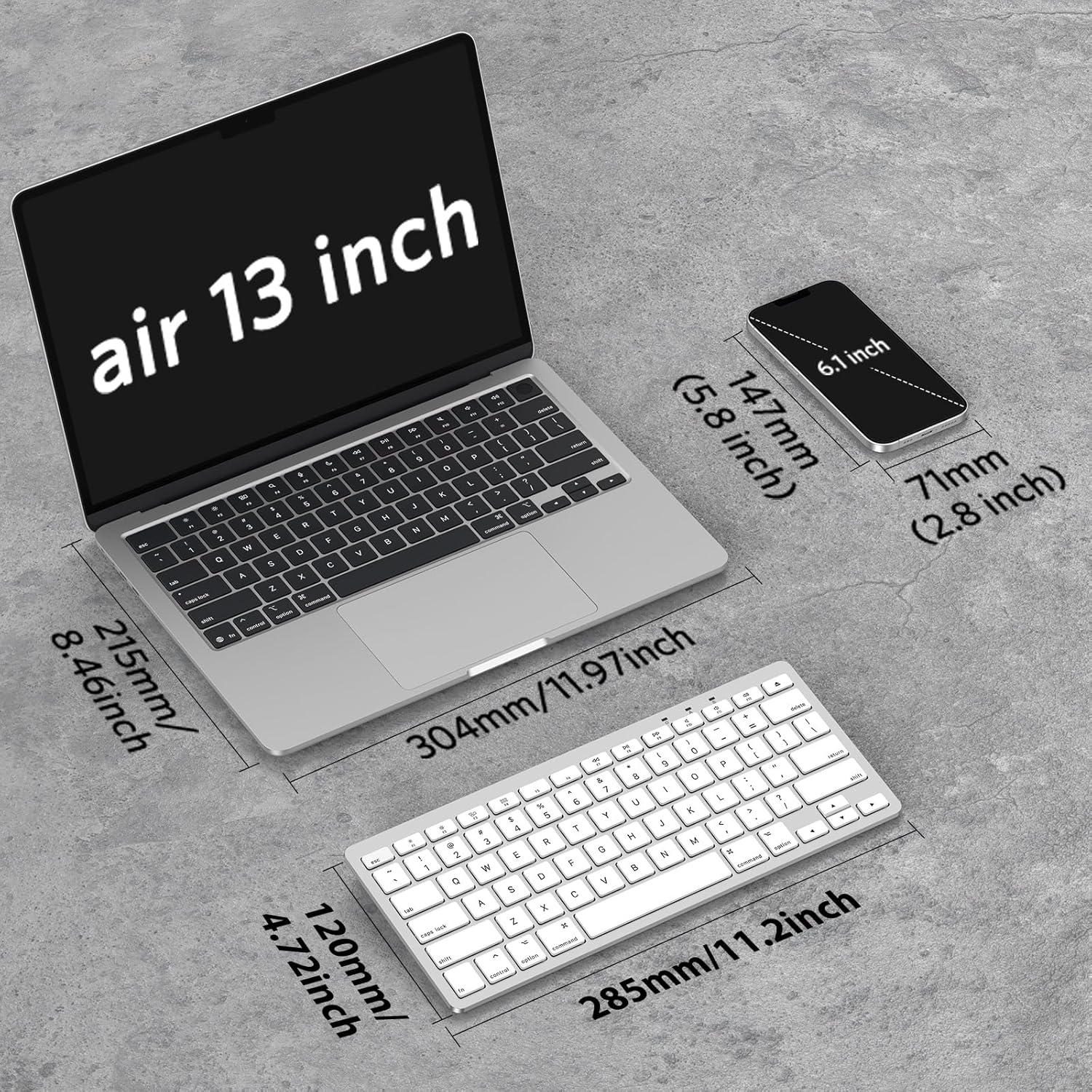


Price: $21.99 - $19.99
(as of Sep 29, 2025 10:02:30 UTC – Details)
Product description
Add to Cart
Add to Cart
Add to Cart
Add to Cart
Add to Cart
Add to Cart
Customer Reviews
4.0 out of 5 stars 123
4.2 out of 5 stars 86
4.4 out of 5 stars 394
4.1 out of 5 stars 1,273
4.5 out of 5 stars 88
4.4 out of 5 stars 120
Price
$27.99$27.99 $29.99$29.99 $17.89$17.89 $30.99$30.99 $29.99$29.99 $24.98$24.98
Connectivity
Bluetooth Wired, Dual Interface Wired, Dual Interface Bluetooth 2.4G Receiver & Bluetooth Connection Wired, Dual Interface
Compatible with Mac
✓
✓
✓
✓
✓
✓
Smooth typing
✓
✓
✓
✓
✓
✓
Ergonomic Design
✓
✓
✓
✓
✓
✓
Multi-media keys
✓
✓
✓
✓
✓
✓

If you cannot connect the Bluetooth keyboard to your device, or if the keyboard is not working, please try the following:
1. Press any key to wake the keyboard from sleep mode ( Please wait up to 3-4 seconds for the keyboard to reconnect with the device ).2. Install two new AAA batteries and follow the steps, input the pairing code, try to pair again.3. If your device doesn’t detect the Bluetooth Keyboard, restart your device.4. Forget the keyboard and Reconnect it again.
Should you have any product issues or questions, we will be always here to solve it.
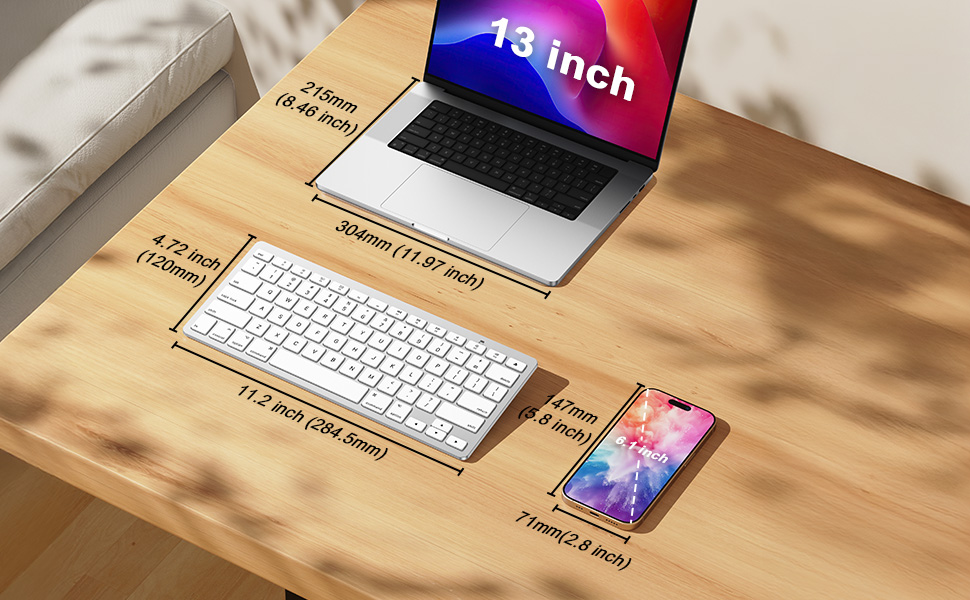


Advanced Bluetooth Technology
The wireless keyboard provides a cable-free connection. After pairing the “OMOTON keyboard” with your device, please enter the numbers on your screen and press “return” to finish the connection.

10-Minute Power Manage
With the keyboard’s auto-off sleep function and independent power switch, you can better manage battery power. It will enter sleep mode after 10 minutes of inactivity. Simply press any key and wait 2-3 seconds to reactivate.

Ergonomic Design
The Bluetooth keyboard features an optimum slope, which prevents your wrist from pain. Customized shortcut keys for Mac offering quick visits, making your time spent on your device highly productive.
Effortless Compatibility: This Bluetooth keyboard is able to work well with Mac OS X 10.10 and above. Compatible with MacBook, MacBook Pro, MacBook Air, Mac, iMac, iMac Pro, Mac Pro/Mini, etc.
Stable Bluetooth Connection: This Bluetooth keyboard features a solid Bluetooth connection range that up to 33ft/10m. The slim and refined design makes it a valuable and gainful addition for your MacOS devices.
Ergonomically Friendly Keyboard: With scissor-switch design, this Bluetooth keyboard is targeted at reducing fatigue and makes typing smoother and more comfortable. Further, it is particularly slim and light allowing for easy portability.
Exclusive Shortcut Keys: This Bluetooth keyboard has streamlined each and every one of your movements in order to ensure ultimate efficiency in terms of time and productivity. The range of 12 shortcut keys make everything a lot speedier.
Long-lasting Battery Life: This innovative keyboard runs on only 2 AAA batteries and is designed to conserve energy wherever it can, especially supported by its automatic sleep mode function. The batteries are not included in the package.
Customers say
Customers find the keyboard’s quality comparable to Apple products and appreciate its compact size and ease of use. They consider it good value for money, with one customer noting it works well as a replacement for older Apple keyboards. The connectivity receives mixed feedback – while it connects easily, it tends to lose connection over time. Battery life and lag time are also mixed aspects, with some customers reporting zero lag while typing while others experience long delays after typing.
8 reviews for OMOTON Bluetooth Keyboard Compatible with Mac, Compact Wireless Keyboard Compatible with MacBook Pro/Air, iMac, Mac mini/Pro Laptop and PC (Silver)
Add a review
Related Products


Original price was: €22.€20Current price is: €20.
Monique L. Avakian –
The packaging had me worried, but everything works great!
I am so happy that I finally got this. Already, my posture is improving and my eyes feel better. I have a little folding desk that has a shelf. Now the screen is near eye level and both my arms are supported by the desk while I type. I love the feel of this keyboard! The individual keys are SO much better than bizarro MacBook Air weirdo feeling keys. The keyboard is tilted and already my wrists feel better. The Bluetooth connection thing was really easy. I think the key point is for the user to figure out where she/he/they finds the Bluetooth menu on her/his/their individual machine. Also, it took me a minute to figure out how to press the “connect” button on the back of the keyboard. My fingers fumbled, but I figured it out. It’s a little black dot. Also, you literally just place the keyboard right next to the laptop and it will start “pairing” which is a pretty bizarre concept to people my age. Anyway, if I can do it, anyone can! The booklet is clear, concise and helpful. There is also a helpful video. If you have an iPhone or hearing aids, put them far away when you first pair the keyboard. In my situation with the MacBookAir, at the top near the volume button is the Bluetooth symbol. I clicked on that and eventually clicked something else which showed the list of choices to “pair.” Look for the numbers as instructed in the booklet. It took like literally 3 minutes from unbox to typing. I was a little worried at first, because the keyboard was delivered in its regular box, literally, with no outer box, no padding, no nothing. But all is well. I was a little surprised, too, that I needed 2 AAA batteries. I thought this was rechargeable, but I probably made a mistake. Anyway, I am having so much fun typing on this keyboard that I may never stop writing this review! Cheers!
Jim C. –
Good keyboard for the iPad at a great price!
Update 11/2019 – Had this keyboard for nearly a year now and its worked consistently well. I did feel the need to knock off one star, however, as two of the keys popped off – the right ALT/OPTION and COMMAND keys. Not too much of a biggie as the ALT/OPTION key popped right back on. However, the COMMAND key locking tabs on the the key snapped off so its not going to stay on. Regardless, the core function of the keyboard is sound and I continue to enjoy using this keyboard. Iâm going to reach out to OMOTON to see if they can send me a replacement key.Original review (01/2019) Keyboard arrived today and seemed of good quality. Instructions were clear and after inserting two AAA batteries and turning the unit on, I was up and running. The bluetooth connected seamlessly to my iPad 10.5 Pro and worked immediately. Typing feel is good with strong tactile response. When the iPad went to sleep, it took only a few seconds after waking the iPad for the keyboard to respond. No more than five seconds. I have not had a chance to test the battery level on the keyboard, but since it uses two AAA batteries that are easily replaceable, Iâm not anticipating any issues. I will update as time goes on, but overall, this is a five-star product based on price, ease of connection, and usability.
Mark A. –
Good, inexpensive substitute for Apple keyboard
If you’re looking for a keyboard to work with your iMac or MacBook, but don’t want to pay the prices associated with genuine Apple products, this Omoton compact wireless keyboard is a good substitute. It has the keys and functions you need to work with your Apple computer, including Control, Option and Command keys, and there are also function keys to use to easily access Mission Control and Launchpad. Other function keys are available to change your display brightness, to change the volume, and to move through music tracks you’re listening to.I’ve been accustomed to using a full-sized keyboard (designed for Windows computers), so at first it took some getting used to the smaller size of this keyboard and the loss of the number pad on the right side. I also think that the Omoton keyboard might have slightly less of an incline (it sits a bit more flat) than my Logitech keyboard. I would have liked the power switch to have been at the top or side of the keyboard, instead of being on the back. The first time you pair the keyboard with your computer, you will also have to press a small black button on the back. Once it is recognized and paired with your computer, all you have to do going forward is to turn the keyboard on or off to start typing. There is a slight delay of a second or two before the keyboard inputs will be shown on screen after you first turn it on. When you look at the keyboard, you’ll notice that there is a Delete key but not a Backspace key. The Delete key on this keyboard performs both functions. If you are typing and want to remove characters to the left of your cursor, just hit the delete key as many times as needed to remove the characters. Hitting the delete key will not remove characters to the right of your cursor; instead you’ll have to highlight them and then hit the delete key. Lastly, there is a small green LED that comes on briefly (above the F11 key) to indicate power when you turn on the keyboard. It does not stay lit while you use the keyboard. The same LED also comes on during the bluetooth pairing process. This LED will also come on when you press the Caps Lock key, and go off when you remove the Caps Lock.The keyboard has a power saving feature that will put itself to sleep if no keystrokes are detected after a certain period of time. This works fine in my experience, as I see a “Connection Lost” notice on my screen when the keyboard goes to sleep, but to me it seems like an unnecessary feature, as the battery in my other keyboard has lasted quite a while without a similar feature. I did not rate the battery life as I have only had the keyboard for a week or two as of writing this review.
Julia Mortley –
This is a great keyboard that works exactly like an official Apple keyboard. Charge holds for a few days, keys have a comfortable click. Laptop is able to connect to mouse and keyboard without conflict.
fatimah –
اÙØµØ Ø¨Ø¹
Mohammed –
Awesome keyboard for awesome price. The quality is great, very light and though itâs plastic but good built for the price. I bought this for my MacBook Pro 2015 model and it works similar to Magic keyboard. All the function keys work as described. The Keys are very good to type. Also connects very well with IPad Pro2018 and beyond. Would definitely recommend if you not planning not to spend on the expensive Apple Magic Keyboard.Cons- Itâs a pain to switch between devices as you have to delete the pairing and repair to the other devices like pairing a new device every time you switch. But thatâs ok for me. Need to wait for the battery performance as Iâm not sure.Was surprised to see next day delivery even though it wasnât Prime delivery ( expected day was 1 week from ordering). 5 star for the seller .
User –
Good quality works with both android and IOS devices
Amazon Customer –
Perfect bt keyboard for everyday use!For key stroke, imagine the perfect medium between macbook keyboard and mechanical keyboard, not too soft like mac and not too clicky like the mechanical keyboard.Syncing is a breeze and battery lasts forever!