
![ClearClick Video to Digital Converter 2.0 (Second Generation) – Record Video from VCR’s, VHS Tapes, AV, RCA, Hi8, Camcorder, DVD, Gaming Systems [Requires Working VCR/Camcorder & Tapes]](https://m.media-amazon.com/images/I/91c1O5fWJfL._AC_SL1500_.jpg "ClearClick Video to Digital Converter 2.0 (Second Generation) – Record Video from VCR’s, VHS Tapes, AV, RCA, Hi8, Camcorder, DVD, Gaming Systems [Requires Working VCR/Camcorder & Tapes]")
ClearClick Video to Digital Converter 2.0 (Second Generation) – Record Video from VCR’s, VHS Tapes, AV, RCA, Hi8, Camcorder, DVD, Gaming Systems [Requires Working VCR/Camcorder & Tapes]
€150


Price: $149.95
(as of Aug 07, 2025 07:39:09 UTC – Details)
Product Description

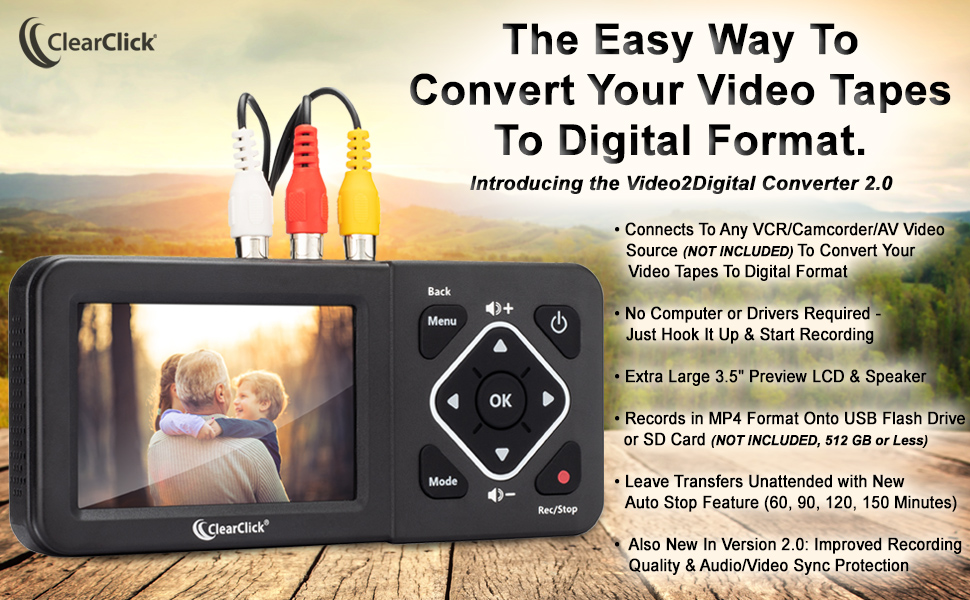
Introducing the ClearClick Video2Digital Converter 2.0 (Second Generation).
Need to turn that box of old video tapes or camcorder tapes that’s sitting in your closet or basement into digital format?
With the ClearClick Video To Digital Converter 2.0, you can transfer your videos to digital format with the touch of a button. Convert your VHS collection and enjoy your old movies again. Restore and share your family memories from 20 years ago. You can watch your digitized videos on your computer, tablet, smartphone, or your TV.
Here’s how it works…
Connect your Video2Digital Converter 2.0 to your VCR or camcorder (NOT INCLUDED; CONVERTER DOES NOT PLAY VHS/CAMCORDER TAPES BY ITSELF), or any other video source. (Accepts any input source with RCA/AV output)Plug in a USB flash drive or SD card (NOT INCLUDED; 512 GB or less) into the converter. Your digitized video will be saved onto this drive.Press the “Record” button on the converter. You’ll be able to see your video on the 3.5″ LCD as it transfers. (No computer is required to capture your videos!)Press “Record” again to stop recording (or use the “Auto Stop” feature to stop recording after a preset amount of time). (Do not skip this step, or the recorded files will become corrupted.)Remove your USB flash drive or SD card from the converter, and insert it into your computer to transfer your digitized videos to your computer. Then put them on your tablet, smartphone, or burn a DVD. (DVD burning software not included.)
If you have questions at any point, this product also comes with ClearClick’s USA-based support.
What’s New In Version 2.0? (Second Generation)
Extra-Large 3.5″ Preview ScreenBetter Recording Quality (Recording Resolution: SD 720×480 or 640×480 Pixels. Not Intended For Modern HD Video Sources.)Improved Audio/Video Sync ProtectionAuto Stop Feature (Automatically Stop Recording After 60, 90, 120, or 150 Minutes)Smartphone/Tablet-Friendly MP4 Recording FormatPause/Resume While Recording
NOT INCLUDED (Additional Equipment Required):
A fully working VCR or camcorder (or other AV/RCA video source) and video tapesRecommendation: Test your VCR/camcorder and your video tapes before purchasing this product. The converter is completely reliant on your VCR/camcorder to successfully make quality digital conversions.USB 3.0 flash drive (512 GB or less) or SD card (512 GB or less, Class 10 or higher) – we recommend Amazon item # B0DJTL4Q6R3.5mm to 3-AV cable (required for some camcorders only) or other proprietary camcorder cableCarrying/storage case (optional) not included – please search for item # B09KB7GNMY.
What’s Included:
Video2Digital Converter 2.0User’s Manual3-RCA to 3-RCA cablePower Adapter (Note: Device Does Not Contain a Battery)USB Cable
Troubleshooting Steps:
Issue: “No audio or video” / “Poor quality video” / “Intermittent signal” / “Defective transfer of image” / “Worked for a few minutes, but then the video image disappeared” / “Video failed to appear”Ensure your VCR or camcorder is in fully working condition, including its “AV OUT” port. If your VCR or camcorder hasn’t been used in several years, it likely needs a tune-up, repair, or cleaning. Ensure your tapes are working condition and are playable. To test, connect your video source directly to a TV to verify playback there.Ensure your AV cable is securely plugged into your “AV OUT” ports (usually in the back) on your video source (VCR, camcorder, etc.), not the “AV IN” ports.Ensure the “Video Source” setting in the converter’s main menu is set correctly.If you are using S-Video, ensure you have hooked up the red/white RCA audio connectors to receive audio as well, since S-Video only contains a video signal.Issue: “The recorded video is jerky or glitchy” or “Video is flickering” or “Picture is jumpy”This can be resolved by recording from your video source’s “S-VIDEO OUT” port instead of “AV OUT” port. (Make sure you also change the Video Source to “S-Video” in the converter’s main menu.)If your video source does not have an “S-VIDEO OUT” port, please contact ClearClick and we will mail you an “AV to S-VIDEO” adapter.Issue: “Converted MP4 file is unreadable or corrupt”Ensure you press the “Rec/Stop” button on the converter to stop recording, prior to removing your USB drive or SD card from the converter.After pressing the “Rec/Stop” button to stop recording, wait 5-10 seconds before removing your USB drive or SD card from the converter, so that the converter can save the file properly.Issue: “Transferred video and audio is out of sync”Ensure you are using a brand name USB 3.0 drive or SD card (class 10 or higher). Generic brand drives are too slow to be used with the converter. Ensure your USB drive or SD card is 512 GB or less.Issue: “Can’t record from HDMI”The converter’s HDMI port is an output port, not an input port. This device does not record from HDMI sources (only AV and S-Video)
Compatibility Information
Compatible with standalone VCRs, camcorders, gaming systems, DVD players that have a “3-RCA/AV OUT” port or “3.5mm AV OUT” port.Compatible with name brand USB drives (512 GB or less) or name brand SD cards (512 GB or less).Not Compatible with “TV-VCR Combo” models. (These combo models do not have an “AV OUT” port)Not Compatible with generic USB drives or generic SD cards or USB/SD drives over 512 GB.Not Compatible with HDMI video sources. (AV or S-Video only)
Convert Your Old Video Tapes or Camcorder Tapes to Digital Format With The Touch of a Button (Recording Resolution: SD 640×480 or 720×480 Pixels. Does Not Upscale To HD. Does Not Record From Modern HDMI Sources.)
Record and Digitalize Video From VHS, VCR’s, DVD Players, DVR’s, Camcorders, Hi8, & Retro Gaming Systems (IMPORTANT: A WORKING VCR/CAMCORDER AND WORKING VIDEO TAPES ARE REQUIRED; CONVERTER DOES NOT PLAY VIDEO TAPES BY ITSELF)
No Computer or Software Required – Just Hook It Up & Start Recording – Records Videos Directly Onto USB Flash Drive or SD Card (REQUIRED, NOT INCLUDED; 512 GB or less)
What’s New In The Video2Digital Version 2.0 (Second Generation): Extra-Large 3.5″ Preview Screen, Better Recording Quality, Improved Audio/Video Sync Protection, Auto Stop Feature (60, 90, 120, 150 Minutes), Mobile-Friendly MP4 Recording Format, & Pause/Resume While Recording
Includes 1-Year Warranty & Tech Support from ClearClick, a USA Small Business
Customers say
Customers find the video converter easy to connect and record with, and appreciate that it saves time and money. The device successfully converts VHS and 8mm tapes to digital format, with one customer reporting success with over 50 tapes without issues. The video quality receives mixed feedback – while some find it clear, others note it can be jerky. The audio quality also gets mixed reviews, with some reporting no audio/video issues while others mention static and muffled sounds. The build quality receives mixed feedback, with some finding it well-built while others report low quality.
9 reviews for ClearClick Video to Digital Converter 2.0 (Second Generation) – Record Video from VCR’s, VHS Tapes, AV, RCA, Hi8, Camcorder, DVD, Gaming Systems [Requires Working VCR/Camcorder & Tapes]
Add a review
Related Products




€150
Melvin –
Performs very well
As someone who has a treasure trove of memories tucked away in various analog formats, finding a way to preserve and relive those moments has always been a priority for me. Enter the ClearClick Video to Digital Converter 2.0 (Second Generation), and it’s like I’ve found a time machine for my cherished memories.Right out of the box, the sleek design of the converter caught my eye. It’s not just about looks; the build quality is top-notch, ensuring that this device isn’t just a one-time use gadget but a durable piece of technology that I can rely on.The user-friendly interface allowed me to convert my old VHS tapes and camcorder recordings with absolute ease. It was a plug-and-play experience that required no complicated setup.Whether it was my old gaming sessions on classic systems or the precious moments of my family’s past celebrations, this converter handled it all. The compatibility with VCRs, VHS tapes, AV, RCA, Hi8, and more made it the only tool I needed for all my digital conversion tasks.The quality of the digital files is astounding. The videos are clear, the colors are vibrant, and the sound is as crisp as the day it was recorded. It’s truly remarkable how this device breathes new life into footage that I thought was doomed to fade away.The ClearClick Video to Digital Converter 2.0 has exceeded my expectations. It’s an invaluable device that has allowed me to safeguard my family’s history and enjoy it in the modern digital era. I would recommend it to anyone looking to convert their analog memories with zero hassle and complete satisfaction.This review is based on my personal experience with the ClearClick Video to Digital Converter 2.0 (Second Generation). It’s a product that has not only met but surpassed my needs, providing a seamless bridge from the past to the present. A big thumbs up from a very happy customer
ola bradford –
Easy and effective to use
I normally don’t write reviews but with this I figured sure! So I got this product after reading other reviews on how good it was, but I did see some reviews giving some critique about the product but how to fix some issues you might come across.I have a mixtures of 8mm camcorder tapes and vhs tapes to digitize. So today I started with the camcorder. The first tricky part was I have an old 1995 Sony handyman camcorder ( my dad’s) and I wasn’t sure how the RWY cords were supposed to go in since the camcorder just had a yellow hole and a black hole so I tried the yellow cord into the yellow hole and red cord into the black hole and I have sound and video. So something to keep in mind if your camcorder only has two connection spots..I’m really amazed it’s just that simple. Now I haven’t tried to digitize the vhs tapes so that might be more challenging but so far very impressed and well worth the money for the item!
lilstar7 –
Plug and Play Good to Go
It works perfect. I use a usb power brick to charge it while itâs connected to the camera Iâm using a hi8 camcorder and what I do is record to tape while recording to usb as a back up. There is one thing the S video doesnât work as well so I would stick to the cables it came with. I am very grateful and happy to use this. Very easy set up. Plug and play for the most part. Sound quality is good and such. Very happy with it.
Don E Baun –
Good basic unit with some issues
I bought this because the adapters that connect directly to the computer sometimes do not work when Windows updates interfere with the feed. After familiarizing myself the unit is easy to use and produces reasonably good video files. I found the results were often a bit superior to video transfer devices and occasionally slightly inferior.Pluses:1. Easy to set up and use. The buttons are actually quite responsive, so don’t make my initial mistake of holding it down for a few seconds.2. Good results.3. Easy to transfer to a PC and use the video files.4. The unit can be set to record for specific time periods.5. It is supposed to sense when the video signal stops (Signal Loss detection) and shut off the recording.Minuses:1. Sometimes the audio is out of synch with the video and I have to re-record it. If you use this for live video feeds that cannot be re-recorded you may want to consider something else.2. The unit can be set to record for specific time periods. This works fine, but I wish there was more flexibility, either with several more selections or the ability to enter a custom time. If I have a source that’s 61 minutes long I have to record 90 minutes. The longest setting is 150 minutes, so longer sources may just keep recording blank/unwanted video until you shut it off.3. The unit is supposed to sense when the video signal stops, but it doesn’t seem to work that well.4. It is supposed to sense when the video signal stops (Signal Loss detection) and shut off the recording. This sometimes works. Fortunately it creates a series of video files that splice together just fine, so you just delete the empty ones.5. When the power is unplugged the unit reverts to 1/1/2019. Not that important (to me), just an annoyance.
Capt. Bastable –
I use this as part of our business. It does a good job converting analogue video tapes. The timer function is good for setting up and walking away. The quality of the recording is only as good as what you plug into it. It is really handy not needing a dedicated PC to make the recordings as it is a stand alone unit.
Snowjam –
Easy to use and great for transfers. Did all of our VHS to digital. Quality is great and multiple inputs are useful.
Yafar S. –
En el pasado compré una “capturadora” de USB… Pero no funcionó como debÃa, aparte, necesitas tener un programa que capture bien (ya no existe casi ninguno, y los que hay son del año de la canica) asà que finalmente decidà comprar esta capturadora… Y MIS RESPETOS.Al principio me dolió el codo por el precio, pero vale completamente la pena! Ya he digitalizado varios VHS y VHS-C y puedo decir con toda seguridad que es la opción que buscas.Es fácil de usar, en el instructivo te guÃan a un video de YouTube que te enseña paso a paso como empezarla a usar. En cuestión de 10 minutos ya sabes todo lo que tienes que saber y estás listo para empezar a capturar tus videos.Algo muy bueno es que aquà no requieres de una PC. Literalmente todo lo puedes trabajar en dónde esté tu reproductor. Yo lo que hago es poner a digitalizar algún video en lo que trabajo en mi oficina.Es una maravilla, es un producto maso menos del tamaño de un celular de los grandes.Si quieres digitalizar y no sabes la opción correcta, créeme que es esta. Aunque sea mucho más caro que otras opciones, es una excelente opción. Mis respetos para la marca.
Cem –
This was quite an expensive experiment. For those who are not so tech savvy, don’t want to spend time in front of a video editing program and have shot there videos in either 3:2 or 4:3 format I guess this is the easiest way to archive precious family memories. I have still my old Sony Digital8 camera which had allowed to shoot in 16:9 but this device only allows 3:2 or 4:3 capturing so the videos will be “squashed”. Now you can manually change the aspect ratio in a video editing program or when you use VLC player on a PC you can change the aspect ratio for playing to 16:9, but that’s all not the ideal solution after spending this money. I may go back to firewire before the tapes “die”…
Ernesto Z. –
Muy buen equipo logra grabar tal como dice. Lo he ocupado para pasar videos de handy cam a usb. Ha funcionado muy bien.