

CORSAIR SCIMITAR ELITE RGB WIRELESS MMO Gaming Mouse – 26,000 DPI – 16 Programmable Buttons – Up to 150hrs Battery – iCUE Compatible – Black
Original price was: €130.€111Current price is: €111.


Price: $129.99 - $110.99
(as of Oct 02, 2025 12:08:31 UTC – Details)
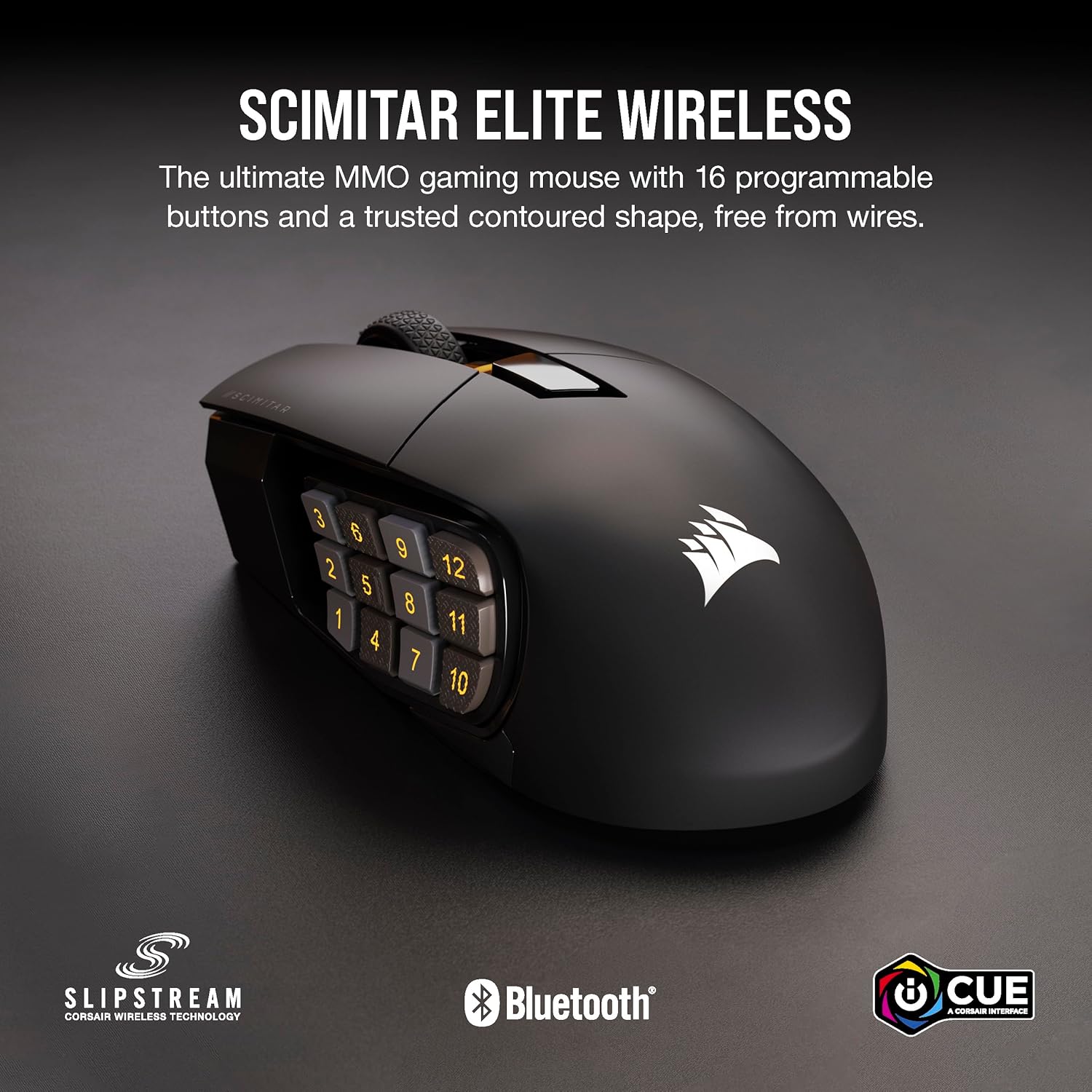
Forge your own path, without wires. The SCIMITAR ELITE WIRELESS MMO gaming mouse equips you with 16 fully programmable buttons, for the freedom to lead the raid, your way. The patented 12-button Key Slider™ side panel adjusts to fit your hand, so you can play without strain or fatigue. Enjoy reliable, sub-1ms connectivity via ultra-fast SLIPSTREAM WIRELESS, with 2,000Hz hyper-polling to game with nearly zero wireless lag. Alternatively, connect to a multitude of devices over Bluetooth®, or USB wired to charge while you play. You won’t need to plug in often, as the wireless battery lasts up to an astounding 150 hours on a single charge. For MMO gameplay, the SCIMITAR ELITE WIRELESS enables you to craft your legacy.
16 Programmable Buttons: Assign and perform every action and macro you need on 16 easy-to-reach, fully programmable buttons.
Adjustable For any Size Hand: Repositionable 12-button Key Slider puts all side panel buttons in the ideal spot for your thumb, and the mouse’s contoured shape greatly reduces strain while gaming.
Quick and Versatile Wireless: SLIPSTREAM WIRELESS offers a sub-1ms connection on PC or Mac with 2,000Hz hyper-polling, up to 2x faster than standard wireless mice. Alternatively connect via Bluetooth or USB to charge while you play.
Up to 150-Hour Wireless Battery with Fast Recharge: Play up to 150 hours,* raid after raid, on a single charge, and fully recharge in just 90 minutes or less. *via Bluetooth with backlighting off.
Ultra-Precise 26k DPI Optical Sensor: With a native 26,000 DPI, 650 IPS tracking, and up to 50G acceleration, the CORSAIR MARKSMAN optical sensor accurately captures even the smallest fast-twitch mouse movements.
Customers say
Customers praise the mouse’s programmable buttons and wireless connectivity, though some report connectivity issues. The battery life receives mixed feedback, with some finding it good while others report it failing after 6 months. Moreover, durability is a concern as the scroll wheel breaks within a few months, and functionality is poor, with buttons failing after 3 months of use. Additionally, the input lag receives mixed reviews, with some reporting no delay while others experience stuttering, and the scroll wheel often scrolls in the wrong direction.
10 reviews for CORSAIR SCIMITAR ELITE RGB WIRELESS MMO Gaming Mouse – 26,000 DPI – 16 Programmable Buttons – Up to 150hrs Battery – iCUE Compatible – Black
Add a review
Related Products


Original price was: €130.€111Current price is: €111.
DM –
Almost exactly the same as the Schimitar Pro in form and functionality, just wireless
ICUE DOES WORK -At the time of this writing there is only one other review posted and it says ICUE does not work. That it false. To be fair, the mouse did not register for me in ICUE at first, either. But the cause is fairly obvious. They are using an old version of ICUE… from before this mouse even existed. Literally all you need to do is update the software. I attached screenshots proving it shows up and works, along with what software revisions they are on right now. Yeah, that’s it… just update your software. There is a button in the corner.For the mouse itself, it is ALMOST identical to the old wired version. There are a few minor aesthetic downgrades. For some reason they removed the RGB in the mouse wheel, plus the light in front of the side buttons is gone too. Also, it has one less button on the top, behind the mouse wheel. The fit and feel is the same.I would certainly be happier without those random minor downgrades, but they are super minor and the upgrade of FINALLY having a wireless version of this mouse is 100% worth it. I love this mouse and have been on the lookout for a wireless version for years. It is the best MMO mouse, and now finally wireless.
Alex –
Exceptional Productivity Mouse for Engineering and CAD Users
I purchased the Corsair Scimitar mouse primarily for my engineering workflow, which heavily involves AutoCAD, Revit, and Bluebeam. After extensive daily use, I can confidently say it’s one of the best productivity enhancements I’ve added to my workstation.The mouse is ergonomically designed and fits comfortably in my hand, reducing strain during long drafting and design sessions. The adjustable thumb keypad is extremely beneficial, allowing me to quickly execute macros and shortcuts specific to AutoCAD and Revit commands. Tasks that previously required multiple keyboard inputs now happen seamlessly with a single thumb click, significantly boosting my productivity.The clicks are precise and have a satisfying tactile feedbackâcrisp without feeling harsh or fatiguing. The responsiveness makes precise selections in Revit or detailed markups in Bluebeam smooth and intuitive. The build quality feels solid, durable, and suitable for intensive, professional use.However, configuring the mouse through Corsairâs iCue software was initially a bit cumbersome. While visually polished, iCueâs learning curve is steeper than Logitechâs more straightforward alternatives. That said, once the setup is complete, the software works reliably, automatically switching profiles based on the active application, a feature I find particularly useful moving between CAD, PDF markups, and other software.Overall, despite the initial software hurdles, the Corsair Scimitar has become an essential part of my engineering workflow. It significantly reduces repetitive actions, saves time, and enhances my comfort during extended periods of technical work. Highly recommended for engineers, architects, and anyone whose daily tasks involve complex software shortcuts.
Trevor Herring –
Your scroll wheel WILL break eventally.
While I want to give this mouse a 5 start review their is a fatal flaw in its build quality that will come back and haunt you. Initially this mouse is great and will survive and perform great over several hours of game play. But after a bit of breaking in the scroll wheel will start scrolling the incorrect direction and taking erratic inputs. This is not something that can be fixed by software and is a hardware level issue. If this mouse didn’t have that issue it would be amazing but it looks like cost cutting ruined what would have been an amazing device. I would recommend avoiding this product unless you like gambling with your gaming equipment.
Joe –
Wireless version is alright so far, needs improvement
I’ve had the wireless version for about a week now and it’s noticeable that you need to press the left and right click with a bit more finger power compared to the wired version, I didn’t like it at first but by now I’ve gotten used to it.The battery life is great for long hours of gaming.I just wish that on the icue software it would show the percentage of battery life.I only use the usb wireless receiver when using the mouse and one problem that happens every few hours is that while in game, for a second the mouse cursor skips/blinks around where I’m trying to move the cursor.Not sure if that has to do with battery life but when I check icue for the battery status it’s good on charge.Hopefully updates fix this.Overall I’m happy with the wireless version so far.I’m hoping that the durability of the L + R clicks and mouse wheel will last much longer than the wired version.The wired version would usually last me about 6-8 months before they become barely usable.Update Oct 5 2023As of now, I returned the mouse and got it replaced, hoping that my mouse was defective because of the reoccurring mouse cursor problem where randomly the mouse cursor would spas out and not follow my movement. Bummer.This is still a problem with the new mouse I just got replaced.I will update this review again if a future software update fixes this problem.
EmiLaBella –
Smooth Glider
It works as it should. Glides smoothly on the desk, pairs easily, and it’s so comfortable! Durable for gaming. Click to your heart’s desire. The buttons on the side are great for some games that use them. I rarely charge it because the battery lasts a LONG time. I’m actually thinking about buying another one for work.
Hazael L. –
Se siente de buena calidad
abdelrahman farouk –
You cannot map buttons on bluetooth mode, only wired or with the wireless receiver inserted.
Mattias Alighieri –
Muy cómodo, buena calidad
Luis Pérez –
Primero tenÃa el alámbrico y se me daño el scroll, la primera vez pensé que fue mala suerte, luego me compre este y me paso lo mismo. Cabe mencionar que no la uso casi, como para que se me dañaran ambas.
Nathanael –
Definitely one of the better mice I’ve owned.