

Embrilliance StitchArtist Level 2 Digitizing Embroidery Software for MAC & PC
€369


Price: $369.00
(as of Sep 12, 2025 07:10:31 UTC – Details)
Product description
StitchArtist is a program for both PC and Mac to create or ‘digitize’ machine embroidery designs from scratch. You can start either by using existing artwork or by ‘drawing with stitches.’ You create and control the shapes, set the stitch types and properties, and StitchArtist generates stitches for you, outputting to a file your embroidery machine will understand.
We designed StitchArtist for ease-of-use and to make digitizing education simple. The process of design creation, commonly called ‘digitizing’, requires a skilled person using specialized software; StitchArtist is that software. Though it includes all the tools you need to digitize, it is designed to take as much difficulty out of learning the software as possible , leaving the user to concentrate on their designs and to become skilled without fighting with their tools.
In a radical departure from the typical digitizing interface, StitchArtist uses a single mode to draw shapes, set stitches, size, edit, rotate, sequence and set properties of design objects. It is easy and intuitive once you know the basics, which are described in detail in the included user guide.

StitchArtist 2: Professional Digitizing for Everyone
Create designs for machine embroidery with professional tools, easily.

Grow with your Skill Level
StitchArtist comes in three levels to suit different skills and needs; you can always purchase upgrades and move to the next level of skill and complexity as you learn.
Level 1 is designed for a hobby embroiderer who needs simple digitizing software able to create stitches without expensive software or complicated, time-consuming tools.
Level 2 is designed for production and skills training for those who would like to create more sophisticated embroidery designs including corporate logos, and offers a wider cross section of tools and stitch types that allow the creation of virtually any design.
Level 3 is meant for those who truly love to create designs or for digitizers working commercially in machine embroidery. It includes advanced tools for shape manipulation, a much wider set of stitch types, and tools that enhance both artistic interpretation and efficiency. SA3 has the most options for input and publishing, making it the choice for stock design creators and professionals.

How do you use StitchArtist?
Most users will begin by importing a background image of a design that they want to embroider. They will then create ‘objects’. These objects are the shapes that will be stitched in the design. Those who are familiar with any modern drawing tool will feel comfortable with StitchArtist as it uses a Bezier model of shaping; even so, StitchArtist also includes a ‘spline’ drawing mode that makes object creation easy, even for those who have never used drawing software. Shapes can also be imported from True Type fonts for digitizing and alteration.
Once you have created your shapes, you can apply stitch properties to each, and can alter their position and sequence, as well as any of your stitch settings at any time at the click of a button.
Easy Editing and Reworking
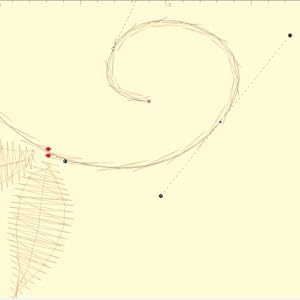
Editing outlines is a frequent task when creating designs. StitchArtist helps make this easier and more efficient with the following features:
Instant and automatic stitch generation for immediate viewing of the results of your edit.One mode for selection, editing, coloring, moving, sizing, rotating or adjusting properties.Multiple display modes that allow you to see your work in line art, stitches, and 3D preview and alter the visibility of your source art easily, no matter the process or mode you are working in.Simulated spline entry makes shape creation easy for users unfamiliar with Bezier making creation easier to teach, while SA allows editing with the precision of Bezier curves on items after they are generated.

Stitch Artist level 2 adds professional tools and control to your StitchArtist Suite
Create Sohpisticated Machine Embroidery
StitchArtist 2 is designed for production and skills training for those who would like to create more sophisticated embroidery designs like logos, including not a more complete set of digitizing tools, including tools familiar to users of embroidery software. It allows the user to learn a wide cross-section of embroidery stitch types and properties, and have enough freedom to control all aspects of each element to create virtually any design. If you are looking to use satin stitches to their fullest extent, StitchArtist 2 is for you.
Added stitch types include, Candlewicking / French Knot, Contour / Satin Contour, 3 & 5 Pass Whip Stitch, Satin Freestanding, Fringe, Curved / Curved Motif Fills, Gradient / Feathered Fills, and Gradient Motif Run.
Import Vector Art
Added to our our professional Bezier and Spline Point drawing tools is the ability to import .SVG vector art and even some cutting file formats (.FCM and .studio) for use as embroidery objects. Now you can start with existing vector art, modify your shapes for embroidery, and add stitch information.
Create Dimensional 3D Foam Embroidery with Ease
Included in StitchArtist level 2 is our automatic 3D Foam column underlay type, which automates the process of converting any suitable satin-stitch elements into 3D Foam embroidery with the click of a button! Add capping, connections, and set your density without the hassle of manually digitizing elements or tweaking settings.
Additional Tools Unlocked with StitchArtist 2 Incline (Stitch Angle) Controls True Bezier Shape Input A/B and Left/Right Satin Column Inputs Continuous Design Visualizer for borders and bands Sequence Mode for single click sequencing Motif stitch ‘scale on line’ decorative scaling Fill Stitch Embossing Many additional stitch types
Level 2 includes Level 1 functions without needing 2 programs. It is designed for production and skills training for those who would like to create more sophisticated designs (logos), as well as a more complete set of tools. It will allow the user to learn a wide cross-section of stitch types and properties, and have enough freedom to create virtually any design. If you are looking to use satins to their fullest extent, this is where you need to look.
Stand alone or combine the different Embrilliance Programs for the best in embroidery creation and editiing.
Runs natively on MAC and PC
Extensive instructional resources available via the official Embrilliance YouTube channel, the built in Help manual, and a community of engaged users online.
If you already own StitchArtist Level 1, you need to purchase StitchArtist Upgrade Level 1 to Level 2 rather than this complete version.
Compatible with current Windows and MacOS operating systems with free, downloadable updates and disk-free installers available.
User Reviews
Be the first to review “Embrilliance StitchArtist Level 2 Digitizing Embroidery Software for MAC & PC”
Related Products
![Express Accounts Accounting Software Free [PC Download]](https://m.media-amazon.com/images/I/81gNCZkcLpL._AC_SL1500_.jpg)
![PhotoPad Photo Editing and Image Editor Free [PC Download]](https://m.media-amazon.com/images/I/61OhD1HYizL._AC_SL1000_.jpg)


![LibreOffice v4.3 for PC [Open Source Download]](https://m.media-amazon.com/images/I/41uovfMTo7L._AC_.jpg)

€369
There are no reviews yet.