

GHome Smart Dimmer Switch Works with Alexa Google Home, Single Pole 2.4GHz Wi-Fi Switch for Dimmable LED CFL INC Light Bulbs, Neutral Wire Required, Not 3 Way, No Hub Required, 4Pack
€59




Price: $58.99
(as of Aug 14, 2025 19:12:51 UTC – Details)
From the brand


GHome started as a vision to create a world where environmental preservation and home automation could unite. GHome offers devices that provide convenience to people in their daily lives while also helping them reduce their carbon footprint. With a focus on environmental sustainability and comfortable living, GHome is committed to manufacturing smart home products using low-carbon materials and following sustainable practices.
Top Sales
Smart Plugs
Smart Switches
Plugs and Switches
Smart Bulbs
Product Dimensions : 4.72 x 2.76 x 1.42 inches; 1.43 Pounds
Item model number : KG2-4
Date First Available : November 11, 2021
Manufacturer : GHome
ASIN : B09LLY51DL
Best Sellers Rank: #17,326 in Tools & Home Improvement (See Top 100 in Tools & Home Improvement) #67 in Electrical Light Switches
Customer Reviews: 4.3 4.3 out of 5 stars 1,865 ratings var dpAcrHasRegisteredArcLinkClickAction; P.when(‘A’, ‘ready’).execute(function(A) { if (dpAcrHasRegisteredArcLinkClickAction !== true) { dpAcrHasRegisteredArcLinkClickAction = true; A.declarative( ‘acrLink-click-metrics’, ‘click’, { “allowLinkDefault”: true }, function (event) { if (window.ue) { ue.count(“acrLinkClickCount”, (ue.count(“acrLinkClickCount”) || 0) + 1); } } ); } }); P.when(‘A’, ‘cf’).execute(function(A) { A.declarative(‘acrStarsLink-click-metrics’, ‘click’, { “allowLinkDefault” : true }, function(event){ if(window.ue) { ue.count(“acrStarsLinkWithPopoverClickCount”, (ue.count(“acrStarsLinkWithPopoverClickCount”) || 0) + 1); } }); });
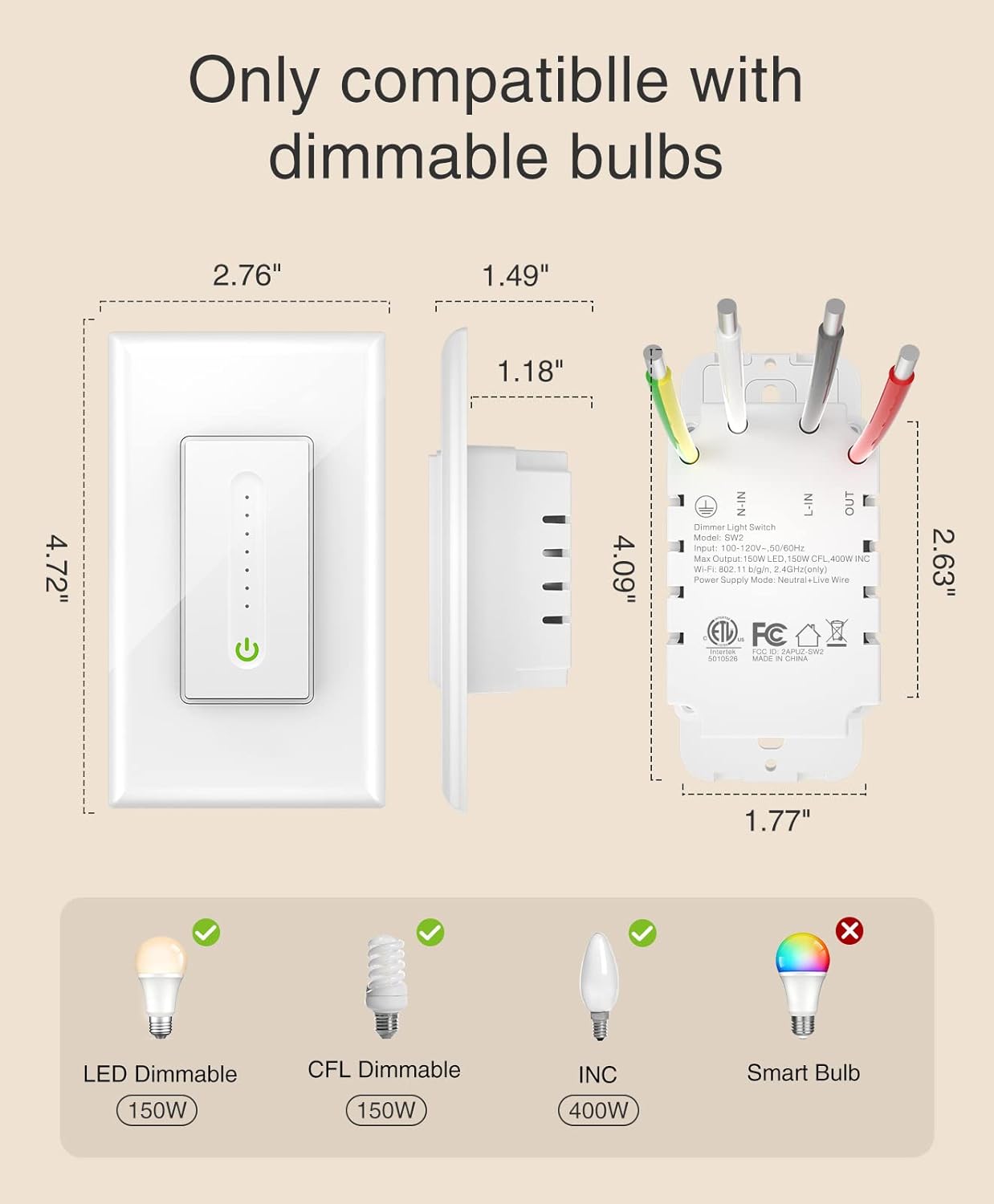
【Easy to Install】Neutral wire required. GHome’s smart dimmer switch requires 2.4GHz Wi-Fi connection, no separate hub required. Input: 120V~ 60Hz; Output: 120V~ 60Hz, 4A Max. Supports dimmable bulbs up to 480W.
【1% – 100% Dimming with schedule】Equipped with a sensitive touch interface, just slide your finger to adjust the brightness, and tap button to turn on/off. Set schedules to turn on when arriving home and come on automatically when it is dark.
【 Voice Control】Works with Amazon Alexa and Google Assistant, so you can control your light using simple voice commands. Enjoy hands-free moments when your hands are full. Note: Not compatible with smart light bulbs.
【APP Romote Control 】Using the APP to light up your house anywthere anytime. You can also view the light status on the app and control them romotely. Set the on/off schedule or default to sunrise/sunset.
【Dimensions】UL and FCC certified, 2-pack single-pole smart dimmer switch (not 3-way) measures 120mm*70mm*41.3mm (H*W*D). Note: Before using a CFL or LED bulb, please confirm if the bulb is dimmable.
Customers say
Customers find the smart switch easy to install and use, with good value for money and an appealing appearance. The functionality receives mixed feedback – while it works well with Google Home and the SmartLife app, some report units failing within 6 months. The dimming ability and connectivity also get mixed reviews, with some finding it perfect while others note it doesn’t dim smoothly and experiences connection drops. The quality receives mixed opinions, with some praising its reliability while others report poor quality.
10 reviews for GHome Smart Dimmer Switch Works with Alexa Google Home, Single Pole 2.4GHz Wi-Fi Switch for Dimmable LED CFL INC Light Bulbs, Neutral Wire Required, Not 3 Way, No Hub Required, 4Pack
Add a review
Related Products


€59
TeeJayN –
Easy to install – work great – a good value
I was looking to add 2 more Smart Switches to my existing Smart Network and I needed them to work with the SmartLife app. These GHome Smart Switches connected near instantly with the SmartLife app and now work with Alexa as well. These Switches also have a high current rating (15 A) and coupled with a nice price make them a great deal.
Squeaky Dino –
Works reliably, phone app finds it every time
I used this dimmer switch to replace the unreliable Wemo dimmer switch. The Wemo often got “lost” in my phone so I couldn’t use my iPhone to control it. Then the next day the device would be found again, with no changes on my part. This Gosund is always found in my phone, it just takes a moment to come up.The app includes a slider to set the brightness level. The brightness level is remembered between uses.Something that MIGHT have made the Gosund so reliable, is noting the instructions for what sort of WiFi connection to provide. My boyfriend changed something about my WiFi to make a better connection to the Gosund.Trying to solve the problems with the Wemo on the other hand, clarified that there is very little to ZERO tech support for the Wemo. Early in its life I was able to talk to a tech support person about the lack of connectivity, but the solution never lasted. As of a couple of years ago when I gave up on the Wemo, there was NO tech support.One thing about the Gosund, over the last several months the app has started displaying ads. That’s annoying, for a product I did pay money for. However it’s pretty easy to dismiss the ads and there’s only just one ad at the time I open the app.
JeffLearman –
Great switches, but tricky to set up on some 5G networks. Great value.
I have lots of Gosund smart plugs and have had no problems with them, so I didn’t hesitate to get Gosund smart switches.I had one issue: my router has both 5G and 2.4G networks, but both have the same wifi name, and I can’t directly control which speed my phone uses when it connects: it always picks 5G if I’m close enough to my router. However, these devices only work if your phone is connected to the 2.4G network. The instructions explain how to give your 5G and 2.4G networks different names, but that’s old-school; things have gotten better these days.The good news is, there’s a workaround (and it’s sad that the instructions don’t mention this.) I had to pair the devices at the end of an extension cord, outside my house. I brought up my (Android) phone’s wifi settings and clicked on my network name, which showed the current status (5G vs 2.4G, and signal strength, etc.) I found a place where the connection went from 5G to 2.4G, and walked a bit farther in that direction.I put a wire nut on the switch’s red wire and plugged the black and white wires into the extension cord, watching the LED on the switch to make sure it was connected. I then followed the instructions.I believe it would have worked fine to install the switches first, and then just walk with my phone out to the same spot (no extension cord.) But I wanted to make sure they’d work before wiring them in. Plus it’s helpful (though not necessary) to be nearby so I can see the LEDs during the process.Once paired, there is no need for my phone to be on the 2.4G network, and after installation, everything works perfectly. Integration with Google Home is easy; once you give the permissions between Google and the Smart Life app, any Smart Life devices automatically appear in Google Home. (The only problem with the Smart Life app is that it does NOT provide a way to move a device to a new home: you have to delete it and add it again. That was a nuisance when I moved. In the future I won’t be using the “home” features of Smart Life. But this is not Gosund’s fault, and it’s not really a problem because I can use the Google app’s features for which device is in which home.)I have other smart devices that don’t need my phone to be on a 2.4G network, and that saves a bit of trouble, so while I like Gosund products, I doubt I’ll be buying more of these particular switches.
Amazon Customer –
It works.
Devices work as intended. However, setup was a little challenging even thought the instructions make it look as easy as 1,2,3 and it wasn’t. The great part is that customer service is very helpful and everything in the end was great. I’m happy to have purchased these devices.Notes: 1. Make sure when connecting these devices thru your smart phone, that your smart phone is connected to the same WIFI you want to connect the light switches to. I have multiple WIFI’s and that was a time consuming issue to figure out.2. When using the Gosund app to connect your switches, every time i tried to connect, the app said it wasn’t successful and it times out. This is is not true, even though the app times out, I learned that the switches were connected regardless of this error. This wasted a lot of my time of trying to reconnect my switches when they were already connected.3. When connecting these switches to Google Home, make sure you label the switches correctly, and I found that connecting one switch at a time works best instead of waiting for all of the switch to be active online at one time.
R. SHIOTA –
2 time purchase for these very versatile switches.
Got these new updated versions as we got only one prior. Now we have an extra and we have 3 lights we can control. The app works super easy after installing. Dimming and off/on options. Timer and remote access too. Set up to wifi was easy and they look great. Really great value with this purchase option. Note the light setting when off and the lowest on or off on the switch.
Daniel Carson –
Even if this wasnât a smart switch it would still be in the Top 5 easiest electrical switches Iâve ever installed in a home. I ended up cutting the ground wire off the old dimmer which was junk anyway to save myself a heck of a lot of time.When I do a full power off of the light switch the top kinda sticks and I have to put my finger on the top of the switch to wiggle it slightly. This is no doubt from the lack of room in the junction box from where I sloppily jammed all the wires back in (the switch itself is very short and a normal person should have way more room than me in the junction box) I just donât feel like taking it apart since the switch will only be used by me and Iâm mostly going to control the lights with my Google Assistant and my Home Theatre PC setup (which dims the lights when I start a movie)
Del J. H. –
Easy hookup. Requires quite a bit of room in the box just like all wifi switches
Vanessa ~ –
So far, I have installed two of the switches. Very reliable switches. They work very well, and the app control is user-friendly with different formats of control. I would like to buy more but I discovered the seller crazily increased the price by over 250% to $100. Then, I totally don’t think it worths that new price.
Shawn Hoskins –
Nice way to control everything on your phone
Tim –
They work good but one already had an issue and i had to turn off power to it and reset / reprogram.