

Redragon K530 Pro Draconic 60% Wireless RGB Mechanical Keyboard, BT/2.4Ghz/Wired 3-Mode 61 Keys Compact Gaming Keyboard w/Hot-Swap Socket, Free-Mod Plate Mounted PCB & Linear Red Switch
€50


Price: $49.99
(as of Sep 20, 2025 18:18:30 UTC – Details)
From the brand

BIG SAVE
NEW ARRIVED GEAR
Gaming Keyboard
Gaming Mice
Audio Gear
Gaming Setup

Redragon H848 Headset
Weighs only 178g (6.2 oz)
Comfortable to wear all day long!
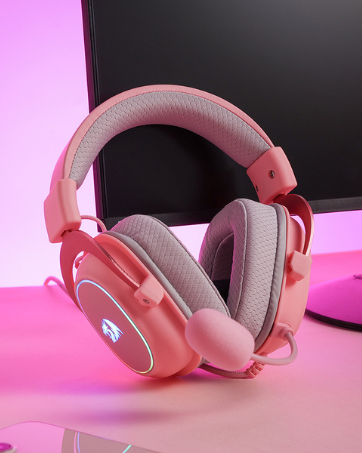
Redragon H510 RGB Series
Pink! Yes, that is PINK available now, cute & hot.
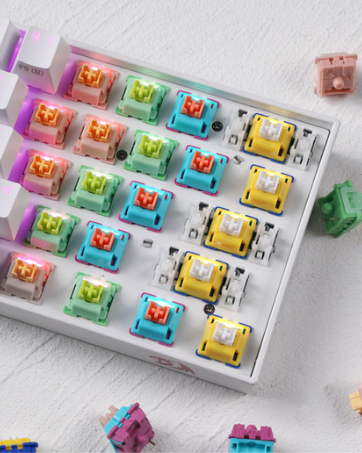
Redragon Custom Switches
6 Types Available for Any Keyboard Moding
Tactile, Linear, Silent, We Got What You Want
Upgraded K530 PRO – Function Upgraded YES✔, Price Increased NO✗, that is the ultimate brand-new K530 Draconic PRO. New 3 modes connection, 61 keys fully hot-swappable PCB plus original compact 60% layout. This time, you will not regret having one, the wait is over.
YES! TRUE HOT-SWAP – The transformative innovation with 99.8%+ switches compatible free-mod hot swappable Redragon keyboard is available now. The unique exclusive structure design of the socket makes the switch mounting easier and less wobbling.
3-Mode Connection – Geared with Redragon innovative tri-mode connection technology, USB-C wired, BT 3.0/5.0 & 2.4Ghz wireless modes which make the user experience upgraded to another level in all fields.
Wireless Made Easy – Built-in upgraded 3.0/5.0 BT and 2.4Ghz wireless chips, K530 Pro offers a real-wireless and no-latency connection for all devices. Easy to toggle among 3 different wireless devices via side switch (2.4Ghz/BT1/BT2).
Hot-Swappable Red Switches – Hot-swappable with almost all switch types in the market no matter 3-pin or 5-pin. Quiet basic linear mechanical switches, soft key travel makes every click easy to register. Easy to mod or update it with your wishing preference, no forum researching required.
Dedicated for FPS Gamer – Place the keyboard proper straight on your desktop and no more crooked way for mouse space saving, your mouse will never hit the keyboard any more. Enjoy waving the mouse without any worries and go get that Team Kills.
RGB Illumination Builder – Dynamic 13 presets illumination modes are free to choose by the keyboard itself. Millions of color options and reactive typing effects make you the designer of your ultimate gear with a pro driver.
Ultimate 60% Wireless Keyboard w/ brand new upgraded software/drive. Get the download link below the product detail description or visit Redragonshop software page (K530-PRO) to dive into the completely endless customization joy.
Customers say
Customers find this keyboard to be a fantastic mid-tier mechanical keyboard with bright RGB colors and solid build quality, offering excellent value for the money. The Bluetooth connectivity and functionality receive mixed reviews – while some praise the Bluetooth connection, others report connectivity issues, and while some say it works well, others mention it stops working properly. The switch options and sound quality also get mixed feedback, with some appreciating the switch options while others find them confusing, and while some find the sound pleasant, others describe it as annoying.
8 reviews for Redragon K530 Pro Draconic 60% Wireless RGB Mechanical Keyboard, BT/2.4Ghz/Wired 3-Mode 61 Keys Compact Gaming Keyboard w/Hot-Swap Socket, Free-Mod Plate Mounted PCB & Linear Red Switch
Add a review
Related Products




€50
Randall Eaves –
What You Expect from High End Gaming Gear without the High End Price.
TL:DR If you are looking for a 60% keyboard this is it: now on to full review.Were to start:Picked this little keyboard up to test it out see why everyone raves over 60% keyboards, out of the box I noticed the quality of the product, the same types of keyboards you see going to 100+ dollars from other companies, for cheaper and better. The 3 channel selection is an amazing feature I didnt think I would want but found it very cool to connect with 3 different bluetooth devices and have them connect and able to swap at anytime.A downside is the usb charge/connection cable is shorter than I would have liked since my setup isnt close enough to use it without an extender. However thats a situation based about my gaming setup not a fault of Redragon. (I dont dock any points off my score for this as I though it was funny and doesnt change the way the keyboard works but a small manufacture defect happend that ended up with the W and A keys being printed incorrectly with the Arrows for the left,and up arrow keys (again this doesnt effect performance and I just got a chuckle and wrote it of as I got a very different keyboard than probably most will) The lighting effects on the RGB are similar to their other products using their software to cycle through lighting options, the rgb is clear and bright enough without having hot spots that accent the keyboard perfectly. The Keys are brown switches meaning you get a softer distinct click than with say blue switches so if noisey keys bother you, these surely wont and they are very very responsive.Gameplay- On and off the connection cable response time was the exact same, I play games such as R6:Siege and even things like stardew valley and such, I didnt see a difference at all in response time with it on bluetooth or plugged in, meaning it was just as responsive on bluetooth as it was plugged directly into the pc which is amazing no delay just gaming and again for the price…you cant beat that.Typing: now if you are use to small keyboards typing is fine, however I typically game on a full keyboard with a numpad aswell so it took some time for me to get use to the smaller layout of the keys however thats a personal thing.Look I could go into every little detail that makes this keyboard awesome but, Just take my word for it, you buy it you wont regret it.
B. Yamamoto –
AWESOME mech keyboard.
I’m really pleased with this keyboard.Some highlights:Switches: Comes with brown switches. It also comes with additional switches you can try out (black, red, blue and an extra brown switch, 1 each). I initially was going to go with a keyboard that had blue switches but after swapping out my spacebar to a blue switch, I had to change it back immediately. The brown switches are a nice happy medium between the red and blue, it all comes down to preference – gamers typically prefer red or brown, blue switches have that kind of high pitched click that some people find satisfying to type on. If you’re unfamiliar with key switches, I would suggest researching them a little to see what you think you’d prefer. The key switches are really only compatible with Outemu switches. I’ve watched multiple reviews on YT and people have tried swapping out for switches like Cherry MX (the “gold standard”) and they did not fit. This keyboard is great for gaming. The brown switches are a nice balance for gaming and typing.Size: It is nice and compact and takes up very little space for a keyboard (obviously, it’s a 60%, ten keyless design) and it gives me a lot more real estate on my desk.RGB: Tons of RGB pattern options that can be programmed straight from the keyboard without using software. RGB has 5 levels of brightness and can be nice and bright.Quality: The build quality feels very solid and durable. For being a budget keyboard, it feels premium.Connectivity: Can be used wired or wireless.Battery life: Used it quite a bit for about 3 days and when I plugged it in, it indicated it was still fully charged so I expect the battery life to be excellent.Complaints: Only gripe is that the caps lock is the only key that does not light up unless the caps lock is activated or if you hit a limit when adjusting brightness of the RGB lights (adjust brightness with Fn2 + [+], the caps lock button will flash red a few times when maxed out). Would prefer if it lit up along with all the other keys during the RGB patterns and maybe stay lit red when caps lock is activated. Wish it had some media controls like skip back/forward, play/pause, volume up/down. Not really a complaint but it takes me a second to use the arrow keys (Fn or hold caps lock + W, A, S or D) because I’ve always used a full layout. Just something to get used to.I combined this keyboard with the Red Dragon M808 Storm gaming mouse, NPET MP02-SP RGB mouse pad and it looks awesome. Would definitely buy again and recommend to gamers and non-gamers alike.
Joseph –
Great Budget Keyboard
Keyboard quality:Really great Keyboard. I have more room on my setup and the keyboard comes with a wire connection, bluetooth chip, and bluetooth regularly. Various background colors and sets. Amazing product
m newnham –
This is a nice, solid keyboard, I’m using it to type this review. the solidity means it does not wander on my desk while typing.I bought it as I had a very small portable desk that this fitted very well.There are a couple of things that I personally don’t like – I use excel a lot and miss dedicated arrow keys. There is a key combination but not quite as convenient (then again this is a 60% keyboard, so should not be surprised), and the other is that the keys are printed in US layout so some symbols are not right on the keys. It is set up on my PC as UK so the symbols are where I expect them but not shown on the keys themselves.The keyboard itself is very nice to use, responsive, connects easily via bluetooth and has a reasonable battery life even with the RGB running
Manuel Sebastian Blanco –
Es comodo para trabajar y jugar una vez que se aprende a usar.
Sami babs –
Love it
Chandru S –
I’m a Mac user, and I was considering buying a Magic Keyboard. However, some of my Windows friends use mechanical keyboards with red switches, which piqued my interest in trying out mechanical keyboards. After doing some research on the internet, I ended up purchasing the K30 Pro Draconic. I had several considerations in mind while choosing the keyboard:It should be wireless, specifically Bluetooth-enabled, to accommodate my MacBook with only two Type-C ports.It should have a small footprint to fit my compact computer table.I wanted a keyboard with customization options, particularly a hot-swappable one, to allow for future key or switch swaps.Initial Impression:The K30 Pro feels substantial and doesn’t feel cheap. The clacky noise is minimal at stock. Typing with the brown switches provides a satisfying tactile feel with minimal noise, akin to red switches.Experiences After Use:Initially, transitioning from the MacBook keyboard to this mechanical keyboard was challenging. However, after typing around a hundred words, I noticed a speed improvement, although accuracy is still not optimal. I may update this after using it for a month.Connection:I connected the keyboard via Bluetooth and didn’t experience any latency issues, contrary to some reviews I read. Even as I’m typing now, the experience feels smooth.RGB:Although I’m not a fan of RGB lighting, for enthusiasts, the keyboard allows programming the color of individual keys without software. The provided software, although requiring Windows, serves its purpose well. The lighting is neither too dim nor too bright.Overall Experience:So far, the keyboard and switches have met my expectations. I’m pleased with the brown switches as they provide a tactile feel without excessive noise. I look forward to customizing the keyboard with new keycaps.Cons:However, the keyboard is not without its flaws. The keycaps feel too close together, which may be resolved by changing the keycaps or getting used to them over time. Additionally, the lack of dedicated arrow keys is inconvenient, requiring the use of function keys, which can be challenging at times.Some users may find their fingers hurting after extended typing sessions, and the absence of a wrist pad may contribute to discomfort. I suggest investing in a wrist pad or creating one inexpensively if needed.In conclusion, I would strongly recommend this keyboard to anyone who types extensively, especially coders
Agustin Tellez –
Es la primera vez que tengo un teclado inalámbrico y es muy bonito en el color blanco muy elegante. Lo que más me gusta es que si no lo usas se suspende automáticamente en luz, pero no se desconecta.No lo uso para jugar solo para escribir lo recomiendo mucho hasta hoy no me ah dado fallas.