

Smart Electric Kettle APP Control, Korex Glass Water Boiler Included Filter Suitable for Alexa Google Home Assistant 1.7 L BPA FREE Great for Coffee Tea Milk With Overheat Protection Controlled
€75


Price: $74.99
(as of Aug 04, 2025 18:23:19 UTC – Details)
Product Description


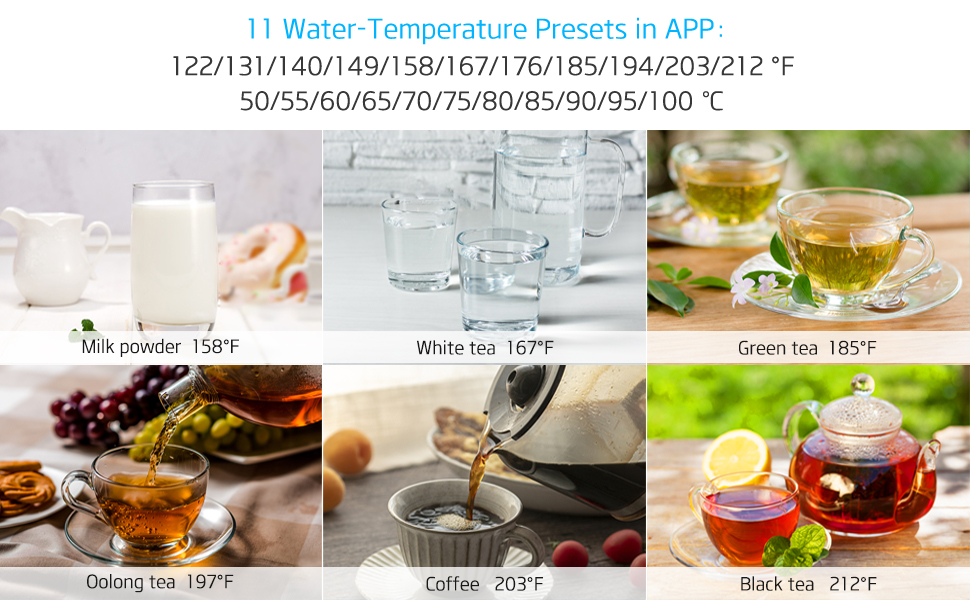
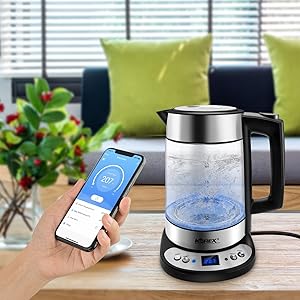
Remote control kettle by your smartphone.
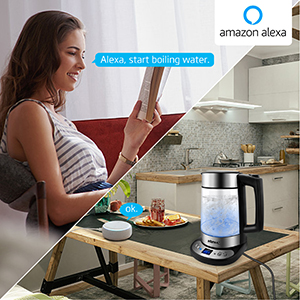
Voice control Turn on / off by Alexa.

Voice control Turn on / off by Google Home.

Suitable for ALEXA and Google Home.You can control kettle by ALEXA / Google Home(Assistant). Note: Except the ” Turn on / off” Alexa /Google Home Voice CANNOT control variable temperature or other functions.
Download and install “Smartlife” APP, add “Kitchen Appliances – Smart Kettle “Wi-Fi” in the list of devices – Operate your remote control kettle via smart device ( iOS and Android ) with a downloadable APP from APP store or Googleplay.
ETL certificated. 100% Food Grade Material: Comes with food grade material, tea kettle is perfect for anyone who is looking for a water kettle glass without any non-food grade material contacting the water.Safety Auto-Off&Boil-Dry Protection: Feel safe to leave the kettle alone. The Kettle will automatically shut off once the water has reached the selected temperature. When the water is nearly dry-out, the glass tea kettle will protect against overheating and switch off automatically.
360 Degree Swivel Base: Conveniently lift the cordless glass water kettle from the base and set it down from every angle.
Worry Free: Clear instruction, consists of a user manual, worry-free 12-Months Warranty, hospitable after-sales service.
8 reviews for Smart Electric Kettle APP Control, Korex Glass Water Boiler Included Filter Suitable for Alexa Google Home Assistant 1.7 L BPA FREE Great for Coffee Tea Milk With Overheat Protection Controlled
Add a review
Related Products




€75
Dana –
Programmable kettle for those early mornings.
I was hoping to find a programmable kettle for a quite a long time, this is the best thing early in the morning. No waiting for my water to heat up. I can have my French press so much faster when I am bleary eyed at 5 am.The first one I received would not pair with the app at all, we tried many times. I did an exchange which was incredibly easy and no hassle, the new kettle synched to the app instantly. I am loving this kettle, I can have Alexa turn in on with a voice command. My favorite purchase in a long time!
Good and easy to use –
Disappointed after just one year of use
At first, this kettle seemed great â stylish and convenient. Weâve been using it for about a year, not even heavily, and suddenly it just stopped working. It boiled water in the morning, but by the afternoon, it wouldnât heat up at all.I tried resetting the system and controlling it through the app, but nothing worked.Really disappointed that I have to replace it after only a year. Next time, Iâll definitely choose a different brand.
chuckc –
Update: Stopped working after 11 months but promptly replaced
Update: I bought this in Jan 2023. End of November (just before the 12 month return expiration), the heating element stopped working. Seller was very prompt in handling my request. Got a replacement unit today. My original rating was 5 stars, I lowered it to 4 stars after the device failed. Still like the unit and hoping this replacement unit lasts longer. Original post is below.I was going to give a 4 star review because of some quirky issues with the operation. But those issues appear to have been fixed.Setup: this was painful. The only feedback that the base unit provides during the network connection process is a blinking light. This isn’t enough to tell you what is going on. Like most IoT devices, this unit needs the old / slow 2.4Ghz network to connect to. Almost all home routers have both 2.4 Ghz and 5Ghz. But note that during the setup, you need to make sure your phone is connected to the 2.4 Ghz network on your router. I had a lot of trouble getting the connection to take. At one point, the fast-blink light on the base turned steady (meaning that the base unit had connected to a network), but it wasn’t connected to MY network. Not sure where it connected, or how, or why. After much fooling around, I finally figured out that pressing both the POWER button and the PROG button at the same time would reset the network connection on the base and it would let me try again (this is not explained in the manual). After several attempts, I finally got it to connect.One of the quirky issues was turning on the pot and setting it to hold a temperature of 203F (which is the recommended temperature for pour-over coffee brewing). The base unit and remote were very picky about the sequence that the buttons had to be pushed to make this work. But this now has been fixed and is more intuitive. Also, there was an issue when you turned off the pot from the base, it would not update the remote app on your phone, so the phone showed the pot as being on when it wasn’t. This has also been fixed.The base unit has a 3 digit display that will tell you the current temperature of the pot. It also has a very bright blue LED to tell you that it is connected to the network. The base unit will also will beep at you when it reaches the target hold-temperature, as well as alert your phone when it reaches the target temperature. This is a red blinking light on the base when the pot is at hold temperature.I am using the Smart-Life app as recommended by the manufacturer. This gives you more control over the functions than the Alexa or Google apps do. The Smart-Life app shows the current temperature, lets you turn the pot on or off, and set the hold temp. You can even have Smart-Life work with Siri. So I can say to Siri “Boil water”, and it will turn the pot on.So far, I am completely satisfied with this purchase and easily recommend it.
ULA –
Programmable temperature
It’s nice to have warm water ready in the morning before heading to work and the ability to power on remotely is a great feature of the electric kettle. The glass kettle gives it a high quality feel and beautiful led light illuminates inside looks really nice
Shaz –
Alexa thinks this is a thermostat
Alexa thinks this is a thermostat and it messes with my thermostat settings whenever I tell her to set my thermostat temperature. How can I fix this?
A guy who buys –
I hate this kettle more and more every time I use it.
There are things that over looked when I first bought this kettle that have become unbearable. Number 4 will shock you!1) No keep warm button on the unit. You have to use your phone to turn on the keep it warm function.2) The base does not tell you the temp of the water unless it is on. Doesnât seem like a big deal except that when itâs on it keeps going to a boil because there is no keep warm button and the UI is crap.3) It only has preset temps. For example, I canât set my kettle to 190f only185f or 194f. Not a huge difference, unless I want my water to be 190f.4) It does kinda work with Google or Siri, but I can only turn it on or off. But does it heat to their patented not-exact-but-close-enough temp and stay warm (as it is programmed)? Absolutely not. It doesnât use any of the programmed settings when activated by your smart home assistant. So, even though I can turn it on by saying âHey Googleâ, I still get to use my phone to set it to the closest temp and keep it warm. Usually it has turned off and cooled by the time I scrape myself out of bed and am ready to make my coffee.5) The app is garbage. Half the time I canât even set the temperature because the button doesnât work.6) It pours like an outdoor garden hose spigot.I know these complaints make me sound like a punk b*tch who canât get past my first world problems, but I really hate this kettle. And by the way, what company even makes this product? Try searching it online. I cannot find a customer support, live chat, or even store front.What do I like about this Kettle? Itâs big.
Erin –
Research before buy
Can’t get it to connect to the app or the provider for Bluetooth also I filled it not near the max line and it boiled over and out the pot so be careful bc if u want hot water all over your counter then this is not for u other than that I do use it with half water with the coffee in it and it makes good cooffee still working out the whole kinks on this bc I normally use a kettle where u boil the water wait and then use a fresh press
Daksha Bhasker –
The Alexa enabled kettle has arrived!
Super pleased to finally have an Alexa enabled kettle. I can get Alexa to turn on the kettle from bed in the mornings and then walk over to a nice hot kettle and pour myself a cup of coffee. Setting up the kettle with wifi and the smartlife all was a synch, 30 seconds at best. It look some back and forth with Alexa support to get the kettle hooked up to Alexa.I waited a long time for a product like this. So far so good. Recommend it!