

SmartSee Anycast HD Wireless Display Adapter WiFi 1080P Mobile Screen Mirroring Receiver Dongle for iPhone Mac iOS Android to TV Projector Support Miracast Airplay DLNA
€20


Price: $19.98
(as of Jul 26, 2025 19:01:34 UTC – Details)
Product Description

Anycast M2 Wireless HD Display Receiver
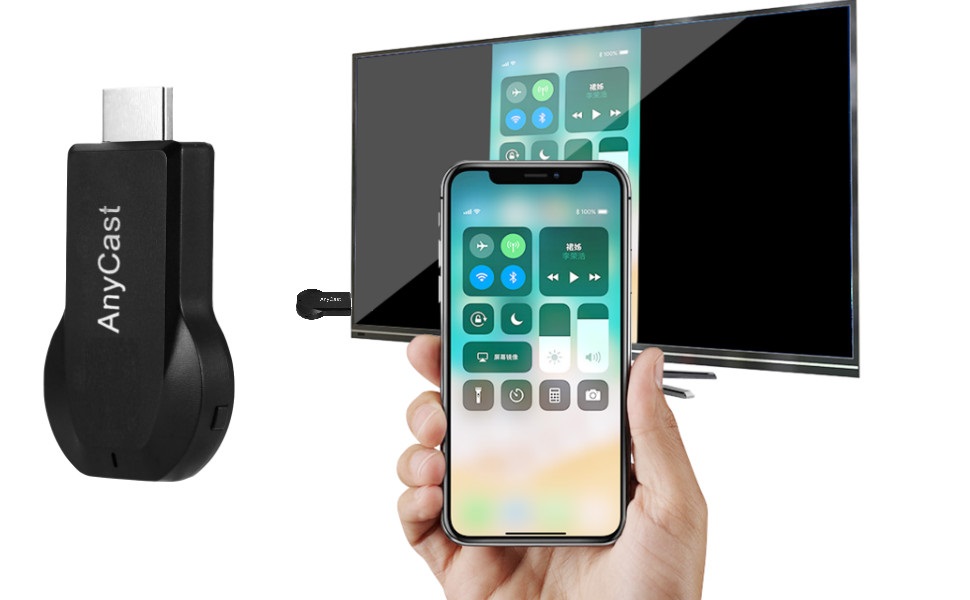
Turn your HDTV into a smart TV with SmartSee Wireless display adapter.
Anycast dongle – Mirror a small screen to a large screen wirelessly.
What is an HD Wireless Display Adapter?
An HD Wireless Display Adapter is to cast what you see on your mobile device(smartphone/tablet) to another big screen(TV/monitor/projector).
Please Note:
A souce screen must be Airplay supported, or Miracast supported. Such as iOS and Mac OS devices are Airplay supported devices. Most Android devices and Windows devices are Miracast supported devices.
A target screen must be HD equipped, such as TV, projector, monitor etc.
Do I need this item?
Yes, everywhere.
At home: you can mirror your phone/tablet to your TV, no need to stare at the phone alone, watch TV together and free your hands.
At hotel: Setting the TV or TV box is a little troublesome? Just mirror your mobile device to TV or projector by using this item.
In a meeting room: No need other cables, just connect this item to mirror your tablet pc on your projector wirelessly.
In a classroom: Share your content of courses on big screen wirelessly.
Installation of Anycast Dongle on an HD display(TV/Projector/Monitor,etc):

Plug Ancyast dongle into your hd display
Plug AnyCast dongle into HD port on TV and switch TV to the right input source.

Plug USB cable for power supply
Connect WiFi cable (micro USB head) to AnyCast dongle. Plug USB cable into an external USB power adapter(power adapter is not inculded).

Anycast connected successfully
After connection, switch display to selected channel, and AnyCast page shows up on your display.
Connection Anycast Dongle with iOS Devices
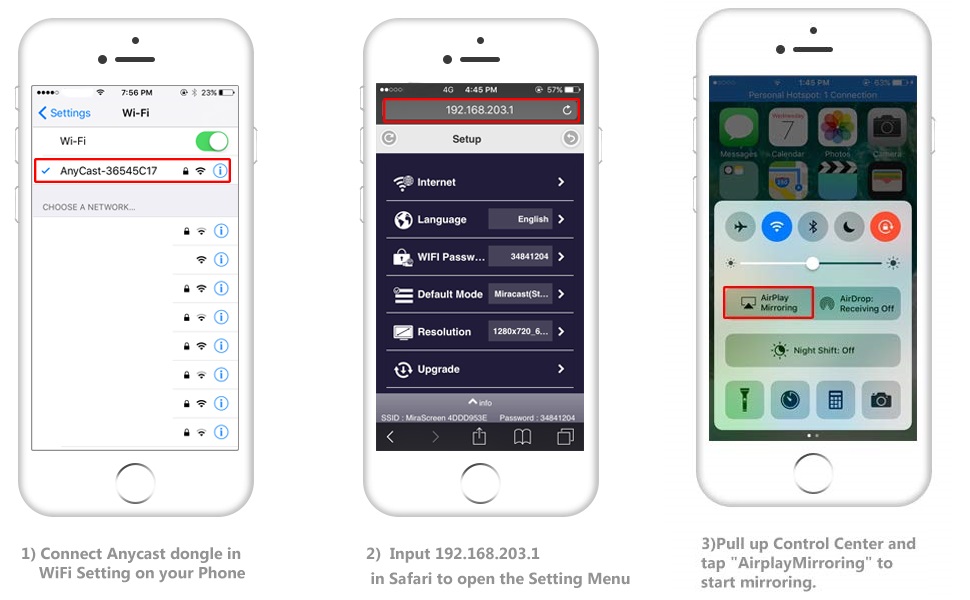
Setup on your iPhone/iPad/Mac
Step 1. Connect AnyCast SSID in WiFi Setting on your iPhone/ iPad/ Mac
Step 2. Go to Safari and input 192.168.203.1 to come to the setting menu
Note: In setting menu, you can connect your home wifi here by clicking “Internet” and Choosing your home Wifi to connect. Once connected, no need to reconnect again. Also, language , Anycast password, and Resolution can be changed by yourself in setting page.
Step 3. Pull up the Control Center on iPhone and go to Airplay mirroring, and select AnyCast dongle to start to mirror.
Please note while use:
1. Once the Anycast dongle connects to your WiFi network successfully, your WiFi name shows up on the right top of your TV.
2. Once the Anycast dongle connects to your WiFi network successfully, the IP address 192.168.203.1 goes invalid, this generates a new IP address on your TV to access the Anycast setup page if needed.
3. Once the Anycast dongle and your phone are connected to the same WiFi network, do Screen Mirroring directly for next use, no need to other connection.
MOST IMPORTANT: If you dont have WiFi network, Please skip the Step 2, only do the Step 1 and Step 3 above. In this way, you use Cellular Data to access the Internet.
Connection Anycast Dongle with Android Devices
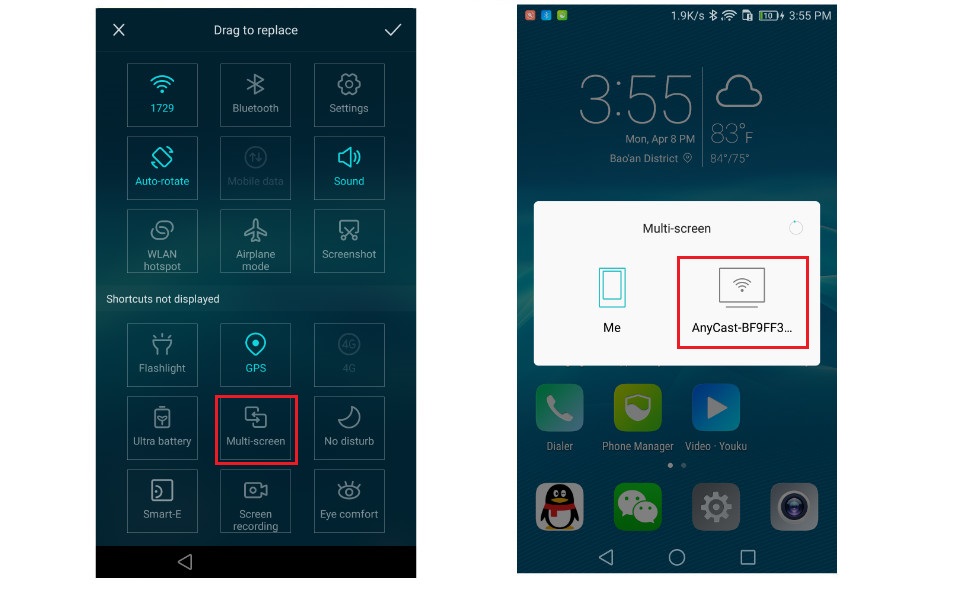
Setup on your Android device
Step 1. Press the button on the dongle to switch to Android mode
Step 2. Find Miracast(wireless display/smartview/play to etc) on your Android device, and pair with Anycast to start mirror.
Note: if you are not sure about Miracast, you can download our EZMira app to pair with Anycast dongle to mirror directly.
To access the setting menu of Anycast dongle:
1. Connect AnyCast in WiFi Setting on your device
2. Go to a browser and input 192.168.203.1 on the very top searching bar to come to the setting menu, you can set all setting of Anycast here.
Please note for Android Users:
1. Miracast protocol has different names on different Android devices, please find your Miracast protocol correctly.
2. Not all Android devices support Miracast protocol, please check whether your phone supports Miracast protocol or not.
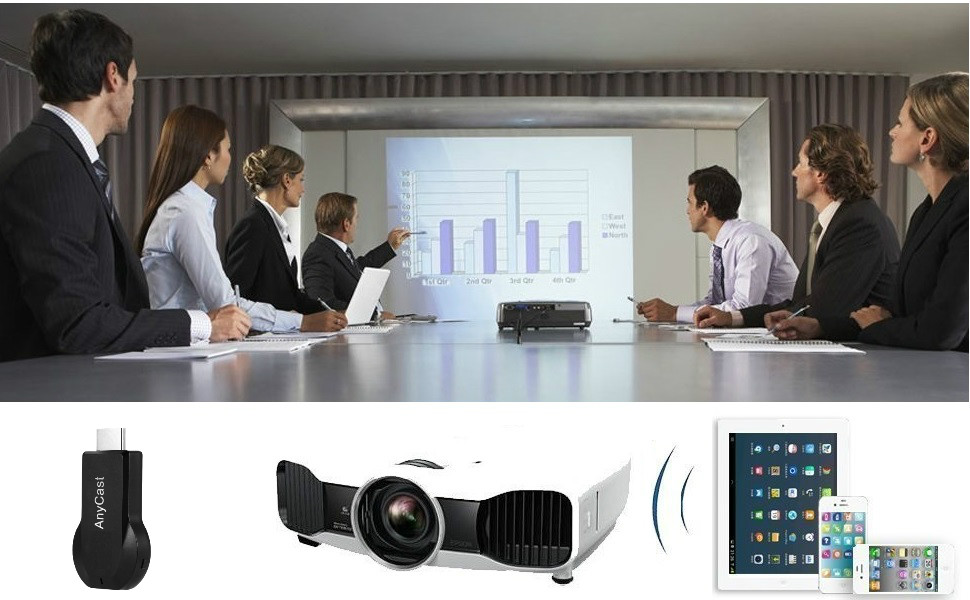
Screen Mirroring Wirelessly for Business Education Home Entertainment
Note: Not compatible with the apps that have protocol protection, such as Netflix/ Amazon Video/ HBO go/ Hulu Plus sky go/DIRECTV etc
Wide Usage:
Watch with colleagues in meeting-Mirroring screen to projector, share PPT, mail, documents and other content wirelessly.
Watch with students in classroom-Mirroring screen to big screen, share teaching content wirelessly.
Watch with your family at home-Mirroring screen to TV, share photos, videos, movies wirelessly. Carry it while travelling, share your phone to TV anytime.
Return Notes:
Returns can be made unconditionally within 30 days.
When returning the goods, please return all the product accessories to the original packaging box, so as not to affect the second sale.
Rather than returning the product, you prefer to figure out the proper usage?
Get in touch with the SmartSee TEAM.
SmarSee Wirelss Display Adapter is a technical product, it widely supports iOS, Android, Windows devices. Yet iOS, Android, Windows use different wireless protocol, and different protocol results in different connection, namely, connections are different on different devices.
We understand there are thousands different devices, no matter what device you use, only correct connection can reach the point. So once you are not sure about the connection, please check the User Manual. If the User Manual not indicates the connection of your device, please get in touch with SmartSee Team directly, we will tell the exact connection according to your device.
SmartSee Team is always here to support.
Add to Cart
Add to Cart
Add to Cart
Add to Cart
Add to Cart
Customer Reviews
4.2 out of 5 stars 54
4.1 out of 5 stars 32
3.3 out of 5 stars 98
3.7 out of 5 stars 114
3.6 out of 5 stars 453
Price
$69.99$69.99 $79.99$79.99 $38.99$38.99 $38.99$38.99 $29.98$29.98
Support Resolution
4K/1080P 4K/1080P 4K/1080P 4K/1080P 4K/1080P
Support WiFi Connection
No Need WiFi Setting. Support Running in dual band 2.4G and 5G network No Need WiFi Setting. Support Running in dual band 2.4G and 5G network. Supports all your wireless networks with Wi-Fi 802.11ac (2.4 GHz/5 GHz) Supports all your wireless networks with Wi-Fi 802.11ac (2.4 GHz/5 GHz) 2.4GHz
Support System
USB C Equiped Phone Laptop Any HD Source Android 5.0+, IOS 9.0+, Mac OS 10.0+, Windows 8+ Android 5.0+, IOS 9.0+, Mac OS 10.0+, Windows 8+ Android 5.0+, IOS 9.0+, Mac OS 10.0+, Windows 8+
Features Support
Screen Mirroring and Extending No content limit. Support Netflix Prime Video, Sky Go, BT Sport, DIRECTV, HULU, Comcast TV, XFINITY, Vudu, Movistar, HBO and more. Support Airplay/MiraCast Mirroring/DLNA Streaming/Support Google Home app/Chrome Browser Casting Support Airplay/MiraCast Mirroring/DLNA Streaming/Support Google Home app/Chrome Browser Casting Support Airplay/MiraCast Mirroring/DLNA Streaming/Support Google Home app/Chrome Browser Casting
Wireless display: SmartSee Wireless display adapter can do mirroring or streaming your mobile device to your TV/projector/monitor wirelessly. Share videos, photos, movies to big screen easily. Make your TV a smart TV.
Easy to use: No App or drivers required. Only 3 steps to enjoy media on large screen: Plug->Connect->Mirroring by using Miracast, DLNA and Airplay mode. Recognize your IP address and match your local language automatically. Note: Not compatible with the apps that have protocol protection, such as Netflix/ Amazon Video/ HBO go/ Hulu Plus sky go/DIRECTV etc
Wide Compatibility: Support Airplay, Miracast, DLNA protocol, namely, support iOS 9.0+, Android 5.0+ devices(NOT supports for Google Pixel, Motorola. Please note your devices need to support MiraCast protocol) and Macbook series. While your mobile device is upgraded to the newest version, this adapter can be upgraded to be compatible with the newest version timely. Buy one, never worry about the version compatibility.
Wide Usage: Watch with colleagues in meeting-Mirroring screen to projector, share PPT, mail, documents and other content wirelessly. Watch with students in classroom-Mirroring screen to big screen, share teaching content wirelessly. Watch with your family at home-Mirroring screen to TV, share photos, videos, movies wirelessly. Carry it while travelling, share your phone to TV anytime.
Regular OTA Update: We will regularly update the firmware from the cloud server to add features and improve compatibility, connect this dongle to your wifi and it will be upgraded automatically, so this dongle could be compatible with the newest version of your iOS/Android/Windows device anytime. When Apple or Android updates the system, our company will update the dongle version within one week. Only our company can do it in time in the market .
Notes on Usage: It has 2 Modes, Airplay Mode for all iOS devices, Miracast Mode for Android devices and Windows devices. Press the button on the product to switch modes according to your device system. Detailed connection please check the detailed description below or the User Manual according to your device system.
Customers say
Customers report mixed experiences with the display adapter’s functionality and ease of use, with some finding it easy to set up while others struggle with poor instructions. The connectivity is problematic, with frequent disconnections and unstable connections, and customers report significant lag and poor video quality, particularly with 1080p resolution. Moreover, the build quality receives mixed reviews, with some finding it decent while others describe it as cheaply made, and customers express concerns about video streaming capabilities.
13 reviews for SmartSee Anycast HD Wireless Display Adapter WiFi 1080P Mobile Screen Mirroring Receiver Dongle for iPhone Mac iOS Android to TV Projector Support Miracast Airplay DLNA
Add a review
Related Products


€20
Zenobia Hart –
Well worth it.
This device is very easy to install. It only takes a few minutes to connect the TV and mobile phone. The instructions are detailed and easy to understand. The wireless transmission signal is strong, the screen projection effect is very stable, there is no lag, and it supports high-definition video playback. The appearance is small and exquisite, easy to carry. It is very convenient to use it to watch movies and make presentations at home, which greatly improves my experience.
S. Baulch –
Miracast support is extremely laggy and unwatchable
I dont use Airplay, the Miracast feature does not work. After a few seconds of extremely choppy video, the video feed freezes and the device needs to be restarted, the same lagging and freezing issue happens every time I restart it. It’s completely unusable, and I had to buy a different device.
Yashica Genre –
Exceed expectations.
I recently purchased the SmartSee Anycast HDMI Wireless Display Adapter, and I must say, it has exceeded my expectations! Setting it up was a breeze; I was able to connect my iPhone and Android devices to my TV in no time. The 1080P resolution provides a clear and crisp display, making it perfect for streaming movies and presentations, I appreciate the seamless screen mirroring feature, which allows me to share content from my mobile devices effortlessly.Overall, I highly recommend the SmartSee Anycast for anyone looking for an easy-to-use and effective wireless display solution. Itâs a fantastic gadget for both personal entertainment and professional use!
Opa S –
More to it than what is shown in the picture.
Considering the low cost of this device it works OK for something with little motion in it. For watching a movie or anything with moderate or faster motion the video tends to jerk. Also, the picture and description are somewhat deceptive. Yes the unit looks just like it does here, what it doesn’t tell you is there is another module is integrated into the power cord. You cannot use a standard USB power cord because that box contains the required WiFi electronics.
speeddemon –
Works like a charm
Does exactly what I need it to. Made an older not smart TV be able to have a phone cast it’s screen so you have a bigger picture. Easy set up slight learning curve on changes mode as this supports apple and it’s. One con i have is the usb cable to power the unit is short so you will need a powerstrip close to the back of the tv to power the unit; unless your tv has an usb port
Gio C –
Not working with home wifi
The device will not connect to my home wifi. The scan to find wifi networks is erratic, sometimes finds networks, and sometimes does not. I want to broadcast videos on my iPhone to my TV. My last AnyCast worked well for three years, then broke. This AnyCast does not work well. The device will never connect to home wifi after many tries. The instructions are also confusing.
S. Cooper –
First one failed to connect
TV & 2 Will 11 laptops SEE the device but device does NOT respond to 3 different browsers nor direct Cmd Ping from 2 win 11 & a Win 7 computer. Fails to load the setup to enter the device password to establish communication… Returned to Amazon and requested a new one..
Quinton Cloutier –
Works great
Works wonderfully, only took a few minutes to set up. Graphic were perfect for projecting my DND maps for my players.
Alex Carrera –
Este producto, el Anycast, vengo usándolo como 2 años en mi salón de clases⦠lo tengo puesto en mi proyector, y con tan solo llegar al salón, y poner mi iPad para sincronizarlo y trasmitir mi clase lo hace muy intuitivo.. sin cables, sin nada.. neta, de las mejores cosas que he comprado.. todos los maestros, en todas las escuelas, deberÃan de tener esta herramienta..
Swazzy –
I love this product, I had to install the app because my phone is older and doesn’t have mirroring, now I can even cast to TVs that have casting options without this casting device, but this casting device is cheap small and doesn’t listen to the household lol, I highly recommend it to upgrade any TV to a smart TV.
Davinder Singh –
I setup this with car rear screen, it work on both devices android and iOS. No lag at all. It easy to setup if follow instruction.
dave Mcil –
To much lag and lag between vid & sound. Went in the bin
Sam –
Many issues:-has 2 modes (apple and android/windows) that act like separate devices, getting one set up dose not affect the other (android side is completely non functional and apple side stopped working after working only once)-difficult to connect or find the device, you may at first se the Wi-Fi hot spot but fails to find or connect after a while-junky garbage companion app full of popup adds, broken features, useless links (QR code to connect only worked once for me) and un helpful information that usually is outdated or dose nothing.you need to connect to its local Wi-Fi signal to set it up to get it connected to your Wi-Fi network using the garbage companion app.has 2 modes apple and android, did not work at all on the android mode, got it into the apple mode and actually connected to the devices Wi-Fi but could get no further due to the wrong mode with my android phone. switched back to apple mode to try and get it se up using an iPhone instead but dose not work, when you set up the Wi-Fi and settings for one mode or the other id dose not set the Wi-Fi up for the other (separate passwords, device name, separate everything). so I was eventually able to get it to work once with the iPhone, had it connected and after searching for 5 min the iPhone was able to screen mirror. after this one attempt the iPhone was never able to re connect or see the Wi-Fi hot spot of the device. the device provides an http//: link to a settings site (different for the apple and android halves) that eventually is no longer accessible and the link breaks and you cant access it any more.My device no longer connects to or is detectable by anything, spent the extra 40 bucks and by a real chrome cast or apple device.