

HP Envy 6555e Wireless All-in-One Color Inkjet Printer, Print, scan, Copy, Duplex Printing Best-for-Home, 3 month Instant Ink trial included (714N5A)
Original price was: €170.€120Current price is: €120.






Price: $169.99 - $119.99
(as of Jul 26, 2025 08:17:37 UTC – Details)
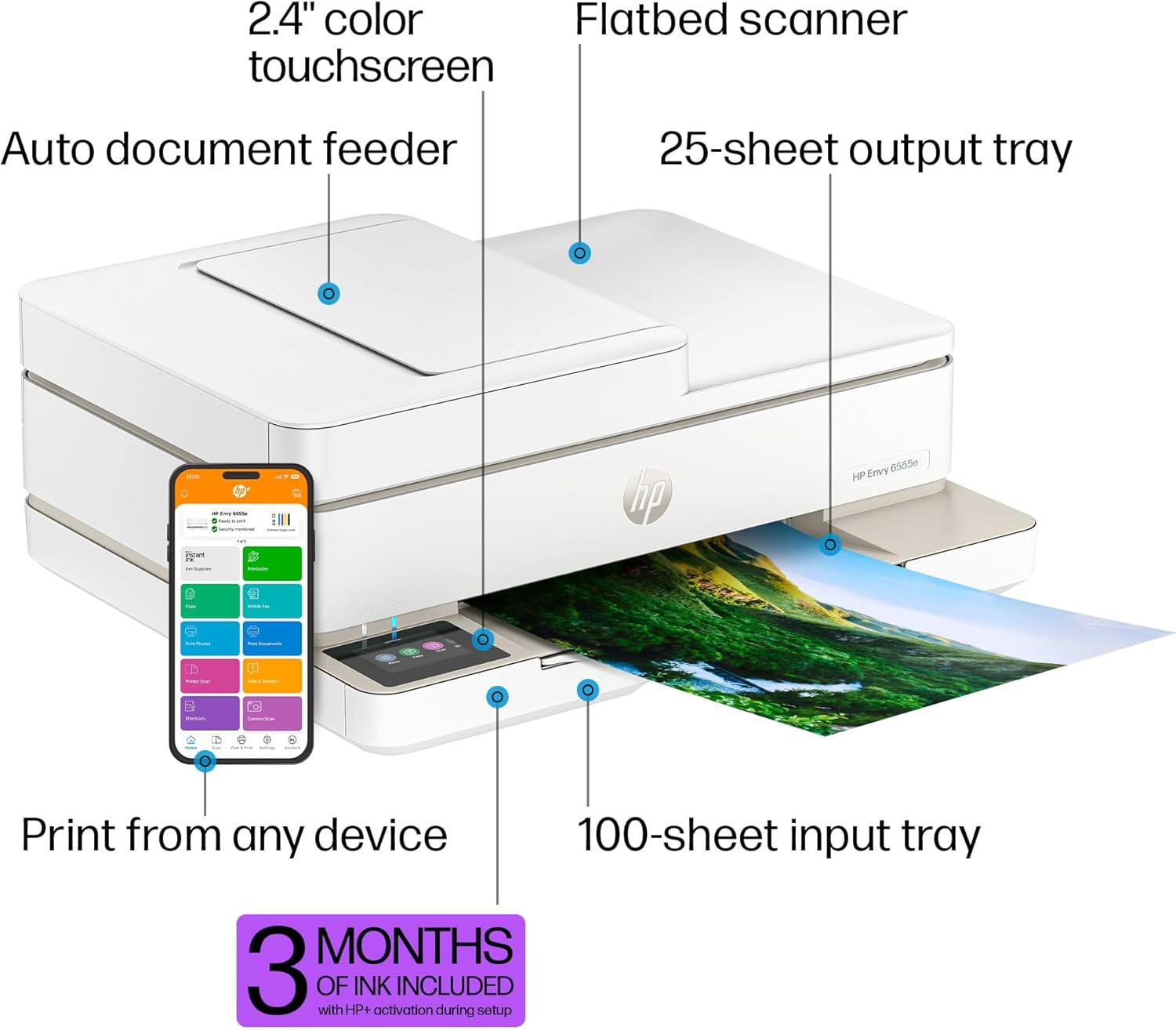
The HP Envy 6555e All-in-One delivers color printing, scanning and copying, plus a 35- sheet auto document feeder and 100-sheet paper capacity. It includes wireless and mobile printing capabilities to keep your multifunction printer connected, and prints highquality documents and photos every time with true-to-screen tech. This inkjet printer also lets you easily navigate print jobs with its intuitive color touchscreen.
The HP Envy 6555e All-in-One delivers color printing, scanning and copying, plus a 35-sheet auto document feeder and 100-sheet paper capacity. It includes wireless and mobile printing capabilities to keep your multifunction printer connected, and prints high-quality documents and photos every time with true-to-screen tech. This inkjet printer also lets you easily navigate print jobs with its intuitive color touchscreen.
FROM AMERICA’S MOST TRUSTED PRINTER BRAND – The Envy 6555e is perfect for homes printing everyday high-quality color documents like homework and borderless photos. Print speeds up to 7 ppm color, 10 ppm black.
KEY FEATURES – Color print, copy and scan, plus auto 2-sided printing, a 35-sheet auto document feeder and a 100-sheet input tray
HP’S MOST INTUITIVE COLOR TOUCHSCREEN – Smoothly navigate your printer with the easy-to-use 2.4″ touchscreen
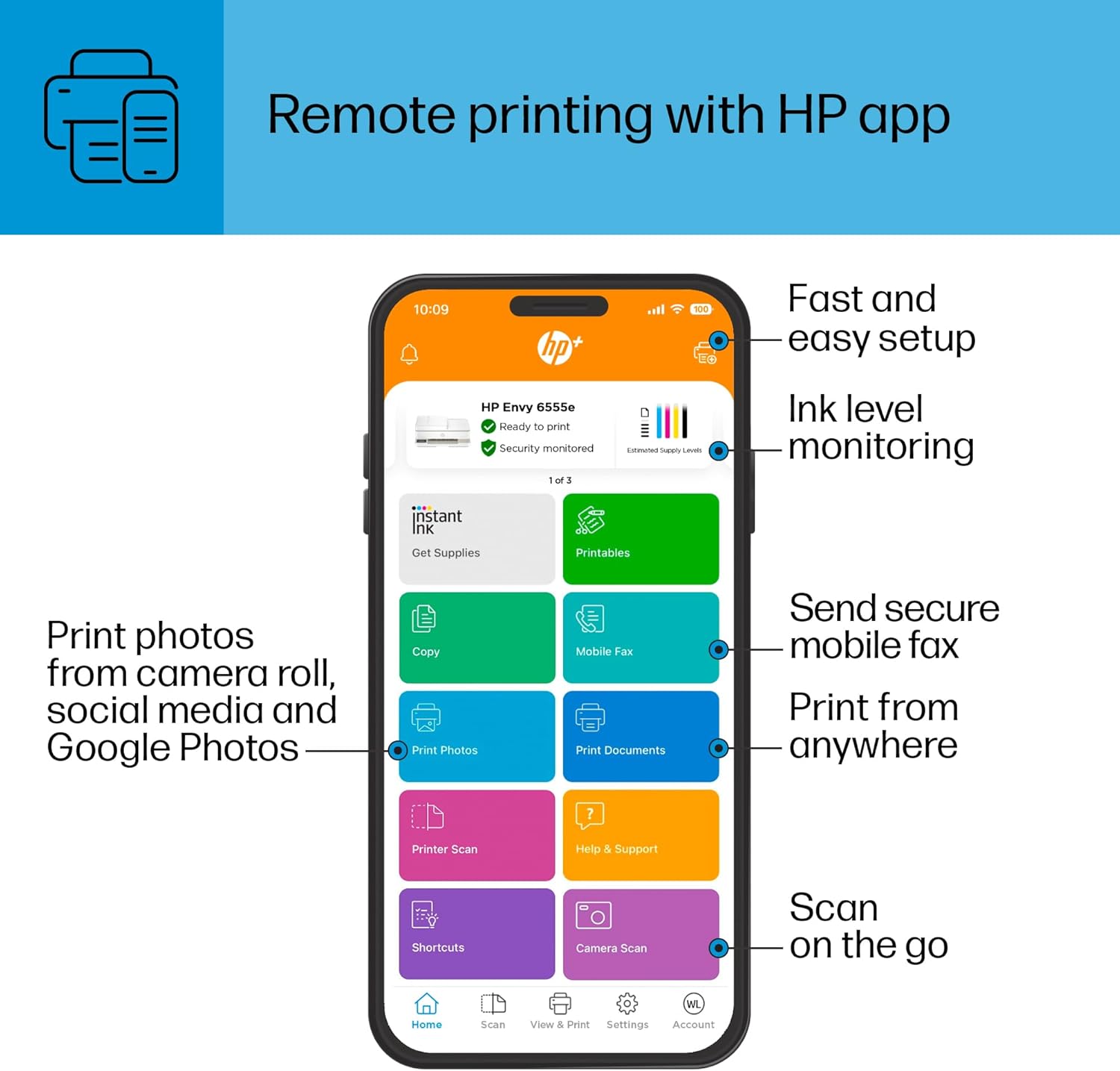
WIRELESS PRINTING – Stay connected with our most reliable dual-band Wi-Fi, which automatically detects and resolves connection issues
Customers say
Customers find the printer easy to set up and use, with decent print speed and good wireless connectivity. However, the functionality receives mixed reviews – while some say it works well, others report it refuses to work. Moreover, the print quality, scanning capability, and value for money also get mixed feedback, with some finding it good value while others say it’s not worth the price. Additionally, customers report frequent error messages and connectivity issues.
13 reviews for HP Envy 6555e Wireless All-in-One Color Inkjet Printer, Print, scan, Copy, Duplex Printing Best-for-Home, 3 month Instant Ink trial included (714N5A)
Add a review
Related Products


Original price was: €170.€120Current price is: €120.
Darlene H. / in GA –
Great little WIRELESS printer, easy set up too.
Good little desktop printer. Setup was the easiest I’ve ever done. Packaging was really well done, thank you!Wireless and I love that! Phone app was very easy to use and understand. I could see on my phone the photo or document I needed to print and I liked that. I use my smart phone for about everything these days so I liked that I can pull up my email and print from my phone a file sent to me in an email without having to boot up my laptop!I was a bit surprised that it had photos and PDF files as the only two print options, but the help support documents tells how to handle files other than jpg or PDF.One thing I would love to see is a port for a SD card from my camera to scan and save or print photos and documents. There is USB port in the back near the power cord plug in. My old printer had the ports in the front. Not critical, just different than what I’m accustomed to. I like the wireless feature a lot more.For the amount I spent, VERY reasonable and does everything I need. It’s quiet, works well, prints nice copies in either black and white or color. The little touch screen menu is very easy to use and read. I appreciate that too. I can read it without my glasses ð.I’m very well pleased with the printer, functions, and price. I’d recommend it as a nice little desktop printer. It doesn’t take up a lot of space and is perfectly fine for my needs.
Kelly M. –
Quick setup
Setup was a breeze for this. Quick tip for people that are non technically inclined – if you have a WiFi network (mine is Verizon) that has two options, one for guests and one for the household, you will need to make sure the phone or computer you are printing from is connected to the same network the printer is on. This might sound basic to a lot of people but it took me a minute to âseeâ my printer as an option and it was because we were connected to two different networks. I hope this helps someone.Overall the printer has been great, itâs fast, it stays connected, it has worked when I need it, print puts are clear and I have no complaints. This printer was $99 when I bought it and I think it was a steal for the ease of use compared to what I had prior.
suzie –
Worth the money
Good printer. I really like that the menu is on the front and easily read. It does a good job of printing pictures also…not professional quality, but just fine.
Anthony A. –
Bad printer, worse technical support
When this printer arrived, I set it up and tried to run a test print. The printer made some noise like it was going to start printing, then did nothing. So I decided to try HP technical support. That is when things went sideways. First, I tried to chat with an agent, but he informed me that I would need to call an 888 number for assistance. So when I called that number, a man who sounded like he was in an overseas call center answered. When I told him why I was calling, he hung up. I tried the number again several times and everyone who answered hung up on me. Then I tried a different number I found on the HP website, and the man who answered started asking for my debit card number because I had supposedly won a $100 gift card. Some sort of scam is at play here, obviously.Im still in disbelief. At any rate, it was a deal breaker and I decided to return the printer. I learned later that these printers are problematic. I also use a Chromebook, which may have added to the problem. I guess HP isn’t the company it used to be. Buyer beware.
Victor Garcia Camejo –
Great purchase!
I have no complaints on this printer. It is user friendly. It connects smoothly to your phone and is easily operated from the HP Smart app. The prints are good quality and the printing speed is decent. The ink subscription is a nice add on. Great value for your money.
Jeremy Maldonado –
Works as described
Works as described. Took 10-15mins to set up, hooked up to WiFi and started printing labels right away and my little shop from home is back in businessð so far so good, if I have any out of the ordinary difficulties will come back to edit review but for now working as should 5 stars.
Ryder on the Storm –
Great printer that’s reliable and easy to use.
I had an HP 6400 Envy series that was a nightmare, so i was very hesitant to purchase this printer, but i have been pleasantly surprised. It prints fast, it never fails to connect, all of the features work as they should, and it never binds up when spooling. It is quiet, the print quality is great and it’s very easy to use.
Amazon Customer –
Cloud dependent architecture
Pros:- Quality printing at a much more decent speed than its predecessor- mobile to print functionality with HP Smart- Scanner is a great addition, produces quality color/BW copies.- easy to use touch screen display panelCons:- The output tray is not automatic like the previous model, manual intervention is needed- very dependent on internet connectivity for activation and printing not ideal for air gapped network environments- Big time loss on LAN printing, no open ports for printing on LAN network, which means we have to print via airdrop, WiFi-direct, USB cable connection, or through the cloud!!??- Very dependent on air drop, WiFi-direct, and cloud based printing, but no basic LAN printing??? Very inconvenient for SoHo and very dependent on the cloud app.- No scanning functionality with the HP Smart App if accessing through the cloud. Only works via Wi-Fi Direct, USB, and possibly air drop. Very backwards thinking here.Conclusion:- Overall, I do like the AIO functionality as itâs scanner and mobile printing is always needed in my household. The printing quality and speed is slightly better than old Envy 4520. However, the ball was dropped when I learned that this printer is heavily dependent on the cloud. From activation to printing, itâs tied to that HP Smart App. The basic LAN network printing is gone due to some security policy we the consumer donât have access to. Itâs a cloud-locked printer that overshot the landing. At the end of the day, you get what you pay for. Iâll be investing in Brother printers after my patience runs out.
Salman Ahmed –
Not as expected
JOHN K –
easy to install and works perfectly. Not a fast printer but works for my needs.
Glenn Badcock –
This printer from HP is so easy to setup and use. Great value for a good price and came with a 3 month free supply of ink. I was already a monthly ink subscriber so it was easy to switch to the new cartridges.
Steven MacDonald –
Great printer for casual printing. Price was good. Able tk print wirelessly
Steve G –
Bought this printer a month ago based on ratings. Worst printer ever. Longest to print a sheet from PC now at 17 hrs, 12 minutes. Doesn’t like or will connect to assigned router when 2 routers are present with different names, same password. Their solution… change password… Yea right, and change a dozen devices all working perfectly from each router.Ethernet direct connected still wants WI-FI connection., Now waiting 1 hr and counting for 1 page to print. Chews up ink like no other machine. Loved my 3830. worked flawlessly for years till it didn’t.