

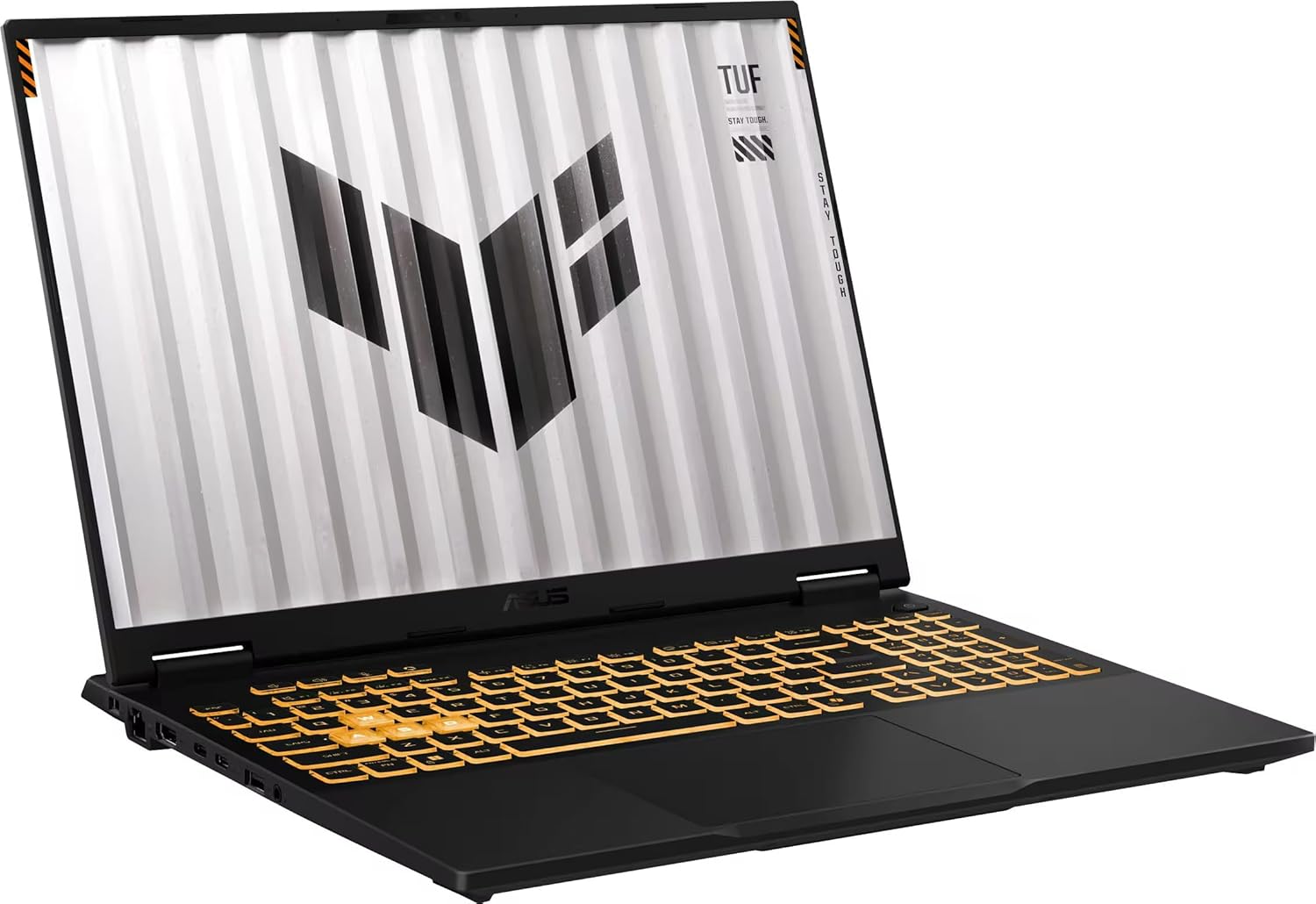
ASUS TUF F16 Gaming Laptop, NVIDIA RTX 5060(8GB GDDR7), Intel 16-Core i7-14650HX, 16″ 165Hz 100% sRGB FHD+ Display, WiFi 6E, Windows 11 Pro, RGB Backlit KB, 32GB DDR5, 2TB SSD, w/Accessories
€1,800


Price: $1,799.99
(as of Sep 19, 2025 05:02:54 UTC – Details)
Statement
Original Seal is opened for upgrade ONLY. If the computer has modifications, then the manufacturer box is opened for it to be tested and inspected and to install the upgrades to achieve the specifications as advertised.
Routine Information
Brand:ASUS
Series: ASUS TUF F16 Gaming Laptop
Model Number: FX608JMR-F16.I75060
Color: Jaeger Gray
Operating System: Windows 11 Pro
Processor
Model: Intel Core i7-14650HX
Number of Cores: 16
Number of Threads: 24
Base Clock: 2.2 GHz
Max. Boost Clock: 5.2 GHz
Cache Ram: 30 MB Intel Smart Cache
Graphics
Graphics: NVIDIA GeForce RTX 5060
Graphics RAM: 8 GB GDDR7
Advanced Graphics Rendering Technique(s): DLSS 4 (Deep Learning Super Sampling), Ray tracing
Memory & Storage
Type of Memory (RAM):DDR5
Memory:32GB/64GB
Storage Type:SSD
Hard Drive:1TB/2TB/4TB
Display
Screen Size: 16 inches
Display Surface: Anti-Glare
Display/Screen Type: LCD/IPS
Screen Resolution: 1920 x 1200 (Full HD+)
Refresh Rate: 165 Hz
Brightness: 300 Nits
Color Gamut (Standard RGB): 100%
Synchronization Technology: G-SYNC (NVIDIA Adaptive Sync)
Wireless
Wi-Fi 6E, 802.11ax, Bluetooth Wireless Card
Features
1080p Webcam
RGB 1 Zone Backlit Keyboard wtih Copilot Key
High Res audio and Dolby Atmos support
MUX Switch with Advanced Optimus
Battery Life (up to) 10 hours
Efficient Cooling Solutions
Military Grade Toughness
Facial Recognition
Ports
3 x USB Type-A 3.2
1 x Thunderbolt 4
1 x USB Type-C 3.2 with Power Delivery
1 x Universal Audio Jack
1 x HDMI 2.1
1 x Ethernet Port
Physical Specifications
Dimensions:13.94in. x 10.59in. x 0.7in.,
Weight:5lbs
Next-Gen Intel Power – Powered by the Intel Core i7-14650HX with 16 cores and 24 threads, the ASUS TUF Gaming F16 laptop delivers rapid multitasking and top-tier responsiveness. Turbo Boost up to 5.2GHz ensures every task and game runs at full speed
GeForce RTX 5060 Graphics Unlock lifelike visuals with NVIDIA GeForce RTX 5060. From smooth gameplay to accelerated creative workflows, the ASUS TUF Gaming F16 laptop provides cutting-edge ray tracing and AI-enhanced performance for the latest titles
Immersive 16-Inch 16:10 Display Experience vivid gameplay on the 16-inch 16:10 FHD+ screen with a blazing 165Hz refresh rate and Adaptive-Sync. The ASUS TUF Gaming F16 laptop delivers sharper details and ultra-smooth visuals for competitive gaming and streaming
Optimized Cooling & Rugged Design Dual Arc Flow Fans, a wide heatsink, and anti-dust technology keep performance stable under pressure. Combined with military-grade durability, the ASUS TUF Gaming F16 laptop is built to stay cool and reliable wherever you play
🔌 Robust Connectivity — The ASUS TUF Gaming F16 laptop offers versatile ports for every scenario, including RJ45 LAN for stable networking, Thunderbolt 4 with DisplayPort, USB 3.2 Gen 2 Type-C with G-SYNC support, three USB 3.2 Gen 2 Type-A for peripherals, and HDMI 2.1 FRL for high-resolution external displays
Customers say
Customers find this laptop to be a nice starter device that’s great value for money and appreciate its portability for traveling. They praise its lightweight design, with one customer noting it’s easy to handle. The functionality receives mixed feedback – while some say it works well, others report it stops working. Similarly, opinions are divided on the size, with some finding it great for traveling while others say the screen is too small. Battery life and speed are also mixed aspects, with some reporting fantastic performance while others experience issues with charging and slow performance.
9 reviews for ASUS TUF F16 Gaming Laptop, NVIDIA RTX 5060(8GB GDDR7), Intel 16-Core i7-14650HX, 16″ 165Hz 100% sRGB FHD+ Display, WiFi 6E, Windows 11 Pro, RGB Backlit KB, 32GB DDR5, 2TB SSD, w/Accessories
Add a review
Related Products


€1,800
Alessandro AD –
Perfect portable typing and research station
Wow wow wow. I can’t find enough good things to say about this portable powerhouse. I’m a pretty hardcore gamer who also uses a lot of graphics intensive programs like Photoshop and Unreal 4. This laptop… is not for that.It’s for those times away from your high-end programs, where you need 10 chrome tabs open in a coffee shop while you’re experimenting with Microsoft Word layouts. It’s for when you’re out in the woods and want to sort and organize the photos on your camera’s SD right then and there. It’s for trips where you want to travel light, but still want the world at your finger tips.OK, OK, enough flowery language. Let’s get to the pros / cons:Pros:-The keyboard feels great, with a nice balance of being chunky and “clicky” while still being compact. Once you get used to its size, it’s pretty easy to get close to your fastest typing speeds with minimal errors.-This thing is really light. Maybe I’m too sued to heavier laptops, but seriously, this thing is effortless to bring around. Throw it in a backpack, tuck it under your shoulder, do whatever. This thing is pretty durable from what I can tell, so all that lightness doesn’t come at the cost of having to gingerly secure it in a special compartment. Any ol’ laptop bag / pocket will do!-The battery life is great! Maybe I’m too used to being tethered to outlets by more power-hungry machines, but I was able to get hours of typing and Chromeing out of this thing. The key I’ve found (as with most machines) is to keep the brightness a bit low when you’re not plugged it, it can make a big difference.-ASUS has always made my favorite laptops and this one is no exception. If you’re a fan of ASUS’ work, you’ll find everything you know and love about and ASUS packed into a tiny package.-The ports, lordy, the ports! So many ports in such a tiny machine.-The screen is far brighter and more colorful than I was expecting. My other laptop is a “state-of-the-art” ROG Strix II, with a high color accuracy, high refresh-rate display… the issue is they never calibrate said displays and they always end up coming out sickly yellow, requiring hours of manual adjusting. Not this little fighter though! Bright and beautiful right out of the box! Color pureists will notice things can get a bit washed out, but it’s certainly preferable to the yellow tint of other machines.-The price is the best I’ve seen for the quality of machine you’re getting. This thing is durable, sturdy and built for a few specific things it excels at. It’s definitely given my productivity a boost and is well worth the investment.-There was pretty minimal bloatware on the machine, which was great.-Office 360 for a year is a HUGE plus. Also be sure to upgrade the machine to full Windows 10 (from S), the process is free, fast and jarringly painless.Cons:-Even 64 GBs is not a a huge amount of space. This is definitely more of a document and cloud oriented device. If you’re hoping to put your entire music library on this thing you’re going to need to expand the storage. If storage isn’t an issue, than this is probably the book for you!-Similarly the 4 GBs of RAM can make this little engine chug sometimes. Don’t expect it to be happy with running 20 chrome tabs at once,n or for it to instantly load pages the moment you click them. It’s certainly fast enough, but as someone who’s coming from a 16 GB machine the little differences can be noticeable.-The touch pad is … OK. It’s not terrible, but (much like all touch pads these days) it loses tracking now and then and lacks any real buttons for the left and right. I never much enjoyed touch pads to begin with so maybe I’m biased.Closing thoughts: If you like what you’ve read, read more reviews and honestly take the dive. If you’re looking for a durable portable typer, that can do a little bit of everything this is your machine!More closing thoughts: A story for you, about ASUS laptops…In winter I got an ROG Strix II, a very powerful and very pricey machine. It was maddening getting the thing to work properly. Getting photoshop to play nice with the dual graphics. Getting the screen to not look yellow. Getting the damn speakers to not crank the bass. Many of these issues are still unresolved and frankly though I love the hardware I’m more than likely going to have to start from square one with that thing.I was all emotionally prepared to go through the same process with this little trail-blazer. I was ready to troubleshoot and troubleshoot and finally get something that mostly did what I needed. To my absolute delight, this machine seems to be the last bastion of PCs that do everything right, everything the way they’re supposed to, right out of the box. I haven’t had to troubleshoot a single thing about this beautiful laptop and honestly couldn’t be happier. If you’re looking for something portable, something durable, something to up your productivity and most of all something easy to work with, this is the laptop for you.
Nina B –
Great budget buy
Excellent little laptop. Took me a bit to get used to the reduced keyboard but worked well. Started getting a bit glitchy at the three year mark but I expected as much for the price. Otherwise great for casual use in all the time Iâve had it
Joshua Storey –
Ol’ Blue Does The Job
My Asus laptop stopped working today after almost five years. I originally purchased it in 2019 because of its affordability and I was in a pinch for a new device. It served me well throughout my undergraduate studies. In its final year, the laptop began glitching and crashing, which resulted in lost progress and sometimes even lost files. Given what I paid for it, I can’t complain too much, but now there are so many better laptop models and sizes available that I’m not sure I would buy this one again. Regardless, it functioned exactly as I needed and was a little sad to see it never turn on again.
MI in DC –
Zips Right Along
I really, really like this little gizmo. Looks good, feels as solid as one can expect, nice response feel on the keys, crisp display and bright, and lightning fast… for a reason. First things first, I ripped Windows out of this mini laptop shortly after powering it up. Why? Windows is a memory and resource hog. Secondly, the amount of information they want just to run the laptop outside Windows S mode is ridiculous. Hence, Windows had to go, so it I took it out.In place of Windows I installed Manjaro Linux, based off the Arch Linux distro, using the Xcfe interface system. Both are considered light weight and just seemed perfect for this mini laptop. The OS slid right in without a single problem, it picked up all the hardware on boot-up, and the response times proved better than I hoped. As a test of the battery, I loaded up Youtube with 15 hours of videos and let it run. After nearly exhausting the 15 hours of videos, the laptop battery finally gave up. It impressed me since it played for 14 hours and 27 minutes non-stop. Moreover, the speakers sounded much better than I thought they would. A little tinny, but what could anyone really expect? The laptop never got too warm, either, considering it is a fanless system. It just powered through without a hiccup.After ten days of regular use it seems rock solid. The shakedown period ran without a hitch. The distro comes with automatic updates, so the OS is kept fresh and update. The WiFi range is quite good. I remained connected to my WiFi for just about fifty feet, and the signal needed to pass through walls. The camera is okay, but to be honest I do not use it much if at all. I simply tested it. At just over two pounds, it travels well in my backpack and I use it during my commutes to and from the office. LibreOffice runs like a champ. GIMP runs like a champ. Audicty runs like a champ. KPatience is quick and fun. Firefox with extensions is incredibly fast… faster than on my main desktop.This is a great little mini laptop and, with the Manjaro OS changes, is worth more than purchase price. I highly recommend it since it proved so amenable to modification. I would definitely buy again.6 Months Later… I still love this mini-laptop. I use it almost every day. Mostly I use it for writing, streaming music to a Bluetooth speaker, and a little web surfing, and I could not be happier with this machine. I made the right choice of swapping out the OS. I have recommended it to others, and I know of at least 3 other people who purchased one. They also seemed pleased, but I don’t want to speak directly for them.
Braulio –
La compré con un descuento de bonificación bancaria, y me parece que es exactamente lo que necesitaba. Pude instalar la versión completa de windows (de fábrica tiene Windows 10 S, una versión que te limita muchÃsimo), paqueterÃa de office, antivirus, dropbox y firefox y no es nada lenta. Le puse una tarjeta SD de 64 GB clase 10 para que guardara archivos temporales y descargas de internet. Incluso he podido abrir sin problemas programas de edición básica de imágenes. Puedo usarla en la escuela y es super ligera. Definitivamente es un producto básico, pero cumple al 100% si tus necesidades son básicas y tienes idea de cómo evitar que una computadora se haga lenta (eliminación de caché, eliminación de archivos temporales, etc.).
Kenan Erkan –
Gut aber amerikanische Tastatur/ amerikanisches System
Mary –
I bought this to stream movies online and it does the job so I am happy with it. It’s light and compact perfect size for me.
Angeline –
I use this as an extra laptop for work. Battery life has been pretty good, able to last a full work day on just surfing, using Office programs and some video clips. Although it’s not as slim as depicted in pictures, it is fairly light and resistant to scratches. I’m loving it so far and no regrets on this purchase. Should have gotten this instead of a MacBook when I was studying, serves its purpose and costs 10x less. If there is one thing I would change, it would be the font on the keyboard..
Francois –
English follows——————————Le modèle reçu est L203MA-DS04. Processeur 2 cÅurs max 2.6GHz avec GPU intégré 8GB, 4GB RAM, stockage 64GB eMMC, 2 ports USB3 + 1 port USB-C.Clavier ANGLAIS – Les touches françaises ne sont pas indiquées, donc à considérer si vous ne connaissez pas les combinaisons de touches par coeur pour les accents ou si c’est pour offrir à un enfant.Attention, les spécifications sont très minimales pour Windows 10 et la majorité des critiques négatives tiennent de cet aspect. C’est toutefois un excellent appareil pour la bureautique, navigation Internet et travaux scolaires des enfants.Je n’ai pas essayé Windows, j’ai immédiatement installé Linux à la place. Selon ma compréhension, le système d’origine est Windows 10 S, ne permettant d’installer que des applications signées par Microsoft, avec possibilité de passer à une licence Windows 10 Home gratuitement.Accès facile au BIOS avec F2 pour désactiver Secure Boot et démarrer sur clé USB. J’ai démarré sur un Live USB et fait une image intégrale (dd) sur une clé USB3 en environ 1 heure. J’ai essayé ElementaryOS et Xubuntu qui fonctionnaient parfaitement bien. Touches FN pour luminosité, volume, etc. fonctionnaient très bien.Tourne les vidéos YouTube 1080P sans problème grâce au GPU intégré au processeur. Diffusion sur Chromecast depuis le navigateur Chrome/Chromium. Qualité du son correcte, volume assez fort au maximum. Le trackpad n’est pas le meilleur mais fait le travail pour le prix et est aisément remplacé par une souris sans fils. Webcam SD (non HD), qualité très moyenne mais correcte pour une utilisation occasionnelle. Libreoffice et VLC tournent aussi parfaitement bien.Mise en garde: Installation de Linux relativement simple depuis un Live USB si vous en avez moindrement l’expérience. Toutefois soyez avisés que si vous n’avez pas les connaissances requises pour faire une copie intégrale du disque interne au préalable (ex: dd if=/dev/mmcblk0 of=/cleusb/image.dd), l’opération est irréversible. Vous ne pourrez plus revenir à Windows par la suite et ce n’est pas couvert par la garantie du fabriquant.Si vous avez faite vos recherches et êtes conscients des limites de ce système avant de procéder à son achat, vous devriez en être pleinement satisfait.——————————The model I received is L203MA-DS04. 2-core CPU 2.6 GHz max with 8GB integrated GPU, 4GB RAM, 64GB eMMC storage, 2 USB3 ports + 1 USB-C.Keyboard is English only so keep that in mind if you needed French characters and don’t know the proper key combinations by heart or you’re buying for a French user.Take note that the specs are really minimalistic to run Windows 10 and most negative reviews about this laptop reflect that aspect.I didn’t try Windows as I immediately installed Linux instead. From my understanding, the base system is Windows 10 S, which only allows to run software signed by Microsoft, although you are allowed to upgrade to Windows 10 Home for free.Easy access to the BIOS with F2 key to deactivate Secure Boot and boot from USB drive. I booted on a live USB and made a disc image (dd) on USB3 within about an hour. I tried ElementaryOS and Xubuntu, both ran exceptionally well. Function keys for brightness, volume, etc. were supported without any problems.I played YouTube videos on 1080P without any problem thanks to the CPU’s integrated GPU. Using Chromecast from Chrome/Chromium was not a problem. Sound quality is ok and loud enough at max setting. Trackpad isn’t the best of its kind but does the job for the price and is easily mitigated with a wireless mouse. Webcam is standard définition (non-HD) a quality was average but still ok for the occasional use. Libreoffice and VLC also ran without any issue.Please take note: installing Linux from a Live USB is relatively easy if you have experienced it before. However, if you don’t have the knowledge to make a disc image of the entire drive beforehand (hint: dd if=/dev/mmcblk0 of=/cleusb/image.dd), removing Windows will be irreversible. You won’t be able to get it back and that’s not the kind of situation that would be covered by the manufacturer’s warranty.If you have done your research properly and are aware of its limitations before buying, you should be plenty satisfied.