

Nero Burning ROM 2025 | The original burning software | CD DVD BluRay | Burn | Copy | Rip | BackUp | Windows 11/10/8/7 | 1 PC
Original price was: €50.€30Current price is: €30.


Price: $49.95 - $29.95
(as of Aug 09, 2025 09:23:46 UTC – Details)
Product Description
Nero Burning ROM – The burning pro | The most used CD, DVD and Bluray burning programme worldwide.

Rip, copy, burn, and protect data.
What Nero Burning ROM can do: Set new standards with Nero Burning ROM’s proven burning technology! Copy, import, and burn data and music to your favorite disc types? Create discs with the highest security? All no problem for the latest version of the Nero burning pro, which ensures the best results with SecurDisc 4.0 and much more!

Ripping
Go your own way: If you need your audio CDs and individual music tracks as a file on your PC, smartphone, or MP3 player, convert them to the format you need in no time at all! Nero Burning ROM offers everything from MP3, MP3 PRO, AAC and FLAC to APE – including song titles and album information. Thanks to integrated Gracenote technology, original album covers are integrated into the audio file. This allows you to browse your playlists conveniently and play your music in a relaxed way.

Copy
Double your media enjoyment! Want to share movies and have your hits ready in the car and living room? Copy CDs, DVDs and Blu-ray Discs that are every bit as good as the original in terms of quality and sound! Audio CDs are also quickly reproduced – including CD text and original album information including original album cover!

Burn
Light the multimedia fire: rely on nothing but the best burning specialist for all disc types, whether you want to immortalise your favourite memories on CD, DVD or Blu-ray Disc. Create ISO images or burn your video disc structures and disc images onto new media. Burned audio CDs will also sound even better, and you can customise them not only with automatic sound enhancement, but also with filters and other adjustments to suit your taste. Thanks to Gracenote technology, you can also put original album covers on MP3 CDs and MP3 DVDs for your new car radio. And with Nero CoverDesigner, you can also turn your burned works into real works of art.

Secure
Protect what is dear to you! Be in no way inferior to the professionals when it comes to security: With SecurDisc 4.0 technology, your files are in the best hands. Thanks to 256-bit industry-standard encryption, digital signatures, and password protection, no one but you can access your burned data archive. And because Nero stands for longevity and readability, even scratched discs can still be played thanks to adjustable data redundancy.
Now you can create Rasperry Pi OS on your USB stick or SD card with Nero Burning ROM

Nero Burning ROM and Nero Express support CD text editing in multiple languages

Product Dimensions : 3.54 x 4.92 x 0.08 inches; 1.13 ounces
Date First Available : March 11, 2025
Manufacturer : Nero
ASIN : B0F13Y9WBR
Best Sellers Rank: #149 in Software (See Top 100 in Software) #2 in CD & DVD Burning & Labeling #4 in Digital Video #4 in Computer Recording Software
Customer Reviews: 3.8 3.8 out of 5 stars 21 ratings var dpAcrHasRegisteredArcLinkClickAction; P.when(‘A’, ‘ready’).execute(function(A) { if (dpAcrHasRegisteredArcLinkClickAction !== true) { dpAcrHasRegisteredArcLinkClickAction = true; A.declarative( ‘acrLink-click-metrics’, ‘click’, { “allowLinkDefault”: true }, function (event) { if (window.ue) { ue.count(“acrLinkClickCount”, (ue.count(“acrLinkClickCount”) || 0) + 1); } } ); } }); P.when(‘A’, ‘cf’).execute(function(A) { A.declarative(‘acrStarsLink-click-metrics’, ‘click’, { “allowLinkDefault” : true }, function(event){ if(window.ue) { ue.count(“acrStarsLinkWithPopoverClickCount”, (ue.count(“acrStarsLinkWithPopoverClickCount”) || 0) + 1); } }); });
✔️ The original: Nero Burning ROM
✔️ Easy to burn and copy: your files (data, music, videos and photos) on CD, DVD, Blu-ray disc
✔️ Rip & convert: save your music CDs as MP3s and play anywhere
✔️ Secure and protect: secure your data with password and highest encryption
✔️ Nero cover designers: create individual covers, labels and booklets
✔️ Nero Live Guide: Interactive context-related program aid for all your questions
✔️ Ris, copy, burn and protect data
✔️ Box contents: card with license key and download link
✔️ Multilingual: Nero Burning ROM supports 23 languages
8 reviews for Nero Burning ROM 2025 | The original burning software | CD DVD BluRay | Burn | Copy | Rip | BackUp | Windows 11/10/8/7 | 1 PC
Add a review
Related Products



![Express Accounts Accounting Software Free [PC Download]](https://m.media-amazon.com/images/I/81gNCZkcLpL._AC_SL1500_.jpg)
Original price was: €50.€30Current price is: €30.
Stephen Weatherly –
Great
Works like a charm.
Lovecraft –
If you are used to using Nero, you’ll be fine, learning curve otherwise
This is great if you are used to using Nero Burning Rom. You;;;l have to first download the Nero Start application which will confuse you and ask you to download many other products you don’t actually need for burning media.That’s my only complaint with this, it’s overwhelming. I get the feeling that whoever runs the Nero organization is one who people can’t say “No” to. The nero start app is so all over the place and confusing. So… here is my advice. Just scroll down to “Nero Burning Rom” and install that. You don’t need to install everything else. This is for Nero Burning Rom itself, not all the platinum stuff.Using Nero burning Rom is a little different than other software you may be used to (unless you were doing a lot of burning in the 90’s and 2000’s — if so this will be a similar experience using the old nero burning programs you have used in the past.It does it’s job well and is a trusted name in burning CD’s, DVD, and now BD. While it’s design is not something I have ever liked, it has longevity and has been used for decades. If coupled with fast burning hardware, it burns fast (it can do 16x speed on a Blu-ray — depending upon the size).It’s GREAT software, just dont exepct it to follow the current idioms of todays user experience flow. And.. I would say.. why should it? Something is working for Nero so why change it, yeah?
dmargita –
Not for me
Will kit burn dvd movies
Robert Harmon –
Burner
Excellent burner
Maz-n-blu –
Difficult to Use
I was able to download the Nero software from the website easily and without issue to my PC. The activation code worked seamlessly.I tested this software by attempting to burn a music CD from audio files in my computer. I found the process difficult to achieve, not at all intuitive. The âhelpâ menu did not display well on my screen. I had to shrink it to fit a 15â screen and that made it too small to easily read.Overall, Nero appears to have a robust variety of functions, but for me there will be a learning curve. I will have to research how to complete tasks and make the most of Neroâs functionality because it is not readily apparent or user friendly at first, at least for me.
DiRT –
Still Works Great In Windows 11
It’s been ages since I used NERO, but it was THE recording software back int he day. With the return of physical media and the need to make ISOs and burn back-ups again, I found myself wanting a full featured program that just worked without a lot of setup. I forgot how easy to use NERO is. I had no problems installing in on the latest version of Windows 11 and it quickly burned an ISO back-up with no fuss. It will try hard to upsell you on a suite of programs, but that’s to be expected in 2025. And if you want to make a DVD or Blu-Ray of videos you already have, you’ll need an authoring program like DVDFlick to set it up for you.
JHoney –
Classic Nero interface. Blu-ray support. Launcher is a bit annoying.
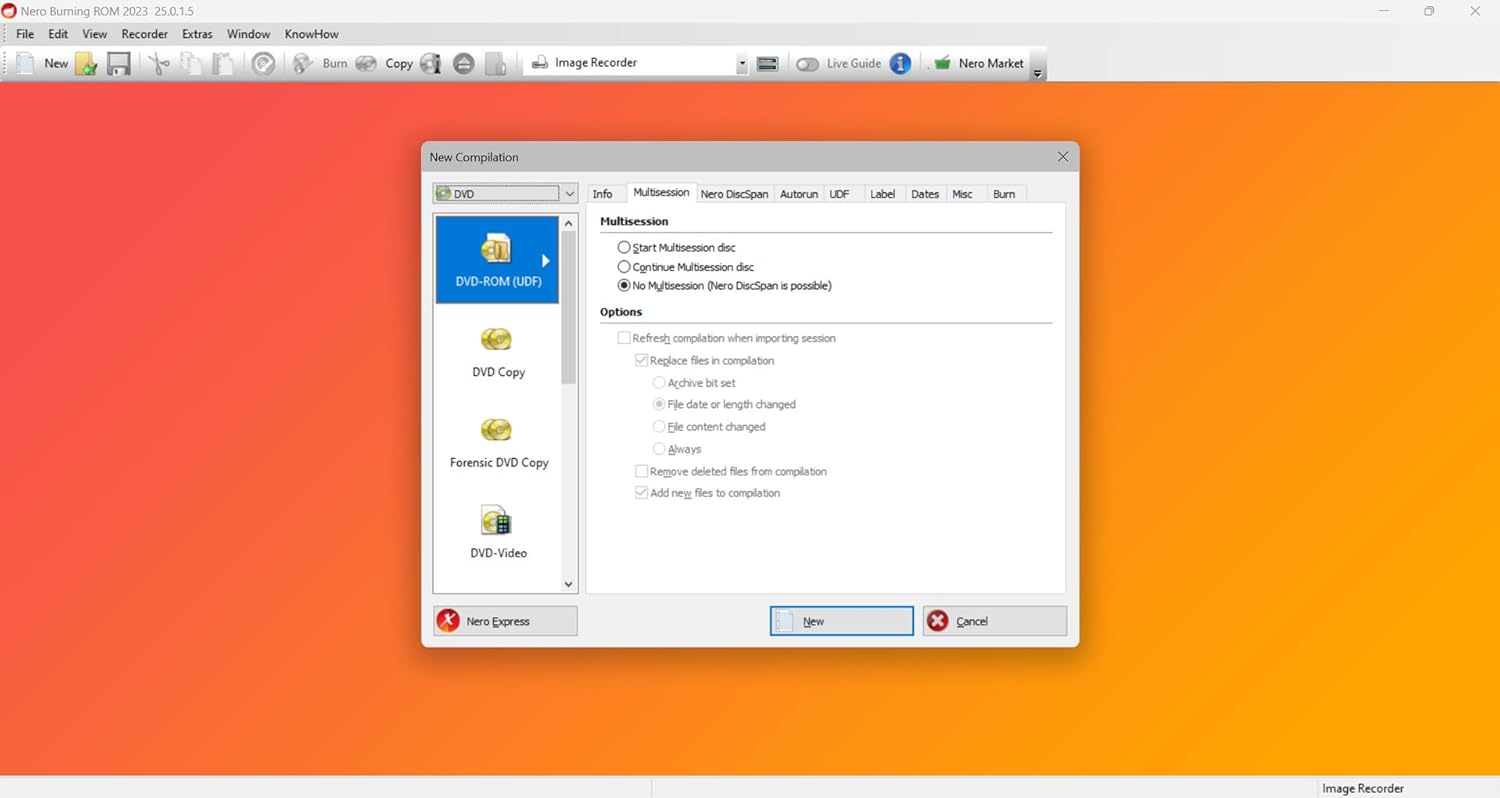
I received a little envelope with the software key on a card.I figured this would require an account so I tried to create one ahead of time, but the web account creation failed. When I installed the software, it offered to create an account for me. The process just sends a password to your e-mail address.Installing is handled through Nero Start, a sort of launcher that also installs Nero Market. You download it, log in, and activate the key. It doesn’t create a shortcut to directly launch Nero Burning ROM, but you can navigate to the executable and create your own shortcut to skip the Start launcher.I haven’t used Nero since version 7 maybe. It is pretty old school, and not much has changed in the interface. The biggest thing I got out of this is Blu-ray support. Otherwise I’m really happy with the familiar interface.I found it useful for writing backup copies of blu-rays, but it can’t read copy protected discs.Other things I noticed:- Ability to write USB/SD images such as Pi OS- Audio ripping, and conversion (maybe old feature)- Live Guide, a sort of quick reference that updates as you move through the interface- Video trainings. The menu link gets redirected to a download page (fail), but in the Live Guide the links open videos directly. They seem verbose, but decently produced.
Homesteader Extraordinaire –
Still the Gold Standard for Disc Burning and Backup
I’ve been using Nero Burning ROM for years, and the 2025 version continues to deliver the same reliability and versatility that made it the go-to burning software. It handles CDs, DVDs, and Blu-rays with easeâwhether Iâm burning data, ripping music, or creating backups, it gets the job done without a hitch.The interface is clean and familiar, and it’s fully compatible with Windows 11, which made setup seamless on my newer machine. I especially appreciate the disc copying and image burning tools, which are fast, stable, and customizable. The software also includes built-in support for encryption and data protection, which is a huge plus for sensitive backups.If you need a dependable, professional-grade burning tool that covers everything from media creation to secure archiving, Nero 2025 is still the best in class. Highly recommended for both casual users and longtime disc media enthusiasts.