

Optoma GT1080HDRx Short Throw Gaming Projector | Enhanced Gaming Mode for 1080p 120Hz Gameplay at 8.4ms | 1080p and HDR support with 4K UHD input | Bright 3,800 Lumens for Day and Night Gaming | White
€988


Price: $988.00
(as of Aug 06, 2025 23:26:30 UTC – Details)
The Optoma GT1080HDRx Short Throw Gaming Projector offers the convenience of short-throw projection for installation in smaller spaces, and an enhanced 120Hz 1080p gaming mode with a fast 8.4ms response time for a competitive advantage. 3,800 lumens of brightness means you can get your game on any time, day or night, and you’ll see every detail with full 1080p resolution and an amazing 50,000:1 contrast ratio. HDR10 technology (with 4K input) gives you brighter whites and deeper black levels, and the six-segment color wheel (RYGCWB) produces accurate color with sRGB & REC. 709 color profile support.
HDR COMPATIBLE: HDR10 technology (with 4K input) enable brighter whites and deeper black levels. The six-segment color wheel (RYGCWB) produces accurate color with sRGB & REC. 709 color profile support..Power supply : 100 ~ 240V, 50 ~ 60Hz.Batteries Required:no
FAST RESPONSE TIME: enhanced gaming mode enables lightning-fast response time of 8.4ms with a 120Hz refresh rate
SHORT THROW LENS: The GT1080HDRx is designed to be placed closer to the wall than standard throw projectors. Experience a large 120″ Image projected from four feet away.
BRIGHT, RAZOR-SHARP IMAGES: 3,800 Lumens, 50,000:1 contrast ratio, and full HD 1080p (1920 x 1080) for a clear, detailed image
LONG LAMP LIFE: Enjoy up to 15,000 hours of lamp life for an average of four hours of viewing time every day for 10+ years.
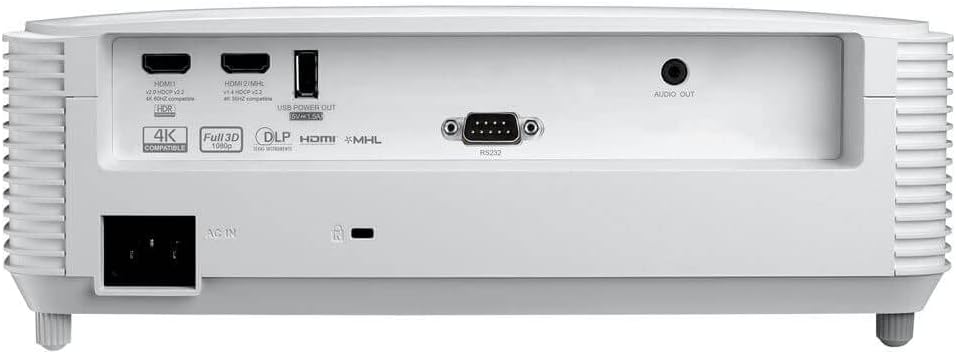
FLEXIBLE CONNECTIVITY: Connect to gaming consoles, media players and other HDMI devices such as Google Chromecast, Amazon Fire Stick and Apple TV; inputs include dual HDMI (1.4a 3D support)
Customers say
Customers praise the projector’s picture quality for its crisp resolution and brightness, with one noting it works well in medium dark areas. The device receives positive feedback for its value, being considered the best 4K capable projector for its price. Functionality and build quality show mixed results – while some say it works perfectly for their needs, others report it stopped working within six months. Color accuracy and sound quality also receive mixed reviews, with some customers appreciating the colors while others find them poor, and while the sound works well enough, many note it’s not loud enough for dialogue.
7 reviews for Optoma GT1080HDRx Short Throw Gaming Projector | Enhanced Gaming Mode for 1080p 120Hz Gameplay at 8.4ms | 1080p and HDR support with 4K UHD input | Bright 3,800 Lumens for Day and Night Gaming | White
Add a review
Related Products

![[1500 ANSI/Netflix-Licensed/36W Dolby Audio] Smart-Projector with WiFi 6 and 2-Way Bluetooth, Auto Focus & Keystone, TOPTRO X9 4K Supported Outdoor Movie Projector, Gray](https://m.media-amazon.com/images/I/71LJlu8RlsL._AC_SL1500_.jpg)


€988
The Traveler Tool Kit –
Best Golf Simulator Projector
I built a golf simulator in my basement last year, and after a lot of research, landed on this projector as the best option. I needed something that would put up with hours of continuous use and had a short throw. After using it for more than a year and probably thousands of hours here’s why I would give it a five-star rating.Bright and clear pictureWhen setting up a golf simulator, you need to be in a room with some light so you can see the ball. I worried that a projector would struggle to provide a bright image in this environment. That is not been the case for this projector. It always appears bright and crystal clear even in a room with a lot of ambient light. I’ve also been impressed with the clarity of the picture. We use it to watch movies and videos from time to time and it really does feel high definition.Easy of UseIt couldn’t be simpler to use. The remote is easy to operate and even my 12-year-old can go down and confidently operate the projector and golf simulator. It was also very simple to hook up with an HDMI cable out the back of the projector running straight to our iPad. I also found the Keystone adjustments to be easy to work with. It got pretty close to what I needed on its own and I was able to fine-tune things manually. I never read an instruction manual, and everything turned out to be so easy.Performance over long hours of useMy two sons are competitive golfers who play tournaments almost year-round. So, I can confidently say we are users of our golf simulator. Sometimes the projector has to run for six or eight hours a day. Even with that we’ve never seen overheating issues or had any problems with performance. It simply works all the time every time.SummaryAll that being said, I can’t find anything that I would take a star off my rating for. We’ve truly been happy and I was surprised at how affordable the projector was when we purchased it. So, if you’re specifically looking for a projector for a golf simulator or even a home theater situation wherea short throw is important. I would highly recommend checking this one out. I don’t think you’ll be disappointed.
Wesley C. Honeycutt –
Great Cinematic projector!
Firstly, I wanted to say that I was not compensated to write this review. It is simply the result of my good experience with this projector over the last month. Also, Iâve had experience with 2 pevious projectors, the most recent being the Optoma EH415ST (which is also a decent 1080p projector) and 2 projectors I tried and returned. I really just wanted better, more accurate color and a way to show my 3D collection. I was sold on the Optoma short throw set up. It works perfect for me as I move my projector around. It isnât as finnicky as the Ultra Short Throw projectors. For those you need an absolutely flat, fixed screen because they show every little imperfection. Believe me I tried. This Optoma short throw of 100 inches at about 4 feet is thankfully, more forgiving. And lastly, Iâm not a gamer so I canât speak to the input lag and all that. But I imagine it would be a very good experience.Setting up: Itâs pretty intuitive. I have yet to look at the manual or even the quick setup card. You turn it on, plug in your roku, firestick, bluray player or whatever in HDMI 1 and get familiar with settings you prefer. Pretty simple. Even a Caveman could do it. There was no substantial lens cap on mine. It came with a clam shell cover that was taped on.Remote: I got a small remoteâ¦.like roku small with a lot of little buttons. Luckily, my old, larger remote works with this projector and is easier to work. You can buy these on amazon for a reasonable price.Brightness and Daylight viewing: Hey, itâs a laser light! It has a very long lifespan and Itâs super bright. For me, it stays in ECO mode and I find myself turning down the brightness. Iâm including a photo of the screen with a couple of window shades up. It will still produce a decent image. And you can adjust for this by choosing a different mode and tweaking settings. I think it would do a very good job in a conference room in presentation mode. At night, I can have a lamp or 2 on with very little degradation of the image.. Also, I turn my projector on and off a lot. I think the laser is a better choice for this.Color and image quality: This projector has rich, accurate color and produces, what are sometimes, eyepopping whites and colors. I found that the best setting for this is the Cinema mode. It seems to do a great job with whatever it does with 4k and HDR input and produces beautiful images. Black levels are very good. Maybe not as good as a OLED tv, but itâs better than my LG 4k flat screen. Here are some of my settings for the Cinema mode: I leave dynamic range, or HDR on auto.Brightness, contrast and color can be zeroâ¦. Or -4 brightness and +4 color. In the color group, Brilliant color goes on the blue side at the low end and green at the top. I leave it in the middle at 5. For Gamma I leave it at standard. I do find the Cinema mode is on the blue side with temperature set at Coldâ¦. I adjust this with +5 for Tint. Or you can adjust the color temperature. Pretty simple. Youâre mostly adjusting the brightness and color as you go from media to media.I also spent time with the RGB mode. Itâs preset very warm and on the green side. You can adjust with tint and color temp. Whites arenât as brilliant, but this can be easier on the eyes.I tend to have sharpness turned up all the way but it depends on the media. Older films that are lower resolution copies can benefit from turning down it down.Random: I watched the movie Speed Racer last night. My gosh, what an eyecandy extravaganza! Looked fantastic!3D viewing: Itâs good, nice color but you still see roughness in action. Optoma touts the 120 hz support as being helpful with 3D, but I believe this only applies to a game console or computer. Correct me if Iâm wrong. I was pleasantly surprised that once you switch to 3D mode, you can still adjust image settings. Iâll keep playing with that.Photos: Iâve included some photosâ¦.not really for close inspection. Just snaps I took from my couch with my phone mainly to show color. And my first screen was screwed up at the top. The real thing is better with proper keystone, color and sharpness.All in all, I think Optoma hit a sweet spot here. A laser projector that produces a beautiful, cinematic image as good or better than a movie theater and support for 4k and HDR input. If you have the bucks and the short throw works for you, give it a try!
Amazon Customer –
I installed the Optoma GT200HDR in my golf simulator and it works perfectly. It replaced an older 3000 lumen projector and the difference was remarkable. The GT2000 HDR is very bright and even with additional ambient lighting. It was extremely easy to set up and the projected image is as bright and clear as the television set that is connected to the gaming computer. The Optishot Nova launch monitor which is connected to the Orion video software allows this projector to display the most realistic images of the golf courses that I have ever experienced. An excellent projector for a golf simulator.
David –
Me encantó, cubre mis necesidades. Excelente producto. Gracias
8210N35 –
Hola! El proyector llegó en el tiempo indicado. Me gusta la marca porque es buena y mas barata que otras. El tiro corto es excelente! distancia de 1.5 mts, proyecta una imagen de 2.5 mts cuadrados. En la oscuridad se ve perfecto. Lo probé con luz del dÃa y se bastante bien. Lo uso para trasladarme, el inconveniente es que es bastante grande (Revisa las medidas en las especificaciones) y para transportar debe ser en alguna mochila o maleta resistente y grande. Te lo recomiendo 5/5
Jonny Castle –
Is way overpriced. It is nice while it lasts, but it will fill will dust, which will show as dots on screen. I have spent hours trying to clean it out, but the dust goes deep. So garbage now, getting a TV. I am also on my third bulb.
alicia laguna castillo –
cumple con todo lo que tiene como caracterÃsticas