

ProtoArc Backlit Bluetooth Ergonomic Keyboard, EK01 Plus Full Size Wireless Split Keyboard with Dual Bluetooth and USB, Cushioned Wrist Rest, Rechargeable, Compatible with Windows/Mac/Android, Blue
Original price was: €100.€80Current price is: €80.


Price: $99.99 - $79.99
(as of Oct 05, 2025 07:35:26 UTC – Details)
Product description
ProtoArc Backlit Full Size Bluetooth Ergo Keyboard
The video showcases the product in use.The video guides you through product setup.The video compares multiple products.The video shows the product being unpacked. ProtoArc Backlit Bluetooth Ergonomic Keyboard Merchant Video
Warm Tips about EK01 Plus Backlit Ergo Keyboard:
Since it takes some time to adapt to the keyboard layout when you first use our ergonomic keyboard, it may cause inconvenience to your use, but our ergonomic design will help relieve the muscle pressure on your wrists and forearms
 Full Size with Cushioned Wrist Rest
Cushioned wrist rest provides 54% support to make typing effortless and comfortable
 Three Different Tilt Angles
Ensures comfort and relaxation for your wrists whether you are sitting or standing
 Ergonomic Comfort Design
Curved split key frames improve typing posture, reducing muscle strain on your wrists and forearms
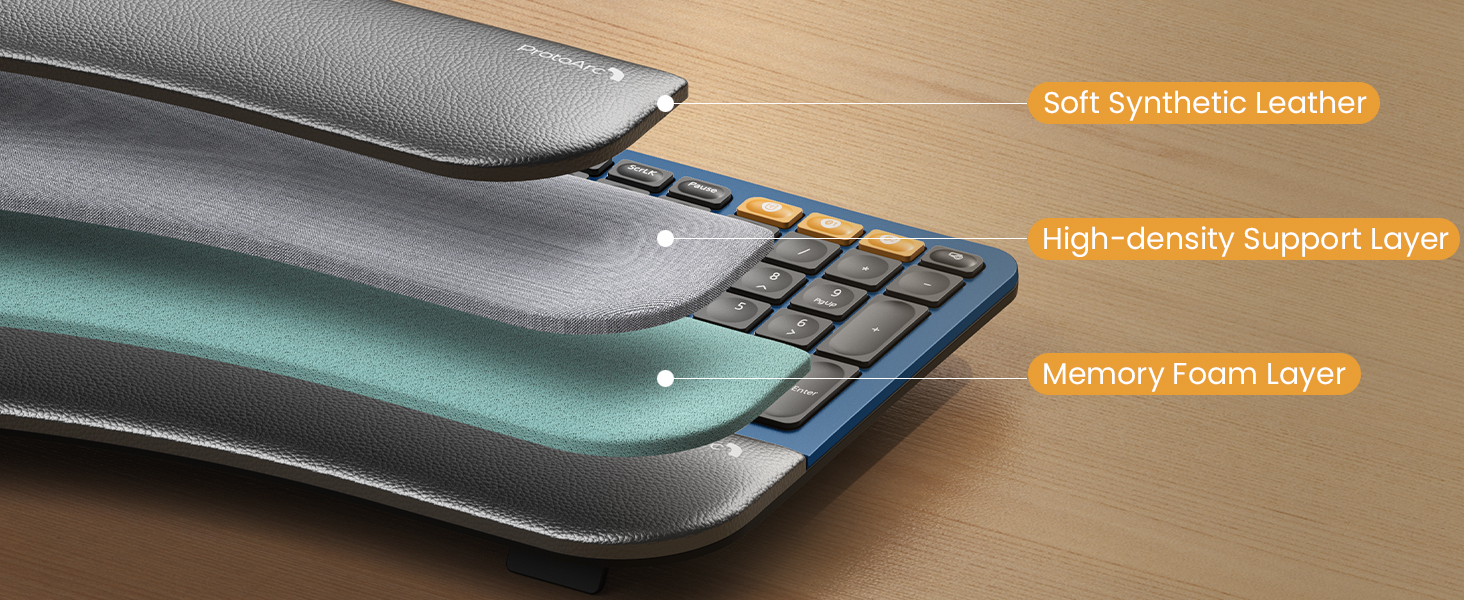 Pillowed Wrist Rest
3 layers of comfort: soft synthetic leather, high-density support foam and comfortable memory foam
 Choose Your Favorite
1 Productivity & Comfort
2 Adjustable Tilt Feet
3 Ergonomic Design
4 More Wrist Support
5 Multi-Color Ergo Keyboard
Comfort and Efficiency at Every Keystroke with Full Size Backlit Ergo Keyboard
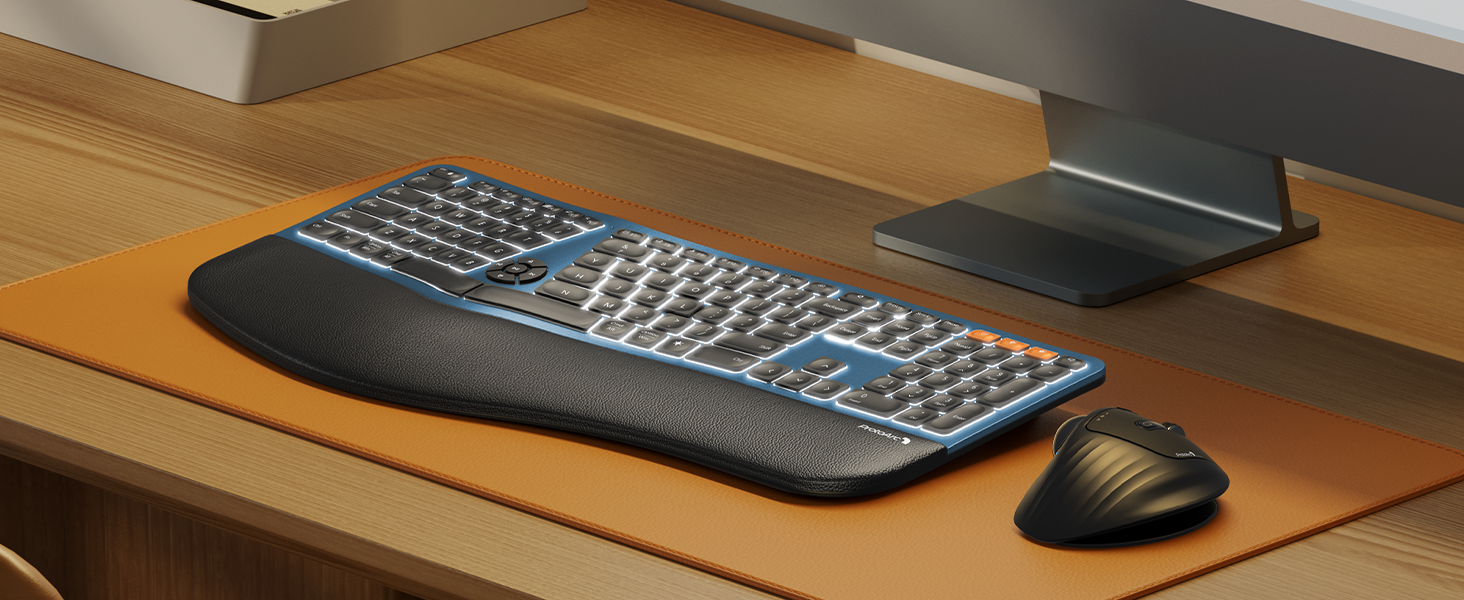 3 Adjustable Backlight Levels
The ergonomic keyboard can easily set three adjustable brightness levels(low-mid-high), allowing for comfortable typing even in low-light environments, without straining your eyes
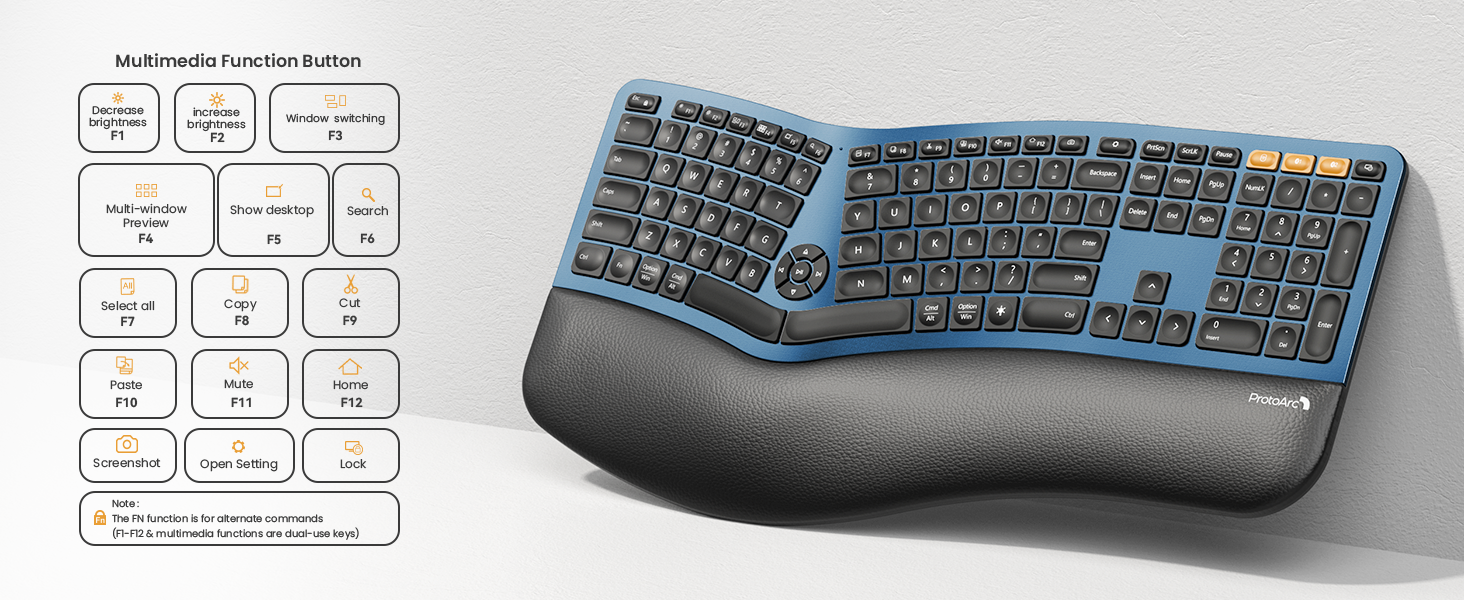
By default, F1-F12 are multimedia function keys. it need to press Esc+Fn to turn off to switch to traditional key functions
Note: All keys of the keyboard are not programmable and do not support wired mode
EK01 Plus Ergonomic Wireless Keyboard
Productivity & Comfort
Type more naturally with ProtoArc EK01 Plus. The ergonomic split keyboard with cushioned palm rest, curved split keyframe and responsive scissor keys – Reduces wrist strain, keep your hands and shoulder relaxed as well as improve typing posture.
The video showcases the product in use.The video guides you through product setup.The video compares multiple products.The video shows the product being unpacked. bluetooth ergo keyboard Merchant Video
Seamlessly Switch 3 Devices to Boost Your Productivity 
In 2.4G mode, the keyboard is not compatible with the Mac OS/ IOS system, resulting in some function keys not being able to be used normally. please try switching to Bluetooth mode
Working Together for a Sustainable Future
 Meet Ergo Series with EM11 NL Ergonomic Mouse
Wireless combo is designed for premium typing comfort and productivity
 Pair with ProtoArc EM01 NL Trackball Mouse
Our wireless trackball mouse, with adjustable angle from 0 to 20 degrees according to your needs for a more natural, comfortable hand position and less muscle strain.

Some keyboard keys do not work / Keyboard keys have typing delay / Keyboard keys repeat typing:
1.Make sure the keyboard is fully charged;
2.Turn off Bluetooth on your computer and then turn it back on
3.Recommended to be compatible with PC devices produced after 2015;
The keyboard cannot connect to your device?
1.Ensure that the keyboard is fully charged.
2.Confirm that the keyboard is in the correct mode.
3.Delete the keyboard’s Bluetooth pairing from your device’s Bluetooth listing.
4.Repair the keyboard with your device.
How to Use Multimedia or F1-F12 function?
FN-Lock key makes it easy to switch between F-keys and Media keys by pressing Fn+Esc. The Bluetooth keyboard comes preconfigured with multimedia functions. Press Fn+ESC key to activate the FN functions, you can perform F1 ~ F12 functions
The brightness control keys are non-functional when using the mac mini m4 with an external mac display?
The brightness control keys of the keyboard are non-functional when used with mac mini m4 and its external display. This issue is expected to be resolved in a future firmware update.
Multimedia keys and Option and Command key functions, combination keys cannot be used normally?
In 2.4G mode, the keyboard is not compatible with the Mac OS system, resulting in some function keys not being able to be used normally. You can try switching to Bluetooth mode
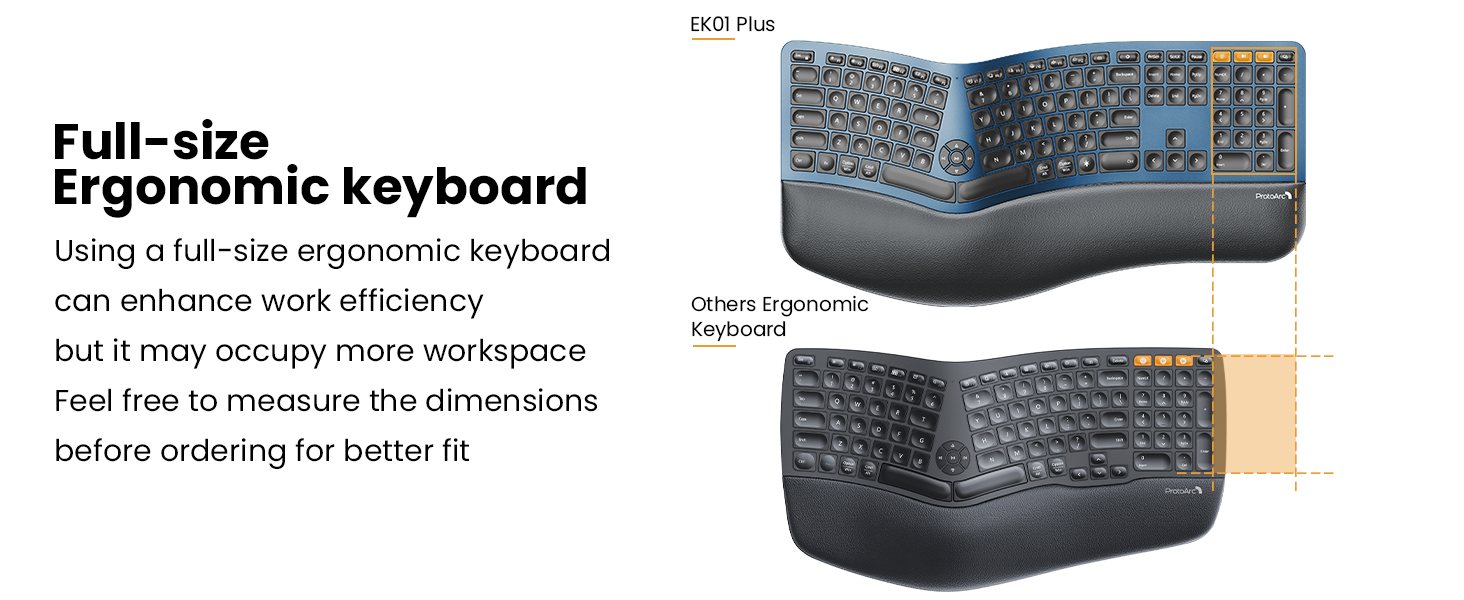
Full-Size Ergonomic Comfort: The ProtoArc Ergonomic Keyboard features a unique curved split-frame design that actively reduces strain on your wrists and forearms and promotes proper posture. The scooped keys are crafted to fit your fingertips perfectly, making typing effortless and natural. Please note: we recommend checking the dimensions before ordering to ensure an ideal fit for your workspace. (While our full-size ergonomic keyboard enhances productivity, it may occupy more desk space)
Cushioned Wrist Rest & Adjustable Tilt Feet: Experience comfort with our ergonomic keyboard. The curved wrist rest provides 54% more support to reduce wrist fatigue, ensuring comfortable typing for hours. With four adjustable tilt feet, you can choose the keyboard to three different angles, keeping your wrists relaxed whether you’re sitting or standing
Since it takes some time to adapt to the keyboard layout when you first use our ergonomic keyboard, it may cause inconvenience to your use, but our ergonomic design will help relieve the muscle pressure on your wrists and forearms
Adjustable Backlighting: The ergonomic keyboard features soft white LED backlighting with three adjustable brightness levels (low, mid, high). Whether you’re typing in a dimly lit room or a bright office, you can set the suitable brightness to reduce eye strain and stay productive
Note: The keyboard backlight adjusts based on inactivity periods to conserve power: After 1 minute: Backlight turns off (press any key to wake); After 60 minutes: Enters deep sleep mode with backlight disabled (press any key to wake the keyboard within 3 seconds, then manually turn on the backlight)
Seamless 3 Device Switching: Switch between devices effortlessly. With Bluetooth and 2.4G USB connectivity, this wireless keyboard can pair with up to three devices simultaneously. A simple key press lets you jump between your laptop, tablet, and computer. It’s compatible with Windows 8/10 or above, Mac OS X 10.12 or above, Android 4.3 or above, and Microsoft systems. (The keyboard cannot be connected via wire)
USB-C Fast Charging: The ergo keyboard is equipped with a large 2000mAh rechargeable battery, offering extended working hours—especially with the backlight turned off. Focus on your tasks without worrying about frequent charging.(The USB charging cable can only be used for charging, not for wired connection)
Charging Tips: For optimal performance, charge the keyboard using a computer’s USB port or a DC 5V 1A charger. Avoid using fast chargers or high-power adapters, as they may affect the keyboard’s performance. (All keys of the keyboard are not programmable)
In 2.4G mode, the keyboard is not compatible with the Mac OS/ IOS system, resulting in some function keys not being able to be used normally. please try switching to Bluetooth mode; By default, F1-F12 are multimedia function keys. it need to press Esc+Fn to turn off to switch to traditional key functions
Customers say
Customers find this keyboard to be a high-quality replacement for Logitech and Microsoft ergonomic keyboards, with good tactile feedback and a soft wrist rest. They appreciate its amazing backlight with three brightness levels, comfortable typing experience, and straightforward Bluetooth connection that connects mostly by itself. Customers describe the keyboard as extremely easy to use and very quiet during operation. The functionality receives mixed reviews, with some customers reporting that certain keys don’t consistently work.
8 reviews for ProtoArc Backlit Bluetooth Ergonomic Keyboard, EK01 Plus Full Size Wireless Split Keyboard with Dual Bluetooth and USB, Cushioned Wrist Rest, Rechargeable, Compatible with Windows/Mac/Android, Blue
Add a review
Related Products


Original price was: €100.€80Current price is: €80.
Banjoey –
Great keyboard; feels good on my RSI wrists
After almost 20 years, my Microsoft Natural Keyboard 4000 started to break down on me. I’ve had to learn to touch type because the letters have worn off over the years. I have been in development/IT/cybersecurity for many years and have carpel tunnel/RSI/whatever-its-called-these-days and a natural keyboard with a split key design is a necessity. But I’m quite picky with my keyboard and wanted to find something that would suit me.This unit fits the bill perfectly. I don’t like really loud mechanical keyboards. Some people do but I do not. This keyboard has a good tactile feel to the keystrokes so that I can tell if my presses registered without me having to look at the screen, but it’s not so loud that people on my zoom calls ask me to mute my microphone because of the noisy keys.Another feature I like about this one is that it is similar (not identical) to my old unit regarding the wrist rest. It is some type of faux leather with some texture to it, but is also slightly padded. Not so much that it makes it awkward, but just enough to keep it from being too firm. Very comfortable. The keys are spaced appropriately and I had no trouble adjusting to this new keyboard even though the keys are significantly different from my last one.Some of the nice features about this keyboard are that it has volume up/down controls in the center of the keyboard, along with play/back/forward keys too. There are some handy keys available for use with this unit as well, but I’m a pretty simple user.While my last keyboard was usb, this one is wireless, but I had a requirement of not wanting a bluetooth keyboard. I have a KVM switch on my desk for my home laptop and my work laptop, as well as other “mad scientist” computer experiments, and this keyboard allows me to plug in an RF USB receiver into the KVM instead of being forced to use bluetooth. It does have bluetooth and an easy to use switching system for multiple computers (separate buttons included above the numeric keypad), but because I’m sometimes installing operating systems, etc., it is a must for the keyboard to appear as a native USB HID on the target computer. This ProtoArc device works perfectly in that regard and I’ve had no problems with any computer I’ve worked on so far, and I’ve tried at least 7 various units. It works great with my KVM, or plugged directly into the computers.Another feature I didn’t think I would care about but has been very handy on quick trips into the office when I do not turn on the overhead light is the backlighting of the keys. I thought this would be very over-rated but has turned out to be the “surprise” utility function for me.overall the feel is great, functionality is superb. I hope to be posting about a new model in about 20 years when the keys are so worn off that I can’t tell what key is what anymore. I’ll definitely see what ProtoArc has to offer for human input devices at that time as well…
James Corona –
Great ergonomic keyboard.
This is my first venture into using a split keys keyboard. I have taken a different job that requires me to type a significant amount of my day. I quickly developed a repetitive motion problem with my left picky from using the shift and CTRL keys to capitalize and copy paste.Using an ergonomic keyboard has changed the location of those keys so I didn’t have to strain that finger to type. Additionally, the new position of my hands makes typing a good part of the day much easier on my hands and body.What makes this ergonomic keyboard stand out?The keys near the center remain near standard size. The space in the middle is allowed to naturally be there.The rest of the keyboard layout is similar to all the other 101 key keyboards so you do not have to adapt to a different key placement of special function keys.The media controls are in the space between the keys. I didn’t have much of an opinion either way until I started using them to control the volume on the podcasts I listen to. The placement keeps me from having to find the correct controls on the function keys,It is back lit. I am not a trained touch typist and find myself looking at the keys fairly often to reset my fingers on the keys.It is rechargeable. I charge it at the end of the week and have not had a problem with it dying during my work week. If it did all you need to do is connect it to a USB C charging cable and it gets a full charge in about the same time as it does tour cell phone. You can use it while it is charging.The feel is great the keys have a good resistance and a comfortable travel distance when you push them. You might even find yourself pressing a little less.Maybe the most surprising thing is the heft of the unit itself. It weighs a significant amount. Much more than my Logitech I replaced it with. The advantage of this is it stays in place on my desk . I don’t feel it sliding as I type. This is a problem, as I do have a lot of hand movement when I type, and I do not find myself having to reposition the keyboard before homing my fingers. When you type it feels solid on every key press.It has the ability to connect to multiple Bluetooth devices and still use the receiver provided to communicate with another without having to do anything beside pick the device on the orange keys.The wrist rest is padded and is something I didn’t have on any other keyboard before this one. It definitely adds to the overall comfort of the unit.
Diana A. Valverde –
Great Ergonomic Keyboard!!!
Super comfortable and easy to connect to my computer. Loved the wine color! The backlit option is just a plus. It works perfectly and quick. Keys are subtle and not loud. Overall great built!
Mise –
Les van mis comentario, uso bastante el teclado, vengo de un Logitech mx keys muy bueno por cierto pero nada ergonómico, este teclado me ha ayudado bastante con el tema del dolor de muñecas, es bastante buena la iluminación y el famoso retraso de reconexión no me lo ha hecho, las teclas son suaves al tacto y no necesitas hacer mucha presión para escribir, la baterÃa me dura una semana mas o menos, sà le doy bastante uso, el cambio entre mac y windows no me ha afectado ya que el teclado cuenta con la iconografÃa de ambas plataformas, el único pero que le pongo es el lenguaje que solo es en inglés, bueno eso vi cuando lo compre, como escribo sin ver las teclas no me afecta pero las persona que buscan los signos ortográficos si tendrán problema por que no son los que deberÃan ser hay que buscarlos picando uno por uno hasta que salga el que deseas, !tómenlo en cuenta!, el teclado cuenta con un cubre polvo transparente de latex, eso me gusta pero sinceramente no lo uso me dificulta escribir rápido, se lo pongo cuando no lo uso.
Princess –
Number 7 in the key board for some reason is not working?!
Duc Thanh Tran –
This keyboard arrived on the same day : Charlie Kirk got assassinated. This keyboard model is Charlie Kirks wife Initials. Well designed keyboard, scissors clicks feel comfy. And there is a silicon keyboard cover included. No additional software required, connect via Bluetooth allows all of the keyboards functions.
G. Clarke –
Amazon Vine Review – March 2025Backlit, Rechargeable, Wireless, Bluetooth, Ergonomic, Full Size Split Keyboard with Cushioned Wrist Rest – Gray Ball – Model EK01 PLUS â by PROTOARCThis review may be longer than most. If you are genuinely interested in this product, please take the time to read it and indicate if you found it helpful.MY STORY:We all know what a standard or traditional computer keyboard looks like, but an ergonomic keyboard breaks the mould! Even if you’ve used an ergonomic keyboard before, this one is more innovative and user-friendly than any you may have encountered â I promise! I can admit that I previously owned a first-generation ergonomic keyboard. While it was a reasonable effort at the time, I eventually returned to using a traditional keyboard. However, I was thrilled when I discovered this new ergonomic keyboard. It stands out from all the rest. I believe that the split keyboard makes all the difference. My personal experience with it has been reassuring.I have written this review within a limited timeframe based on my personal experience with the product. I objectively assess the positive and negative aspects to help you determine if this product is right for you.This product became available on the Amazon Canada site in January 2025, and I requested it in late February 2025. I have been using it ever since.NOTE: All measurements provided are my own. I have attempted to be as accurate as possible; however, they should be regarded as “approximate.”WHAT YOU GET:This product arrived in the indicated time frame. It was as described by the seller.The packaging is outstanding. You know right away that you have something extraordinary.Included in the package are the following:⢠backlit, rechargeable, wireless, Bluetooth, ergonomic, full-size split keyboard with cushioned wrist rest. The keyboard weighs 1064g (37.5oz) and measures L 48cm x W 23cm (at the widest point) x 2.5cm (at the highest point) [ L 19in x W 9in (at the widest point) x H 1in (at the highest point)].- Keyboard dust cover included;⢠an envelope of welcoming literature and other product offers;⢠a detailed Quick Start Guide;⢠a User Manual in English, French and German;⢠a USB dongle receiver (embedded in the underside of the keyboard) or, alternately, you can connect via Bluetooth;⢠and a USB dongle receiver â L 82cm (L 32 ¼ in).The team at PROTOARC is deeply dedicated to their company and its unique identity, a pride reflected in every aspect of their work. This particular product, a testament to their dedication, was designed by a gentleman named Howard. Congratulations are for both him and the team supporting him. In contrast to many other companies that make contact information hard to find, PROTOARC has its details displayed in nearly every part of the box and its contents. They even include a sticker with their contact information for the underside of the keyboard.Adjusting to the ergonomic keyboard and its layout may take some time, but stick with it. You can return it within 30 days if it’s not for you. PROTOARC covers you with a 2-year Premium Warranty, so keep your Amazon order details.This keyboard can be used for three separate devices simultaneously. It has an optional background light with three adjustable brightness levels. The background lights turn themselves off after about 3 minutes of inactivity, yet they turn back on as soon as you hit any key. When not used for more than 60 minutes, the keyboard will automatically enter sleep mode and wake up by pressing any key.The User Manual covers features such as a 2.4G USB connection and Bluetooth connection, how to switch device channels, a charging guide, multimedia function buttons for Windows, Android, iOS, and Mac OS, and the use of special characters.One full charge of the keyboard takes 2 to 3 hours. You should use the USB-A port on your computer, not a fast-charge device. The battery capacity is 2000mAh.The keyboard has an effective operating distance of 8m (26 ft) â really?WHAT I THOUGHT OF THE PRODUCTI found the setup quick and easy. The User Manual is friendly to use. It only took me a few days to become proficient in using this ergonomic keyboard. I can’t imagine going back to a traditional keyboard. This is fun to use.I am very impressed with this new keyboard, so I have also purchased a PROTOARC wireless trackball mouse to accompany it.I am pleased to offer this Backlit, Rechargeable, Wireless, Bluetooth, Ergonomic, Full-Size Split Keyboard with Cushioned Wrist Rest, Model EK01 PLUSâby PROTOARC, with a 5-star rating.
Lee –
Nice keyboard, nicely replaces my old Microsoft ergonomic keyboard.The keys are flatter, more resembling a laptop keyboard, so still adjusting for that.Bluetooth connection was a breeze.I like the Lock button and the multi-connection feature I can imagine will be useful in the future.Excellent value for money.