

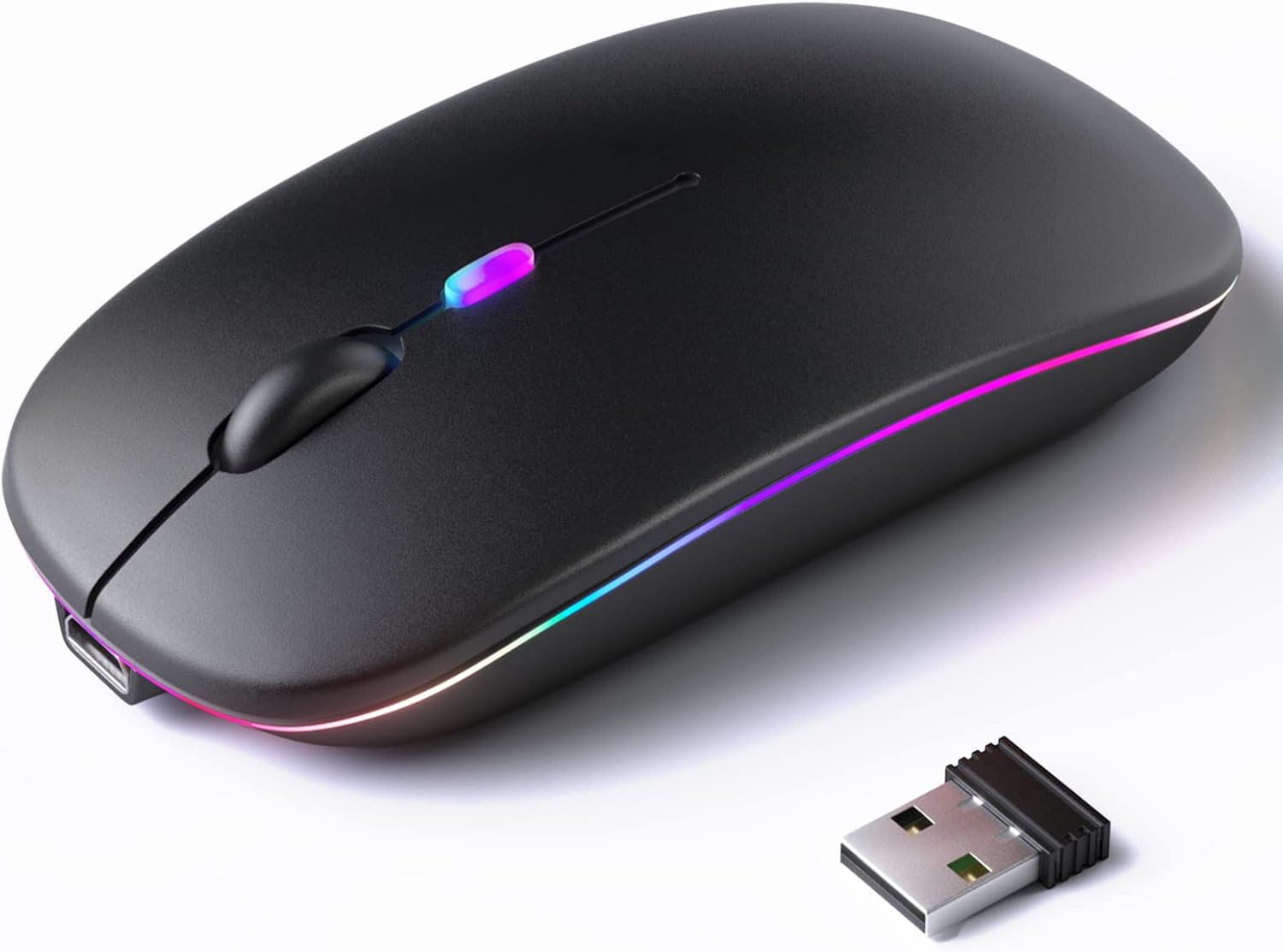
Rechargeable Bluetooth 5.2/3.0/Type-C/USB-2.4G Mouse for MacBook/MacBook air/Pro/iPad, Wireless Mouse for Laptop/Notebook/pc/iPad/Chromebook (Black)
Original price was: €12.€11Current price is: €11.


Price: $11.85 - $10.85
(as of Jul 27, 2025 08:29:39 UTC – Details)
RECHARGEABLE DUAL MODE BLUETOOTH MOUSE(Bluetooth 3.0/5.2+Usb-2.4G/Type-C)
It is compatible with Mac OS Windows XP, Vista, 7, 8, 10and is suitable for desktop, notebook, PC, Mac Macbook Pro/Air/ipad/iMac and other devices.
How to use it Bluetooth Mode:
No need to occupy PC interface, fast and stable connection, Turn on the device’s Bluetooth function,Switch to “ON/OFF” button to left(Bluetooth mode),Search the product of Bluetooth and find “BT5.2/3.0 Mouse” to pair,It’s ready to use.
How to use it 2.4Ghz Mode:
just take the USB/Type-C receiver from the bottom of the mouse, then insert the USB/Type-C receiver into the computer USB/Type-C port,Switch to “ON/OFF” button to right,Then you can use the mouse in 2.4GHz Mode.
How to connect to iOS/iPad/Pro/Air/iPhone (ios 13/ios 14) via Bluetooth Mouse
first slide the button at the bottom of the mouse to the bluetooth ” ” position ( bluetooth mode), open tabletSettings >Accessibility > Touch > AssistiveTouch > Click to open (An auxiliary dot will appear on the screen),Go back to Settings > Click on the bluetooth > Click to open > BT 5.2/3.0 MOUSE > connect and Pair.(PIN:0000)
Note: The mouse cursor will move slowly or stop moving when the mouse is low battery,Please charge it in time. The blue light beside the scroll wheel will be on while charging, and then goes off when the mouse is fully charged,It takes about 2.5 hours to fully charge.
Packing list:
rechargeable dual-mode mouse *1
USB charging line *1
USB2.4G/Type C Nano USB receiver *1(hidden in the slot at the bottom of the mouse)
Instructions*1.
Upgrade version Rechargeable 4 Modes bluetooth mouse(Bluetooth 3.0/5.2+USB2.4G/Type C), Dual-port 2-in-1 Receiver USB2.4G/Type-C You can switch between the 4 connection modes, adds more fun to the boring office life.
It is compatible with Mac OS Windows XP, Vista, 7, 8, 10and is suitable for desktop, notebook, PC, Mac Macbook Pro/Air/ipad/iMac and other devices.
Built-in durable Lithium polymer rechargeable battery,You can use the USB cable to charge the mouse without replacing the battery,Just 2-3 hours charging, you can use it about 7-30 days, Standby time is very long, energy-saving features, automatic sleep mode and wake-up mode are installed to save energy,If you do not use the mouse for 5 minutes, it will go to sleeping mode.
4 mode bluetooth mouse is designed ultra-silent and reduce noise by up to 96% compared with others, Sleek, well-built and lightweight , Contoured shape to fit comfortably in the palm of your hands so you can stay productive longer.
3 DPI switches (1000, 1200, 1600) change the speed of the mouse freely,This bluetooth mouse can meet your demand of daily office working and personal preference.
Customers say
Customers find the mouse easy to connect and appreciate its appearance, particularly noting how well it matches gold-colored MacBooks. The battery life and functionality receive mixed reviews – while some report great battery life, others mention it only lasts a few days, and while some say it works well, others report it stops working completely. Moreover, the durability is concerning, with customers describing it as flimsy, and the value for money receives mixed feedback, with some considering it good for the price while others find it not worth buying.
10 reviews for Rechargeable Bluetooth 5.2/3.0/Type-C/USB-2.4G Mouse for MacBook/MacBook air/Pro/iPad, Wireless Mouse for Laptop/Notebook/pc/iPad/Chromebook (Black)
Add a review
Related Products




Original price was: €12.€11Current price is: €11.
Anonymously –
This mouse in incredible! Now I can right-click in Metatrader!
At $13.26 after tax this mouse seems like a great deal. It works flawlessly with my Late 2013 Macbook Pro 13″ Retina with High Sierra MacOS Version 10.13.6. When it first arrived I used it with the cord and just left it plugged in the laptop all day yesterday, today I’m using it without the cord and it’s great. I’m getting ready to order a hard mousepad today.The reason I bought this mouse is because I use Metatrader 4 and Metatrader 5 and you can not right click just using the Macbook Trackpad. So even though I like my Macbook by itself just using the trackpad, there are a lot of functionalities that you can not access without an external mouse. Even though I bought my Mac back in February 3, 2014 I just now discovered a need for this mouse, but now having used a mouse with my Macbook I’ll never look back, there’s nothing like the convenience of using a great mouse that works great. It’s a lot less work for my hands. I never noticed how hard my hands were working really until just now when I started thinking about how much easier using this mouse is. Anyway thank you so much. :)Note: I love the sleek design, light-weight, the fact that it’s a lazer, the last mouse I used was an old-school rolly-polly mouse, haha. It’s a bit slippery on this card-stock paper I’m using, but maybe getting a hard mouse-pad with some grippiness to it will help, because specifically when I’m using my computer in bed, the mouse is not on a level surface.So like I was saying, now I have full access to all the features of Metatrader by being able to right-click on stuff. (*see picture) This is likely to be the case on many Windows tools that have been adapted to run on Macs.UPDATE: The cursor seems to move, it drifts, is there any way to calibrate it so it does not drift? is there any software that can help with this? late 2013 macbook pro high sierra 10.13.6NEW UPDATE: The cursor no longer moves or drifts and works perfectly! Something I hadn’t figured out before is that ALL YOU HAVE TO DO TO TURN THE MOUSE BACK ON IS CLICK THE MOUSE! Before I figured this out I was “re-pairing it” to the blue-tooth which was really so annoying. But now that I know how to properly use it it is amazing. Thanks!
AJohnston –
Great item, great value
Low profile and easy to set up and works great with my MacBook Air.
Linda –
Cute and functional
The color of this mouse is great and works with the laptop that it is supposed to. Easy to charge and use.
Derek Alvarez –
Good physical quality and battery life, functionality is not 100% there
Bettery life is great.Range is not as good as I would expect for a bluetooth.I am constantly having to click endlessly to get it to reconnect.Not a deal breaker because I have used it for about a year now, but it is a bit cumbersome
Ry –
Perfect!!
I admit at this pricepoint I was worried, but this little mouse is PERFECT. I’ve only been using it about a weekl and a half now so will check back in if anything changes, but so far very good!I’m super picky about my computer stuff and when it comes to a travel mouse I just want something simple that doesn’t take up a lot of space, but also wanted it to be “cute” to go along with my mac stuff. This mouse nails it all.I love that it’s Bluetooth so I don’t have to worry about losing any wireless dongle or deal with batteries. It uses the same USB charging cable as a number of my other devices (like my kindle), so I don’t need to travel with a ton of cables. Huge plus!Yes, it is super lightweight. Other reviews mentioned it felt cheap and I get that, but I don’t agree. I think it looks sleek and is weighted just fine for mouse use, but so lightweight that is barely an addition to my travel bag. It does not appear to be flimsy at all either.I don’t travel with a mousepad, usually opting for a magazine or book, but I don’t even need to do that. I just plop it on the table and it works great. There’s enough friction on the little feet to keep it stable on a tabletop.Pairing is as simple as anything else on my Macbook 2018 running Catalina. Also works smoothly while running sidecar with my iPad. I haven’t connected it directly to the iPad so I can’t speak on that.Responds just like any other mouse I’ve used, no lag whatsoever.I charged it fully before I left and it held that charge for an entire week of use before I started to see signs of it slowing down a bit. It also charges up very quickly.Bonus: I didn’t realize until today that you can quickly adjust the dpi by clicking the middle mouse button. Love that!Honestly, at this price, this is a no brainer. A must get for anyone who needs to save a few bucks but still wants that “mac” vibe.
Sanjay –
Very good product for my mac book ,good quality material used , happy with product
Mac_coder –
Worked straight off the bat with my macbook air. The only thing would be great to see a battery percentage so you know how much charge it has. Other than that, its an excellent mouse. The button clicks feel really nice after using a very old wired logitec mouse for the last 9 years!
Fb –
Working good
T Wheeler –
Mouse “sleeps” and loses Bluetooth connection. Wakes and connects after moving or clicking. Not the same as an Apple mouse.
Leonora Contreras –
Excelente calidad cumple con su función y dura bastante