

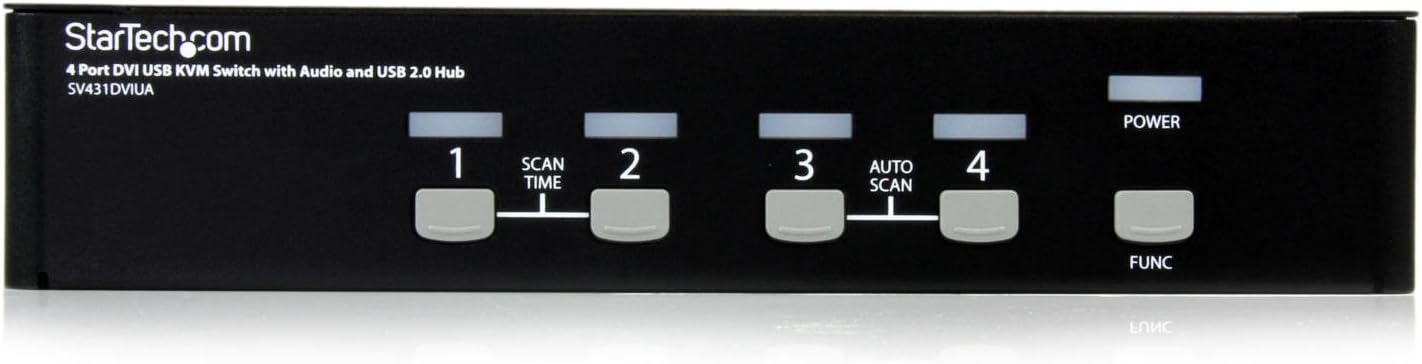
StarTech.com 4-Port KVM Switch for DVI Computers – 1U Rack-Mount KVM Switch with Audio – DVI KVM switch -2 port – 1U , TAA (SV431DVIUA)
Original price was: €229.€188Current price is: €188.




Price: $228.99 - $188.00
(as of Sep 30, 2025 06:25:57 UTC – Details)
General InformationManufacturer:StarTech.comManufacturer Part Number:SV431DVIUAManufacturer Website Address:www.startech.comBrand Name:StarTech.comProduct Name:4 Port DVI USB KVM Switch with AudioProduct Type:Analog KVM SwitchTechnical InformationNumber of Computers:4Number of Users:1Video Signals:WUXGAGraphics Resolution:1920 x 1440Graphics Resolution:1920 x 1200Interfaces/PortsUser/Console Ports:4 x 4-pin Type A Keyboard/MouseUser/Console Ports:1 x DVI Female VideoUser/Console Ports:1 x Mini-phoneUser/Console Ports:1 x Mini-phone AudioComputer Ports:4 x DVI VideoComputer Ports:4 x Mini-phone AudioComputer Ports:4 x 4-pin Mini Type B Keyboard/MousePhysical CharacteristicsForm Factor:19″ Rack-mountableHeight:1.7″Width:8.7″
Share keyboard, mouse, speakers and a DVI display between four multimedia computers
4 Port DVI USB KVM Switch
4 Port DVI KVM Switch with Audio
Built-in 4-port USB 2.0 device hub for sharing high-speed USB devices
Perfect for demanding high resolution applications (2560×1600 @60 Hz (Analog)
Customers say
Customers find the KVM switch works well and consider it a good unit. They appreciate its compatibility, with one customer noting it works with Corsair Strafe RGB keyboard, and another mentioning it’s great for multi-format PCs. The port size receives mixed feedback – while one customer appreciates the 4 USB hub ports, others note the DVI ports are too close together. Value for money opinions are divided, with some finding it a great value while others consider it expensive.
9 reviews for StarTech.com 4-Port KVM Switch for DVI Computers – 1U Rack-Mount KVM Switch with Audio – DVI KVM switch -2 port – 1U , TAA (SV431DVIUA)
Add a review
Related Products



Original price was: €229.€188Current price is: €188.
fba –
Good KVM, one annoying issue..
I picked this up for my work desktop to replace another 4 port KVM. The older KVM I used had a lot of problems with being connected to a Mac computer and a PC at the same time. When both were connected, input on the Mac would be delayed and often lost making the KVM unusable.I have used other StarTech.com equipment in the past, and generally been happy with it, so I decided to give it a shot. The result, while not perfect, is miles away better than the older KVM that I had. I currently have the KVM connected to a home-build desktop PC, a current generation Mac mini, a Chromebox, and an older generation Mac mini. I have not had any problems with the input to any of those machines when using this KVM.One other problem my old KVM had that this one doesn’t, is with the resolution on the monitor. When I booted a machine that wasn’t the one selected on the KVM, the machine would usually end up with its resolution set to something low, like 800×600. So when I switched over to the machine, I had to muck around to get the resolution set right. With this StarTech, all of the machines boot to the 1080p resolution that the monitor supports, so I don’t have to mess with settings to get it to look right. It just works. (And, IMHO, “It just works” is about the highest level of praise you can give a KVM.)That said, it isn’t perfect. About 1 in 20-30 switches I end up in a weird state where the screen shows the right machine, but the keyboard and mouse don’t seem to function. It also seems to happen more often when you switch quickly between devices. However, the vast majority of the time you can clear this up by switching to a different machine, making sure the keyboard and mouse are working there, and then switching back to the machine you want to work on. It is annoying (which is why I only gave this 4 stars), but it is tolerable.One thing for people that don’t buy KVMs very often. This KVM does NOT come with the cables that you need to actually hook everything up. For most of the KVMs I have purchased and used in my life, this has been the case. So, make sure you either have cables, or order some. Also, be aware that the DVI ports on this KVM are VERY close together. So, when buying cables, make sure there isn’t much extra material on the edges of the connector. If the plastic on the connector sticks out much beyond the edge of the screw connectors, it probably won’t fit. My old KVM had connectors that had just a little bit of plastic beyond the screw terminals, and they barely fit. However, you would be hard pressed to fit a piece of paper between them. That is how snug they are.I also can’t comment on how well the audio or 4 port hub works, as I have not used those. But, my Microsoft Natural 4000 keyboard, and my Logitech M510 (wireless) mouse work just fine with this KVM.Overall, I think this is a very solid KVM for the money.
tombot –
Works like I hoped. Has a 3 year warranty (parts & labor)
It works as I had hoped. I like the 4 mounting screw holes on each side. Ostensibly they are for mounting in a 19 inch rack, but I wanted to mount it underneath the desktop. So I made my own brackets and now I can slide it in and out under my desktop. That’s a nice space saving idea. Why add to the clutter on the top of the desk?I didn’t want it permanently mounted, cuz then it would be harder to get to the cables.The video switches first, followed by the usb ports (mouse, keyboard) after about a second or two.A lot faster than the usb switching of the Belkin that it replaced.As others have noted, it doesn’t have a feature to remotely switch. And I was thinking that after the warranty runs out, I would hack into it and wire relays in parallel with the front panel switches in order to allow remote switching. But then I found out that it has a 3 YEAR WARRANTY (parts & labor). Wow! Now I have to rethink that strategy.And can you think of any other electronic products that have that long of a warranty without paying extra?They offer accessory brackets for 19 inch racks, but it would be nice if they also offered inexpensive plastic sliding brackets for mounting under the desktop.
SMALLJOES –
More trouble than it is worth, largely due to multiple malfunctions.
Very unreliable.At first it switched audio, then completely quit cooperating with the audio. Only way I could get around that problem was to connect my speakers directly to my main computer leaving the other computers with no audio output.It frequently gets confused on the video switching too. It will not tolerate systems which attempt to use different monitor resolutions. After forcing all systems to use the same monitor resolution I thought I had that one solved – but no. It still flakes out randomly, stranding one of the running computers with no video feed. Power cycling the KVM didn’t fix it. To “solve” that, I had to manually disconnect and reconnect the video feed for that computer. This product isn’t very useful if I routinely have to manually disconnect various cables to keep it working.Sadly, I kept this thing around long enough that I now cannot return it. I strongly discourage others from buying this lest you be disappointed. It is not worth the hassle.
IT Guy –
Works great, but one important caveat
Bought this KVM switch after my old one kept hanging and not wanting to work with DVI inputs. This one works fine, but one important caveat: The DVI input ports on the back are so close together that my cables would not fit. I had to file down the sides of the cables by one or two millimeters so they would fit in properly (luckily the cable ends are plastic, not metal). Otherwise it works fine. I don’t care about audio, so I haven’t tested that functionality.
jmackus1 –
Ok product, does not work with keyboard commands…excellent tech support
Keyboard commands do not work. Very expensive. Excellent tech support though.
G. Hobson –
Solid for the price
This is a great value for the price. Only thing really we wish it has was the ability to change which port is visible remotely – but you are going to pay more for that feature. So far so good.
Eric –
Functionally works as advertised. I used this as an …
Functionally works as advertised. I used this as an upgrade from older computers using PS2. The upgrade to this product showed the limitation that this unit DOES NOT use keyboard switching as previous models did. Although this unit works as described, I really miss the keyboard control.
Remo De Iuliis –
I had 4 Win 7 Pro (64-bit) [now upgraded to Win 10] computers connected to the StarTech 4-port DVI USB KVM switch.This KVM looks good on paper, but unfortunately lacks in performance.As long as the computers are all awake, the switching among computers is usually fine. However, once a computer goes to sleep, accessibility becomes problematic. Indeed, if a computer is in the sleeping mode for an extended period of time, it will usually be unable to come out of it; the only way to reactivate it is with a cold boot using the power switch. Sometimes, when switching computer, the display gets messed up by switching to some unsupported resolution.Another annoying quirk is the frequent audio disconnections, each time triggering the Realtek Audio Manager to pop up.(The only time this switch is of any use is if you only have one computer on at a time, provided you’re willing to put up with the audio disconnections.)I even went to the trouble and expense of purchasing StaTech’s integrated cable systems, which did nothing to correct the problems. (While most other manufacturers include integrated cables, StarTech charges approx. $35 per computer.)I would have returned the item, but waited too long hoping that I might be able to solve the problems — experimenting with various computers, setups, cables, etc.My advice… save your money and look for alternatives.
Sal Martorana –
work well easy to set up.. my only disappointment is that there is no option for short key ( keyboard) swapping as in other KVM… but still very happy with it