

THUSTAR 8MP Document Camera & Webcam 4K with Dual Microphones, USB Visualiser A3-Size, 3-Level LED Lights, Image Invert Function, Fold, for Live Demo, Distance Education -Windows, macOS and Chrome OS
€54





Price: $53.98
(as of Aug 03, 2025 02:01:22 UTC – Details)
Product Description

2-in-1 8MP document camera online teaching & 4K Webcam:
Use real-time image capture to bring new levels of engagement to your classroom courses and presentations. The lens module can be rotated downwards as a document camera to capture documents and handwritten notes, and rotated upwards can be used as a high-definition PC camera for web meetings
3-in-1 function of home, school and office:
The compact base design frees up desktop space, allowing you to use it in different environments. At home, use it with webinar software for remote teaching. In schools, use it to capture small objects and project teaching materials onto a big screen. In the office, use it to optimize participation in presentations and web conferences (Foldable and portable)
Works with a variety of software and applications:
THUSTAR 4K usb camera works with a variety of software and applications on Mac, PC, and Chromebook that allows you to use it in different ways. You can also use it to create flipped classroom videos with software such as Seesaw, Camtasia, or OBS In addition, you can even double it up as a camera for online meetings, video conferencing, or remote teaching when used with video conferencing software such as Zoom GoToMeeting Skype, or Google Hangouts.

3-levels adjustable brightness:
The camera comes with 14 ring lamp beads, 3-levels adjustable brightness, which can eliminate the trouble of shooting in difficult lighting conditions, allowing you to capture objects in dark and bright environments, and also can realize selfie filling function

Adjustable Image Brightness:
USB camera has brightness (+) and brightness (-) buttons, you can manually adjust the image brightness with 10 degree, to ensure you get a clear picture(+) Button: brightness adjustable to 10 degrees(-) Button: brightness adjustable to 10 degrees

Built-in two microphones:
Built-in dual microphones are convenient for recording music lessons, podcasts or games, as well as distance learning, online lessons, streaming or video calling with loved onesThe microphone has a noise reduction / cancellation system, a sampling rate of 8000 / 16000Hz and an accuracy of <5 PPM

Maximum catch area: A3
It can better capture 2D and 3D objects, shoot high definition pictures and videos. Maximum coverage area: 16.5 “x 11.6” (A3 paper)

Simple screwdriver included in the base of the stand:
If the document camera mount is loose, you can use the simple screwdriver we provide to adjust the tightness

The package contains a type-c connector:
It uses a USB Type-A connection and comes with a USB Type-C adapter if a USB Type-A port is not available on your system

Super high-quality live broadcast:
Your thustar document camera is equipped with an ultra-high resolution 8MP SONY CMOS sensor that captures real-time images up to 3264 x 2448 pixels at 30 fps. The camera’s autofocus lens can instantly move the focus between objects (minimum distance = 10 cm)
Reverse image up and down, reverse image left and right buttons:
The THUSTAR document camera with this function, no mirroring function that can be realized without the use of software
3 levels of image brightness adjustment, 10 levels of image exposure adjustment:
Built-in LED lighting will allow you to illuminate objects in low light areas. Just press the touch button on the top with the LED lampshade to turn it on or off, can use the THUSTAR camera in any environment
Overview in Full HD (2448p):
Use the THUSTAR multifunction camera to create promotional and educational videos, teach in class and online, participate in video conferences, give live demonstrations, provide remote service. Whatever the use, the picture and sound quality is always crisp and clear
Compact, light and height adjustable:
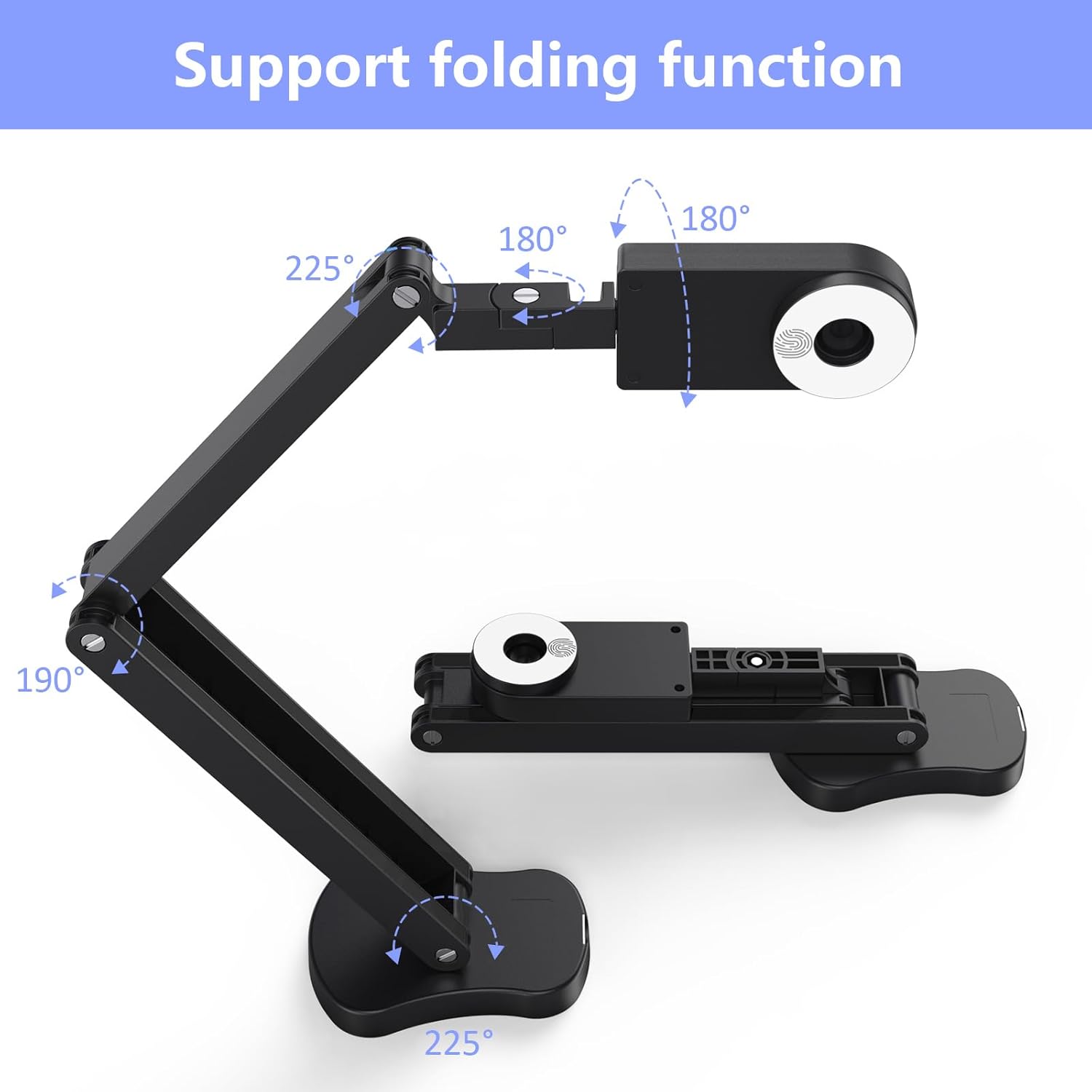
Easy to carry, weighs 665 grams, with foldable arms, you can easily carry it with you. The unique structure of the multi-articulated arm and rotatable camera makes it possible to capture images and videos from all angles

Mirror left and right button:
When making a video call, recording a video, or taking a picture, the picture obtained is not normal, and the picture is left and right reversed, then you don’t need general video software to set it up, you can directly use the “left and right reverse” on thustar document camera. Turn the button to adjust, and click the button of “left and right reverse” to get the image you want.
Mirror up and down button:
When making a video call, recording a video or taking a picture, the picture obtained is not normal, and the picture is upside down, then you don’t need general video software to set it up, you can directly use the “Up and Down” button on thustar document camera “Button to adjust, click the “Up and Down” button to get the image you want.

Distance video instruction
The camera mount can be reversed for remote video teaching and chatting

Course demonstration
Share student experiences for peer review, demonstrate a technique, or record lessons and presentations

Suitable for playing games
If you are gaming, surfing, or streaming, you can configure the camera as a face camera, manual camera, or keyboard camera

Remote video conferencing
It can be used as a webcam. When you work at home, you just need to connect the computer with USB to chat

The document camera is compatible with Tiktok, Zoom, Skype, Google Meet, Microsoft Teams, FaceTime, etc. ! You can start a video conference with doc cam in 3 steps:
Step 1: Plug in the computer. It will be automatically detected. No need to install any drivers or other softwareStep 2: Launch the desired video sharing appStep 3: In the settings menu, change the camera source to “Stream Camera” and you can start using it.Finally: Image resolution can be adjusted as you need
USB Document Camera with adjustable image reversal: The camera that can manually adjust image reversal. In video chat or image output, the image can be freely adjusted left/right and up/down; you can also manually adjust the reversed image that appears in the device to a normal image
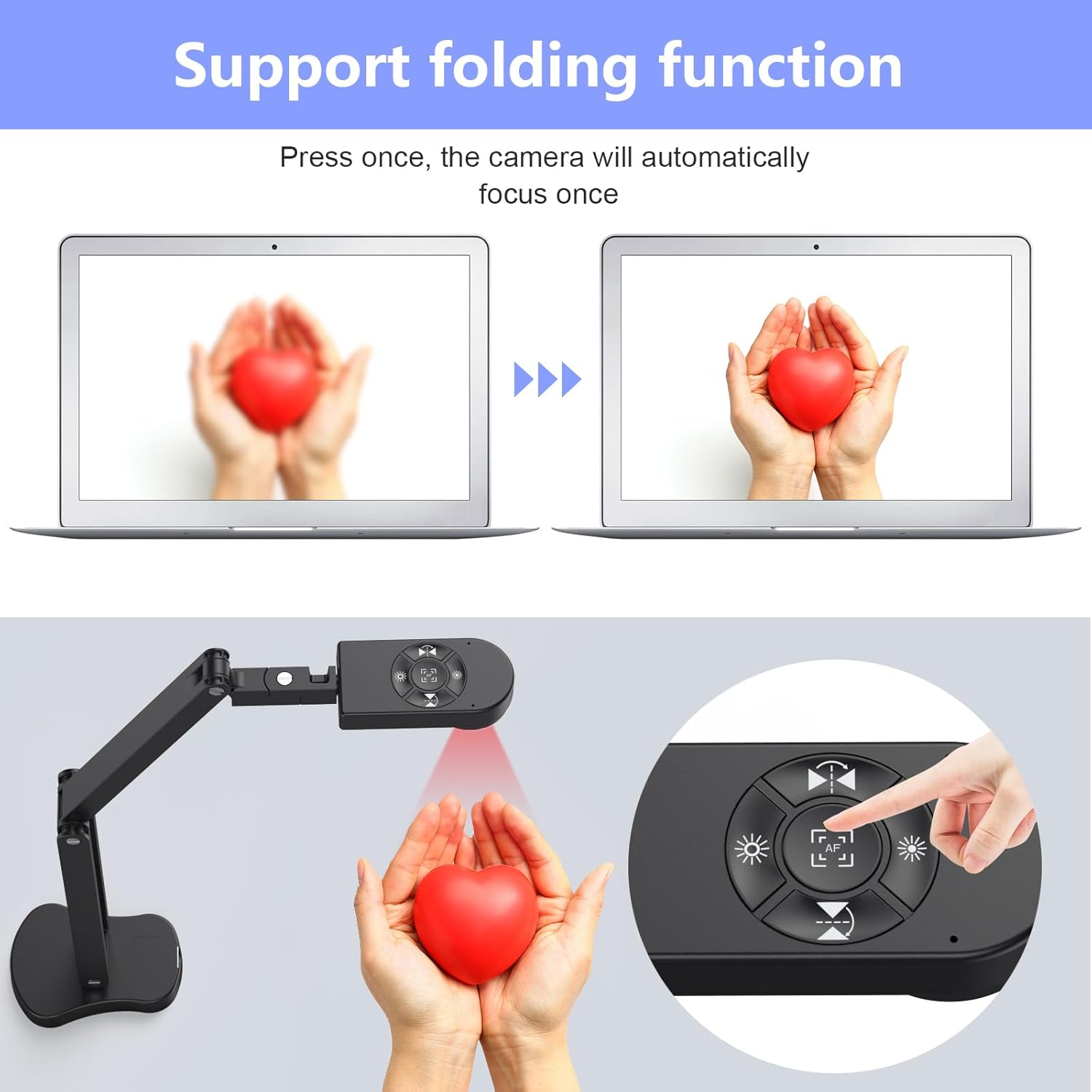
8MP/2448P document camera with 30fps: it output ultra-high-definition images and videos live transmission, up to 2448P megapixels. Press the focus button once to automatically focus the document camera once. Moving the object under the lens, the camera will not be arbitrary automatic focus and the image dance. Macro can capture objects as close as 3.94″
Document Camera with Adjustable Image Brightness : the usb camera has brightness (plus) and brightness (minus) buttons, you can manually adjust the image brightness with 10 degree, to make sure that you can get the clear image. Camera comes with 14 ring lamp beads, 3 levels of brightness adjustable, which can eliminate shooting problems under difficult lighting conditions, allowing you to capture objects in dark and bright environments, and can also achieve Selfie fill-in function
Foldable Document Camera for teachers/classroom: embedded design, occupies a small space after folding, easy to carry; Multi-joint support with multi-angle rotate freely usb camera can capture 2D and 3D objects better and shooting high-definition images and videos. Maximum covering area: 16.5″ x 116″ in. (A3 paper)
USB Camera with highly compatible, plug-and-play : applicable to Windows PCS, Macs, and Chromebooks, automatically installs drivers when the device is plugged in, compatible with Tiktok, Google Meet, Skyp-Microsoft Teams, Zoom; it has built-in dual silicon microphones, which can reduce noise and improve sound quality
Customers say
Customers find the document camera easy to set up, with one noting it works seamlessly with Windows and OBS. The camera receives positive feedback for its functionality in classroom settings, image quality, and value for money. Customers appreciate its classroom suitability, with one mentioning it’s particularly useful for math and writing lessons. The camera’s autofocus capability and solid construction receive praise, with one customer noting the adjustable arm’s stability.
12 reviews for THUSTAR 8MP Document Camera & Webcam 4K with Dual Microphones, USB Visualiser A3-Size, 3-Level LED Lights, Image Invert Function, Fold, for Live Demo, Distance Education -Windows, macOS and Chrome OS
Add a review
Related Products


€54
Amazon Customer –
plug and play
As a Document Camera:Great for capturing documents, images, or objects in real-time. I use it for an educational setting, as it allows me to display all the materials my students require to see/experience in real-time.It can capture high-quality images with clarity and detail. This is especially important when displaying small text or intricate diagrams. This camera comes with its own light, its 2nd level works best for me because it doesnât create unwonted reflection.The adjustable arm is sturdy and yet flexible, so it allowed me to adjust the angle and height of the camera for optimal viewing.The best quality is that it is very easy to use. Just plug and play. I use it on a MacBook pro. and works just fine with Zoom as a 2nd camera. It has quite simple controls for adjusting the focus, zoom, and other settings.I havenât try it with a variety of software and operating systems, but i’ll post and update as soon as i use it on windows.Portability: It is best to store it or transport it with care.Overall, this is a a valuable tool for educators who need to display documents, textbooks, and other materials in real-time. Its easy to use, flexible, and has a good quality image. Its built-in microphone works as advertised, although I prefer not to use it as a mic.
Thomas Conner –
High quality, clear details, ease of use, surprising durability
Look, I’m going to make this short and sweet… This is the one you want. I did a lot of research and bought two of these and they have only exceed expectations.Exceptional document camera, great clarity, and as easy to use as they come. I use them from scanning TCG cards and playing remotely (spelltable) and it is clear I have the best setup of my friends.These things are also durable, I have knocked them off a high table at least a dozen times with no noticeable effects to its function and quality.Finally, I was forced into utilizing one of them temporarily as a webcam to film some YouTube videos as my typical camera (OMSO 4 action) was away from repairs… now I know the OSMO is much better for action applications than studio shooting, but I was shocked at the significant quality improvement by using this document cam instead. Now I have since upgraded to a real Lumix primary camera setup, but “misusing” this document cam as a webcam was the inspiration from the upgrade.
Rachel –
Great for 2 years
I am a math teacher and needed a document camera for e-learning days or making tutorial videos. This one was pretty good for about 2 years. Auto-focus feature is great, easy enough to move around and position the way I needed, and lighting options did exactly what I needed them to do.I did end up using a different microphone for audio input because this camera had a small, high-pitched “whine” on playback. The base is also very light, so you can only stretch the neck out so far before it tips over; I sometimes set heavier objects on the base to stabilize the camera or set it on an adjacent table keep it from shaking while I wrote. And then after about 2 years of use, the light would turn off randomly during use and the camera would turn on randomly. It was still usable as long as I only plugged it in when I needed it and had an alternate light source.Overall, decent bang for your buck. Considering the pace that technology is evolving these days, I figure this one served me well and it’s time to invest in a newer, more sturdy option.
Albert Bickford –
Wonderful doc cam at a very affordable price
I was excited to see this product when I was looking for a second doc cam recently. It is half the price of the one I had previously, but it performs just as well. I’ve used it for teaching online for a month. I like the fact that it has an included light to illuminate the desk, which helps eliminate the shadow from the camera due to my overhead light. Image quality is sharp. It functions well with the doc cam software that I have. Construction is solid. It’s a little bulkier than others I’ve seen, but this also means it is sturdier and I find that it really doesn’t clutter my desktop significantly because the weighted base is quite small, while still heavy enough to keep it stable. The camera swivels 180 degrees horizontally plus has built in electronic flip and rotation. It also allows me to point the camera easily at different places on the desk by swiveling in the vertical plane, a feature my previous doc cam doesn’t have. There are buttons for autofocus and to adjust brightness. Has a USB-A plug and comes with an adapter for USB-C. I’d say this is a definite improvement over my previous doc cam (even though I didn’t have any complaints about it previously either). A thoughtful feature is inclusion of a screwdriver in the base to tighten the joints, although so far I haven’t need to use it. Overall, the design of this unit seems to be very carefully thought through, and I highly recommend it.
Spike –
Good Product
No Download required, not big not small, easy to use, works great for drawing something in a meeting. Works with Teams, camera is great.
Amazon Customer –
Great, affordable camera for teaching!
As a teacher, I have used this daily for 4 months and it was so worth the money! It connects to my PC, focus and lighting is great, takes up very little space, and works great for reading 2-page picture books. I connected to laptop and opened up my camera application on my laptop and pressed the rotation button and it showed on my Smartboard. Very clear with no complaints. Comparable to much more expensive cameras. No software needed. If the pic rotation button doesn’t show up, just unplug and re-plug and it appears.
Travis Loepfe –
Underwhelming video quality
Probably decent enough for static pages but I was hoping to use it for the video component for miniature painting as others have said they recommend document cameras for that purpose. Camera output had scrolling lines and a warping/underwater effect if movement occurs. Cheap but unusable for me
José MarÃa GarcÃa Pérez –
Aunque se vende como “cámara de documentos”, yo la compré para usarla como cámara web.Hay un modelo similar de Kitchbai que también se denomina KB-700 (al igual que este de Thustand). Supongo que se trata de la misma cámara con ligeras diferencias estéticas (la Kitchbai tiene una pequeña pieza en la base que se puede usar para apretar los tornillos). También he visto algún modelo con una botonera en la base.La calidad de imagen me ha sorprendido. Hay en internet algún vÃdeo sobre la Logitech C-920 y se ve que la calidad de esta cámara es comparable o mejor. Con las ventajas adicionales:1. Incorpora el pie para usarla como escáner documental2. Tiene una luz con tres niveles de intensidad con lo que tu documento (o tu cara) quedan bien iluminados.Incorpora un par de botones para girar la imagen por su eje horizontal y vertical (lo que permite que si muestras texto, éste sea legible).Y por último mencionar que no requiere instalar ni drivers ni software adicional para que funcione.De momento, muy satisfecho con la compra.
Magnus –
Bought this almost two weeks ago after doing some online research to find a multipurpose camera suitable for different use cases. Build quality is sturdy and feels well-made, however, they could improve on cable management (a minor gripe) as the embodied hooks do not grip the cable really well. Hope in their next design iteration they will make cable enclosed within the body of the stand. I am happy with the purchase and must say that in this price range, you cannot find a better device than this one. In my opinion, it is a no-brainer and if you are lucky you may get a discount that Amazon offers from time to time.The versatile design allows its use at different angles. Even though it does not have auto-focus functionality, however, the auto-focus button resolves this issue and if you are not changing the camera position, you will not need to worry about pressing the focus button again. Dual microphones are sensitive enough to record the audio, although you may prefer to use a better external mic while streaming or recording. Its maximum height is 15.5 inches approx. (measuring from the base of the stand/desk to the camera facing downwards), wish it was 18 inches or more so it could share a larger area.If it is of any help, I am adding the different camera modes supported in Windows 11 below as I was unable to find these details before ordering it.Video Resolution supported:- 1080p 16:9 30fps- 720p 16:9 30fps- 2448p 4:3 30fps- 1944p 4:3 30fps- 1200p 4:3 30fps- 480p 4:3 30fpsPhoto Resolution supported:- 2.1MP 16:9 (1920×1080)- 0.9MP 16:9 (1280×720)- 8.0MP 4:3 (3264×2448)- 5.0MP 4:3 (2592×1944)- 1.9MP 4:3 (1600×1200)- 0.3MP 4:3 (640×480)It does not come with a software application, however, it is ‘Plug and Play’ and videos recorded using OBS were smooth, and pictures taken through the Windows Camera app came out good with plenty of detail. I would strongly suggest having good lighting before you intend to use it. I have not yet tried to live stream, however, I will get back and add further info once I get to do it.Hope this helps 🙂
Grandhaye –
Très bon produit
Antonio –
Dato il periodo ho deciso di acquistare tale prodotto dato che lavoro con questa fotocamera come insegnante (lezioni online) e sono stupito di come tutto funzioni semplicemente. L’istallazione è rapida ,una volta inserito il cavo USB istalla il driver dopo pochi secondi. Dopodiché, tutto funziona come precisione inoltre non occorre un alimentatore tutto tramite cavo USB. La fotocamera è facile da trasportare anche in uno zaino stretto. La qualità dell’immagine mette in ombra tutte le fotocamere per documenti con cui ho lavorato finora sopratutto anche quelle più costose . Un altro punto di forza che tale camera può essere ha la possibilità di posizionare nel suo insieme come desideri e ti è più comodo lavorate, esso poggia su una base solida. Posso dire che si tratta uno dei miglior acquisti che ho fatto quest’anno. Altamente raccomandato, soprattutto per chi lavora online(un investimento utile)
David Xie –
It works well if you have enough light in the room. The camera will focus on its own. But if you see it on PC monitor not very clear, you can try to refocus by press the button in the center.The image quality is so-so, well you don’t need that high resolution anyway to read doc. The image pixel seems unnoticeably moves while reading, perhaps it is the nature of EV camera. You will forget about it after reading over 5 minutes. When you focus on book content, it is only a small minor thing.While other products have app to read the docs in which you could tune the image a bit. But not this one, and in my view, it is all right. Because when I read, I just want it to be very simple to use by launching your PC camera app, you are ready to read. But if you are sensitive to ISO, or changing it to warmer color etc, then you might have to think again.