

UGREEN USB 3.0 Switch Selector 2 Computers Share 4 USB Ports USB Switcher USB for PC Laptop Keyboard Mouse Printer Scanner One Button Switch Adapter with 2 Pack USB 3.0 Cables
Original price was: €37.€27Current price is: €27.


Price: $36.99 - $26.99
(as of Sep 20, 2025 10:15:27 UTC – Details)
Product description


1 5 Gbps Transfer
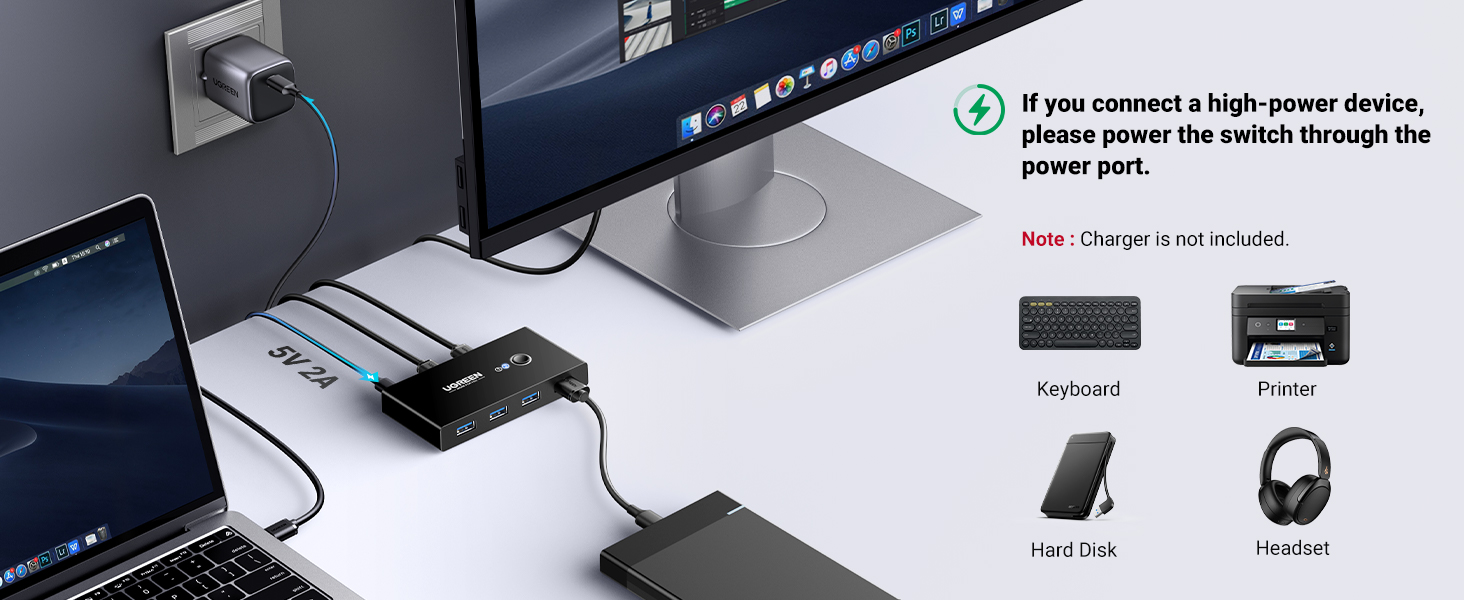
2 Power Supply
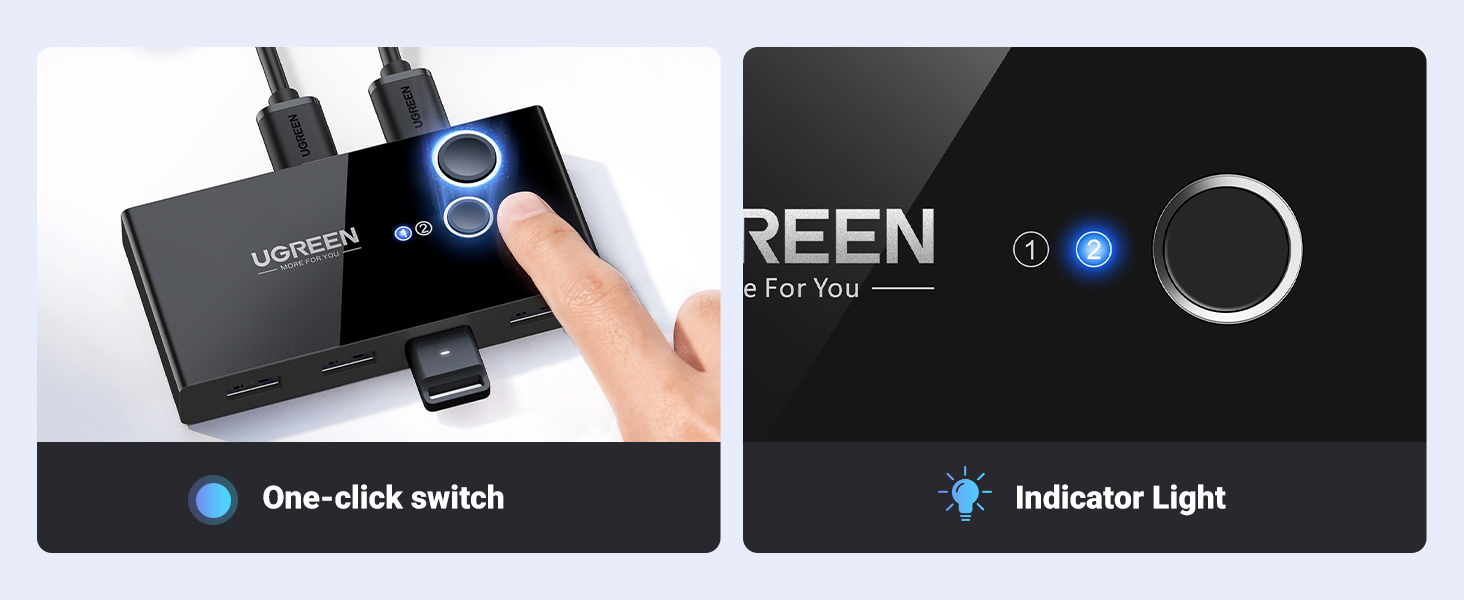
3 Easy Switching

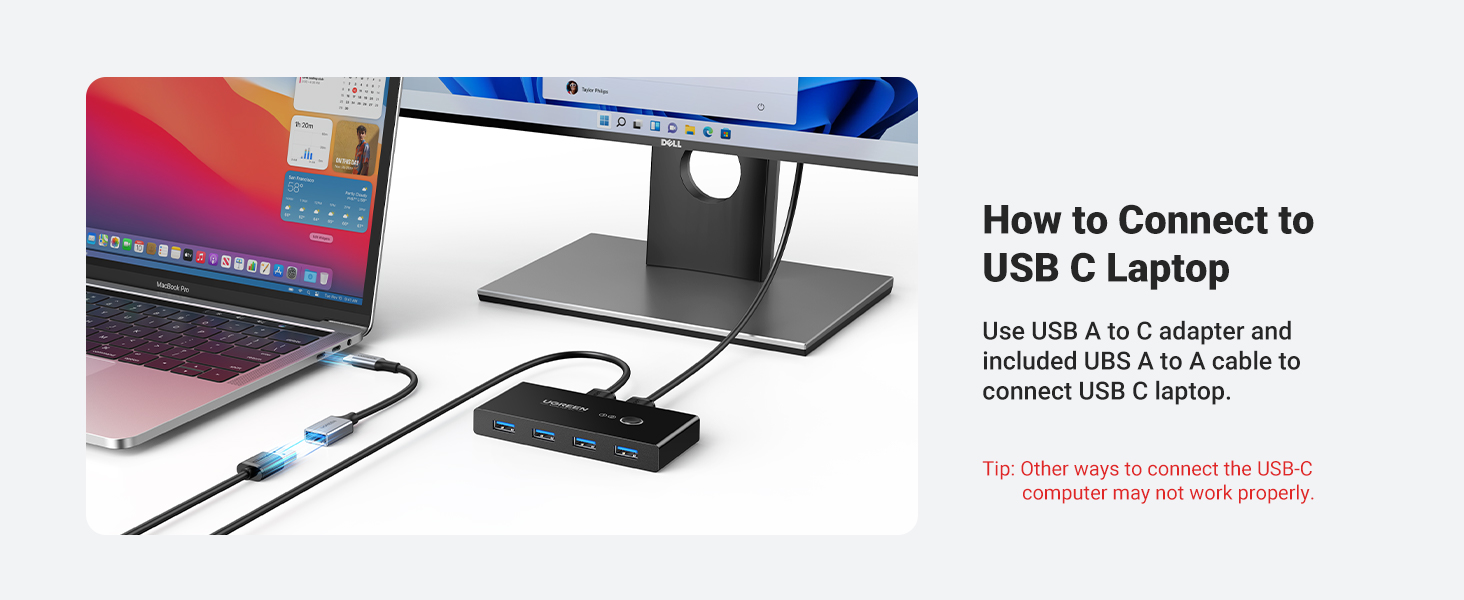
1 Connect USB C Laptop
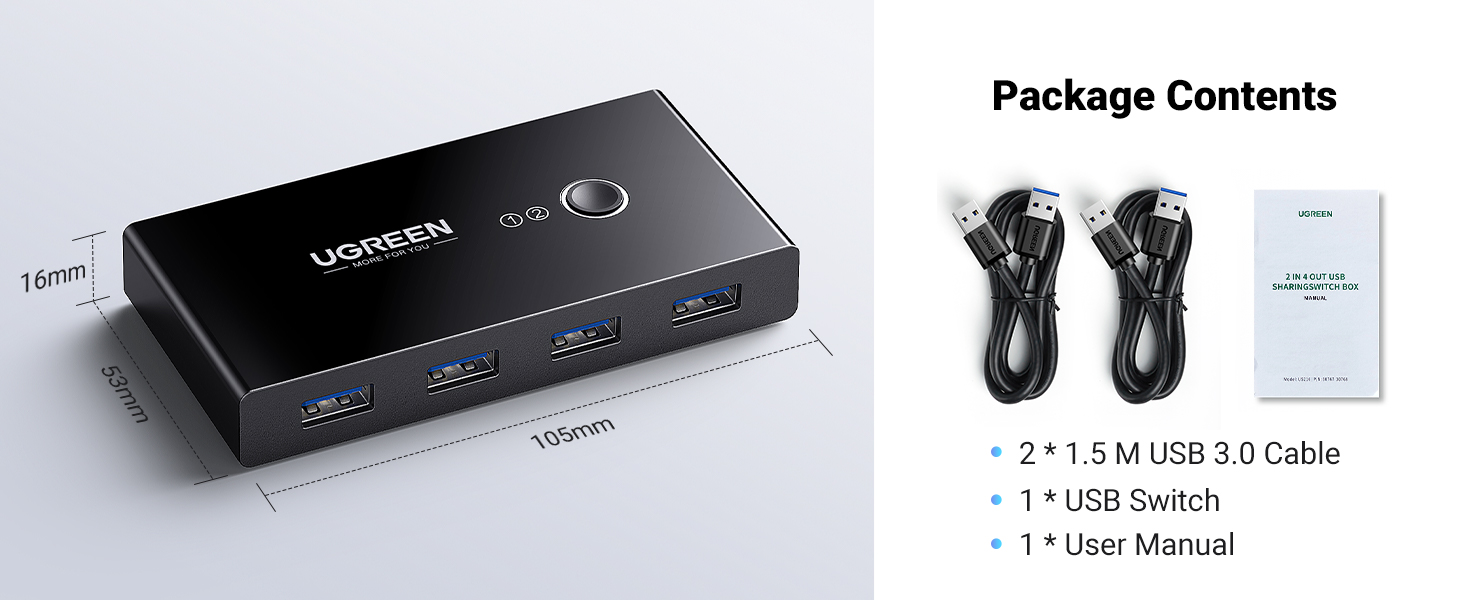
2 What’s in The Box
For USB C Laptop: If you want to work with USB C host devices, you’ll need a USB C to A adapter, as it won’t work directly with a USB C to A cable. For input port: This USB switch doesn’t support a monitor or any video transfer and there is no HDMI input. For output port: The USB output port is only used for data transfer and doesn’t support power supply or video transmission. It’s not suggested to connect the wireless device to the USB3.0 switch due to the 2.4Ghz interference. If your wireless network is affected, please set your router frequency from 2.4GHz to 5GHz. About Power Supply: Neither charging cable nor power adapter is included. It can output 2A at max in total when a standard 5V power adapter is connected. For Mouse Keyboard It’s not suggested to connect mouse or keyboard with long usb extension cable. Package Content: USB 3.0 Switch * 1; USB A to A Cable (5FT/1.5m) * 2
UGREEN USB Switch
Add to Cart
Add to Cart
Add to Cart
Price
$26.99$26.99
$36.99$36.99
$39.99$39.99
$55.99$55.99
$25.99$25.99
Product Type
2 In 4 Out
2 In 4 Out
2 In 4 Out
2 In 4 Out
2 In 2 Out
Input Port
UBS A
UBS A
USB A & C
UBS C
UBS A
Output Port
4USB A
1USB C & 3USB A
1USB C & 3USB A
1USB C & 3USB A
2 USB A
Transfer Speed
5 Gbps
5 Gbps
5 Gbps
10 Gbps
5 Gbps
Power Port
Micro Port
USB C
USB C
No need
/
Switch Mode
Button
Button & Control
Button & Control
Button & Control
Button
Material
ABS
ABS & Aluminum
ABS & Aluminum
ABS & Aluminum
ABS & Aluminum
2 PCs Share Multiple Devices: UGREEN 2 in 4 out USB 3.0 switch supports 2 computers share 4 USB devices like keyboards, mouses, U disk, printers, scanners, USB cameras, headphones, etc. It’s convenient for you to switch freely between your work computer and personal computer, greatly improving work efficiency. (*Not a KVM switch and does not support a monitor or video transmission.*)
Transfer Files in Seconds: With the 4x USB 3.0 ports, UGREEN USB Switcher supports up to 5Gbps data transfer speed. You can easily transfer data from U disk, mobile hard disk to computer. It’s backward compatible with USB 2.0, too. (*It is recommended to power supply when using multiple devices simultaneously to avoid disconnection due to insufficient power.*)
Wide Compatibility & Driver-free: UGREEN USB 3.0 Switch selector is plug-and-play for Windows, macOS, Chrome OS, and Linux computers. Just plug in and enjoy efficient work. (If the input PC only has a USB C port, please use a USB C to A adapter instead of a USB C to A cable, directly using the cable may not work.)
One-Button USB Switch: With the USB switcher button and LED indicator design, you can freely switch multiple USB devices between two computers with one click and clearly know the working status.
High Power Devices Supported: UGREEN USB Switch is designed with an extra Micro USB(5V 2A) power supply port. If you use some high-power devices such as HDD, USB cameras, headphones, dockingstation, microphone etc, you may need to connect extra power for stable performance. (The power adapter is not included)
Customers say
Customers find the USB switch reliable and easy to use, allowing seamless switching between computers and simplifying work-from-home setups. The device effectively shares 4 USB 3.0 ports and works well with both computers, though some report issues with wireless keyboards. Durability is a concern as devices fail within months of use, and connectivity problems include constant disconnects and random disconnections of peripherals.
2 reviews for UGREEN USB 3.0 Switch Selector 2 Computers Share 4 USB Ports USB Switcher USB for PC Laptop Keyboard Mouse Printer Scanner One Button Switch Adapter with 2 Pack USB 3.0 Cables
Add a review
Related Products


Original price was: €37.€27Current price is: €27.
A. Bush –
Works almost perfectly for my needs
Update: 12/2/2021I have been using this switch for nearly 3 years, switching between personal and work computers every single weekday, sometimes multiple times a day in that time, as well as moving it to a new desk setup, and it has worked and continues to work flawlessly. I am very pleased with this device and cannot recommend it highly enough, even if it were to fail tomorrow.Original Review:I set up a docking station for my work laptop at my home office desk where I also use my personal computer. I quickly realized that swapping USB adapters for mouse and keyboard every time I wanted to switch between work and personal computers was a hassle and unnecessary wear and tear on the ports. Once I also realized that the built-in DAC in my work laptop was garbage when I was trying to listen to some music on Pandora while I worked, I decided to look for a USB switch and came across this one.I am happy to report that the UGREEN USB 3.0 switch works almost perfectly with my setup. I have it connected to my personal computer and my laptop dock. Plugged into the front, I have my mouse adapter, wired keyboard, and a standalone DAC. I even used the 4th USB port for another keyboard adapter so that I can use my wireless keyboard from my couch when I want to switch the computer display over to my TV, and this works great as well.Pressing the button on top of the UGREEN unit quickly switches control from one computer to another with no delay. A small, non-intrusive blue LED indicates which computer is active. Mouse, keyboard, and the audio DAC all immediately work correctly on the selected computer. The only thing that I sometimes have issues with is if the computer I am switching to is asleep. In that case, moving the mouse or pushing a key on the keyboard does not wake up the computer like it normally would, and I have to press the power button on the computer to wake it up. I’m not sure why this happens but it seems like if the USB connection was not active when the computer was put to sleep, it does not make the connection until it is manually woken up. I have checked in my power settings to make sure that USB ports are not turned off when the computer is asleep, as this would be an obvious cause for the issue, but that is not the case. This is a minor inconvenience since my personal computer and dock power buttons are both easily accessible, but would be nice if it worked.The UGREEN unit is quite small and sits inconspicuously on my desk on top of my audio mixer. To keep the cables managed cleanly I do have to make a 180 degree bend with my two wired connections (keyboard and DAC) to route the cables back behind the switch. If I just had 4 USB adapters plugged in, that wouldn’t be an issue. The only way to fix this would be to have all the ports on the back, and then the unit would have to be larger in size to accommodate 6 ports on one side instead of 4.The switch is very lightweight (which means stiff cords sometimes lift it so it doesn’t sit flat) and has a cheap feeling plastic housing with no mounting provision if you wanted to attach it to something, but these are minor complaints as it works well enough.It appears you can power the switch with micro USB if your devices require a lot of power (if you were wanting to charge something via USB for example), but even with the backlit keyboard I am using, I do not have this switch connected to power, and it and my devices work just fine.Overall I am happy with the UGREEN USB 3.0 switch. If it were able to always make a connection with a computer that is asleep when switched to, I would be even happier, but that may not even be the fault of the switch. I definitely recommend this if you are looking to share inputs between two computers without having to plug and unplug cords, dongles and adapters.
Alex –
The best KVM I’ve ever used, hands down!
I own three of these already. That’s how much I love them. These work really great. They can be powered by a microUSB cable plugged into a separate charging port, or they can be charged by the USB bus of either computer they’re connected to.All three of mine are not connected to power via the microUSB port and they all work flawlessly.Here’s the way I use all three of mine, in case anyone’s wondering. I have 4 computers. Two Windows 10 PCs, and two Macbook Pros. Well one of the MBPs is a company machine. I have a UGREEN KVM on the left, one in the middle and one on the right. I’m a streamer so I have a 2 PC setup, a gaming PC and a stream PC. I’m left handed so I have the mouse on the left side of my keyboard, for gaming but I also use a Magic Trackpad on the right to control the Macs. I’ve always been ambidextrous with pointing devices but prefer the mouse on the left for gaming.The keyboard is plugged into the center KVM.The mouse (along with the center KVM) is plugged into the left KVM.The Magic Trackpad (along with the center KVM) is plugged into the right KVM.The left KVM switches the mouse and center KVM between the gaming and stream PC. The KVM on the right switches the Magic Trackpad and the center KVM between my home Macbook Pro and my company’s Macbook Pro. The center KVM switches the keyboard between the PC side or the Mac side. So I can use the same keyboard with all four machines, and since the PC and Macs have their own dedicated pointed devices on different sides of the keyboard, this works very well for me.I have a Magic Keyboard I was using with the Macs when I had only two UGREEN KVMs but my desk was way too cluttered and it was a pain to find space for both keyboards. Now I only need one keyboard and I can easily control everything.These are great products. Even if I had a 4 computer KVM I would never be able to so easily switch between two the way I do now, but I suppose a possible con is that these only come in the 2 computer (and maybe 3 computer?) variety but not 4.Another thing that I’d like to see UGREEN improve on is putting the USB inputs on the back. Having them on the front is a bit of an eye sore and a pain, you can see in the pics the one on the right is lifted off the table at a diagonal angle due to the cables in the front being forced to turn around and go to the back, but it’s not a big issue.Also one of the biggest headaches of not being allowed to work using my personal computer has been how to do it. For the longest time I was swapping out cables etc. with the Macs and occasionally glitches would arise, I’d have to reboot the computer, etc. It was a hassle. Now it’s easy peasie, thanks to UGREEN! Thank you UGREEN!