

VIVO STAND-V002F Dual LED LCD Monitor Free-Standing Desk Stand for 2 Screens up to 27 Inch Heavy-Duty Fully Adjustable Arms with Max VESA 100x100mm
Original price was: €50.€40Current price is: €40.




Price: $49.99 - $39.99
(as of Aug 02, 2025 17:22:34 UTC – Details)
Product Description

STAND-V002F SERIES
Dual Monitor Mount with Freestanding Base
Free standing support with a low profile base. Designed with user geared features for versatility and security. Simply adjust your monitor and lock each joint in place for a superior viewing experience.

The video showcases the product in use.The video guides you through product setup.The video compares multiple products.The video shows the product being unpacked. hero-video Merchant Video
Heavy Duty Base provides stability while monitors are held within its center of gravity.

 Full Motion
+90° to -90° Tilt, 180° Swivel, 360° Rotation
 Elevate 2 monitor screens with only 1 base
Supports screens without any wall or desk installation required
 Comfortable Viewing Angles
Elevating screens helps relieve stress on the neck, back, and shoulders.
1 ARTICULATION
2 SOLID CONSTRUCTION
3 ERGONOMIC VIEWING
Variations & Specs


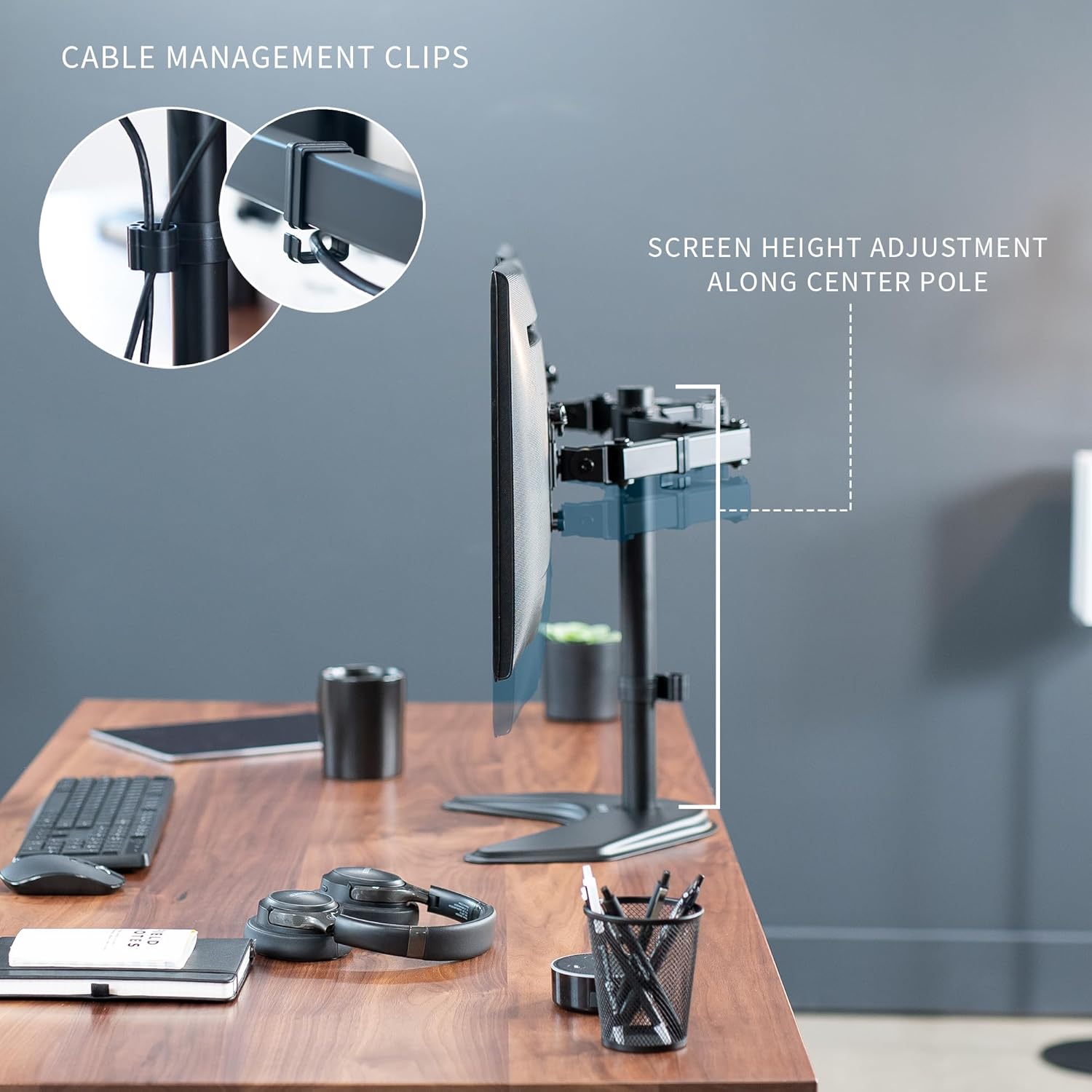
Additional Features Height Adjustment
Monitor height can be adjusted along center pole.
 5 Cable Channels Cable Management
Quick slide channels make organizing cables a breeze.
The video showcases the product in use.The video guides you through product setup.The video compares multiple products.The video shows the product being unpacked. video Merchant Video
Removable VESA Plates Easy Installation
Detachable VESA Plates allow for easy mounting and unmounting.
The video showcases the product in use.The video guides you through product setup.The video compares multiple products.The video shows the product being unpacked. video Merchant Video
Fits 13″ to 27″ Screens: Freestanding dual monitor mount holds two screens 13” to 27” and up to 22 lbs with 75x75mm or 100x100mm backside mounting holes. Keep power and AV cables clean and organized with detachable cable clips on the arms and center pole
Full Articulation: Adjustable mount offers +90° to -90° tilt, 180° swivel, 360° rotation, and height adjustment along the center pole for convenient, customizable viewing angles
Heavy Duty Extra Large Base: Measures 13″ x 10.5″ providing solid stability while monitors are held within its center of gravity. The bottom of the base features padding to protect your desk from scratches
Easy Installation with Detachable VESA Plate: Mounting your monitors is a simple process with detachable VESA bracket plates. We provide the hardware and easy-to-follow instructions for assembly
Best Practices: Please do not pull monitors too far forward or backward unless the stand is bolted down, as this will cause stability issues. Additionallly, please check to make sure the base size fits your available desk space
Customers say
Customers find the monitor stand to be solid and stable, easy to assemble and use, and consider it a great value for the money. The stand effectively holds multiple monitors, with customers mentioning it works well with 24-inch displays, and one customer noting it accommodates a curved 27-inch screen perfectly. While some customers find it easily adjustable, others report difficulties with height adjustments, and opinions about the base weight are mixed, with some finding it heavy enough while others say it’s too light for stability.
11 reviews for VIVO STAND-V002F Dual LED LCD Monitor Free-Standing Desk Stand for 2 Screens up to 27 Inch Heavy-Duty Fully Adjustable Arms with Max VESA 100x100mm
Add a review
Related Products


Original price was: €50.€40Current price is: €40.
Lauren (: –
I couldnât be happier
This has held two monitors for the past 4 years and is still in perfect condition. Itâs exactly what I needed and still to this day couldnât be more happy with it. Itâs very sturdy, but if your monitors are positioned more forward, like anything that requires a bit of balance, itâll become forward heavy and want to tilt over. So just make sure you position them properly. The quality is great in my opinion. Itâs solid metal and hold my monitors very well. Iâve never had an issue with that. Itâs a simple, black design that goes well with the rest of my set up so I really like that as well. You can also tilt your monitors to or away from you, adjust the height you want them (theyâll both be at the desired height), and it comes with cable clips so you can do some cable management.
Matthew M –
Easy to assemble and works great
I have this on my desk at work with a 24in monitor and a 24in TV to keep my desk decluttered. It works great and is of very good quality.
Brian Caasi –
Great, but call for backup.
The product was fairly easy to assemble, though attaching the pole to the base was little hard due to the base blocking light to the holes. This thing is sturdy with a wide range of mobility.My problem was that, out of around 8 hinges/joints, there are two(for tilt adjustment) that are WAY to sturdy. These hinges were designed to keep out the devil himself. While I’m not the strongest man, I’m not exactly weak either, but I literally had to call over my neighbor, so he could use the allen wrench to adjust while I held the thing down. We got it adjusted just right, but I’m getting my bigger monitors tomorrow and we’re both dreading the new needed adjustments.If nothing else, I’ll NEVER have to worry about the monitors sagging downwards.
napapapa –
Amazing product with one word of caution
Im one to never review things unless they are extremely good or extremely bad. I am pleased to say in this case that it is because it is extremely good! The stand is extremely sturdy without mounting it and using it with just the weighted base. It was really easy to put together, only had to put in 3 screws for the base and 4 screws each for the monitor mounts (i actually used the ones provided with my monitor instead of the ones they sent, but the ones they send looked nice enough.)The monitors slid into place easily and there is one nut to secure it on the stand so you dont unhook it when you adjust it. Once you make your adjustments you can tighten the bolts with the included allen wrenches to lock the stand in place. You can then even store the allen wrenches in the included wire clips for future use!I am also just amazed at how much space it freed up on my desk.The ONE WORD OF CAUTION i have is that when attaching the monitors, after putting the first one on it tends to tip over. So between putting the first and second monitors on, either have a buddy hold it steady, or in my case, help weigh the base down more with a ream of paper or a heavy book. Once the second monitor is on, the stand is way more steady then i would imagine.Overall this is a really good stand for the money and i would recommend it to anybody who needs one!
Mark A. Miller –
just set this up and it works great! All was well packaged and clearly marked
Wow, just set this up and it works great! All was well packaged and clearly marked. The directions were the perfect balance of easy to read with enough detail to explain the optional setups. Base and arms are solidly built. Not cheap at all. There were a couple of joints in the arms that were over tightened at the factory and were really hard to loosen, but that was a minor issue. For those of you who have mentioned that it tips – well they will all do that. You have to balance the weight of the monitors by positioning the arms so that the weight is distributed evenly over the base. That is just physics. You can also mount it to the desk. But honestly, even pushing on the monitors, it wont tip if you have it balanced.It is tricky to set up because you will have one monitor on and not the other at some point. Here is what I recommend: Loosen the arm joints so they move easily. Then pivot the arms so that each attachment site is directly over the center of the base to put the first one on. Tighten up the tilt joint. With the base facing you, turn the attachment point 90 degrees either left or right so that when you put the first monitor on the edge of the monitor in pointing at you. The base will hold balance this way even with the weight of just one monitor on. Put the mounting plate on your first monitor and hang it on one of the arms. Then do the same for the other monitor. You should have them back to back at that point and facing outward. Then with the arm joints loosened, adjust the monitors by moving them outward and rotating them towards you keeping it balanced. Voila!
Victoria S. –
Very sturdy
This stand works very well. I wasn’t sure if it could hold two full size (24″) monitors without being top-heavy, but it is definitely sturdy and fits my needs.
Damien Soh –
Received this 3 days back and set this up immediately.No issue with the product in terms of assembly, linkages, adjustment, stability.There is a minor scratch on the base though which is not a big issue to me.I assemble this and set this to roughly the height and position i want by measurement before putting the monitor on. After the monitor is put on, minor adjustment to get them to exactly where i wanted. No issue in the process. In terms of stability, i set this up to a W configuration with the 2 monitors as close to the vertical shaft as possible. This has an advantage of saving desk space too with the monitor all the way back. With this, the stand is very stable. All in all, very happy with the purchase.
greg –
Really good product given the price point. Full adjustable including a minor height adjustment to level up the monitors if running the next to each other.
Rajiv –
Helped me clean a lot of clutter lying around on my desk which was too small for placing two monitors in addition to the usual accessories. No complains!
S Johnson –
Very sturdy and easy to put together but be warned figure out the height before you put monitors on cause it is heavy to adjust with the monitors on. Looks good and gives you more space on desk even if it sits on it.
luis f. –
El primer producto de la marca que compré y desde entonces he comprado otros dos o tres todos necesarios y todos de excelente calidad